Shopify Subscription Products: Import and Configure Recurring Product Data
On this page
Shopify Subscription Products: Import and Configure Recurring Product Data
Subscription products differ from standard Shopify products in ways that affect how they are imported and configured. The differences are not extensive, but they matter: a subscription product that arrives in Shopify without the correct fields populated may not be recognised by the subscription app, may not display a recurring billing notice, or may not have the interval data the app needs to create the subscription schedule.
Most merchants discover these requirements after they have already imported the products and find them behaving incorrectly in the subscription app. The fix is a reimport with the additional fields populated (which is straightforward, but avoidable).
This article covers the specific import fields that subscription products require, how to configure AI-generated descriptions that communicate the recurring value proposition clearly, and how to tag products for compatibility with the major Shopify subscription apps.
What Makes a Subscription Product Different
A subscription product in Shopify is, structurally, a standard product. It has a title, description, price, images, and variants. What makes it subscription-ready is a layer of additional data that the subscription app reads to configure the recurring billing schedule and display the correct purchase options to buyers.
The three categories of additional data are:
Subscription interval metafields. Apps such as Shopify Subscriptions, Recharge, and Bold Subscriptions read specific metafields to determine the available subscription intervals (weekly, monthly, every 6 weeks) and whether a subscription-only or subscribe-and-save pricing model applies. These metafields are not standard Shopify product fields; they are created by the subscription app at installation and populated either manually in the product admin or programmatically via import.
Product tags for app recognition. Most subscription apps use product tags to identify which products are subscription-eligible. Without the correct tag, the app does not display the subscription purchase option on the product page, even if the metafields are set.
Description framing for recurring purchase context. A standard product description explains what the product is. A subscription product description must also explain why buying it on a recurring schedule makes sense: the convenience argument, the cost saving relative to one-off purchase, the consistency of supply. This framing requires a different description style than a standard product.
Required Import Fields
When importing subscription products via a CSV file, the following fields need explicit configuration beyond a standard product import.
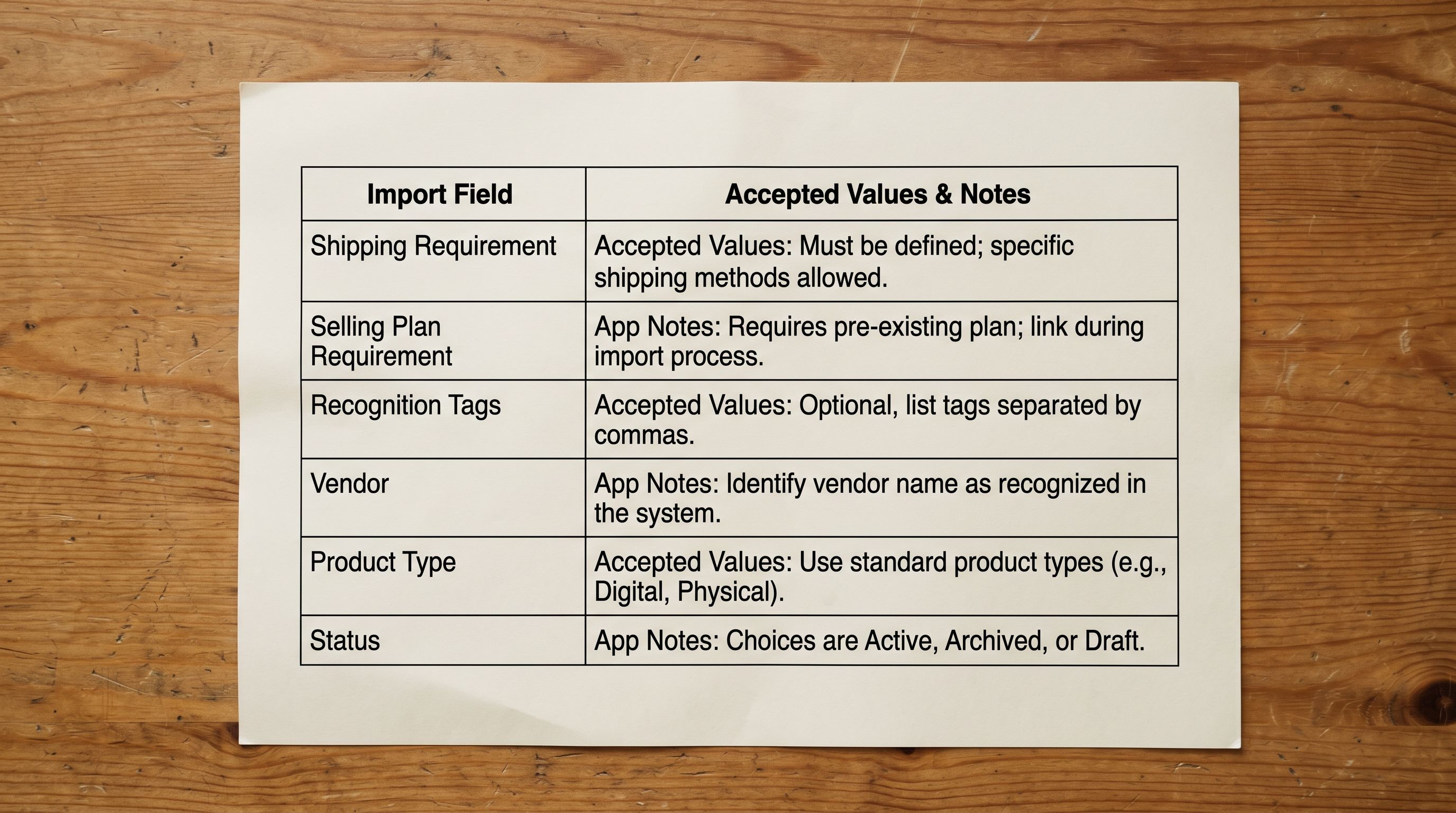
requires_shipping (Variant): set to true for physical subscription products (supplement boxes, food deliveries, physical goods) and false for digital subscriptions. This is a standard Shopify variant field but is worth explicitly setting for subscription imports because it affects how the subscription app calculates shipping for recurring orders.
variant_requires_selling_plan (Variant): set to true to require buyers to choose a subscription plan (no one-off purchase option), or leave unset to allow both subscription and one-off purchase. This field controls whether the subscription is mandatory or optional. For subscription-box businesses where one-off purchase is not an option, setting this field to true at import time is more reliable than configuring it manually for each product post-import.
Product tags: include the subscription app's recognition tag in the Tags column at import time. Recharge products typically use subscription, recharge, or a merchant-configured tag. Bold Subscriptions uses bold_subscription or a custom tag set in the app settings. Shopify Subscriptions uses selling plan groups rather than tags; for those products, the selling plan group assignment is done post-import in the subscription app interface.
Vendor and product type: subscription apps often filter their dashboard by vendor and product type. Consistent values across the subscription product range (all supplement products tagged with vendor "Merchant Name" and product type "Subscription") make subscription-app management significantly more efficient.
Status: set to draft for subscription products that need selling plan assignment in the subscription app before they go live. Publishing a subscription product before the selling plan is configured produces an active product page without a subscription purchase option, which can confuse buyers who arrive at the page during the configuration period.
Setting Up the CSV for Subscription Products
A subscription product CSV imports in the same column format as any standard Shopify product CSV. The additional subscription-specific data fits into two existing column types: Tags and Metafields.
For the Tags column, add the subscription app's recognition tag alongside any other product tags. For a product that should be tagged supplement, subscription, and recharge, the Tags cell value is supplement, subscription, recharge. Tags are comma-separated in Shopify's CSV format.
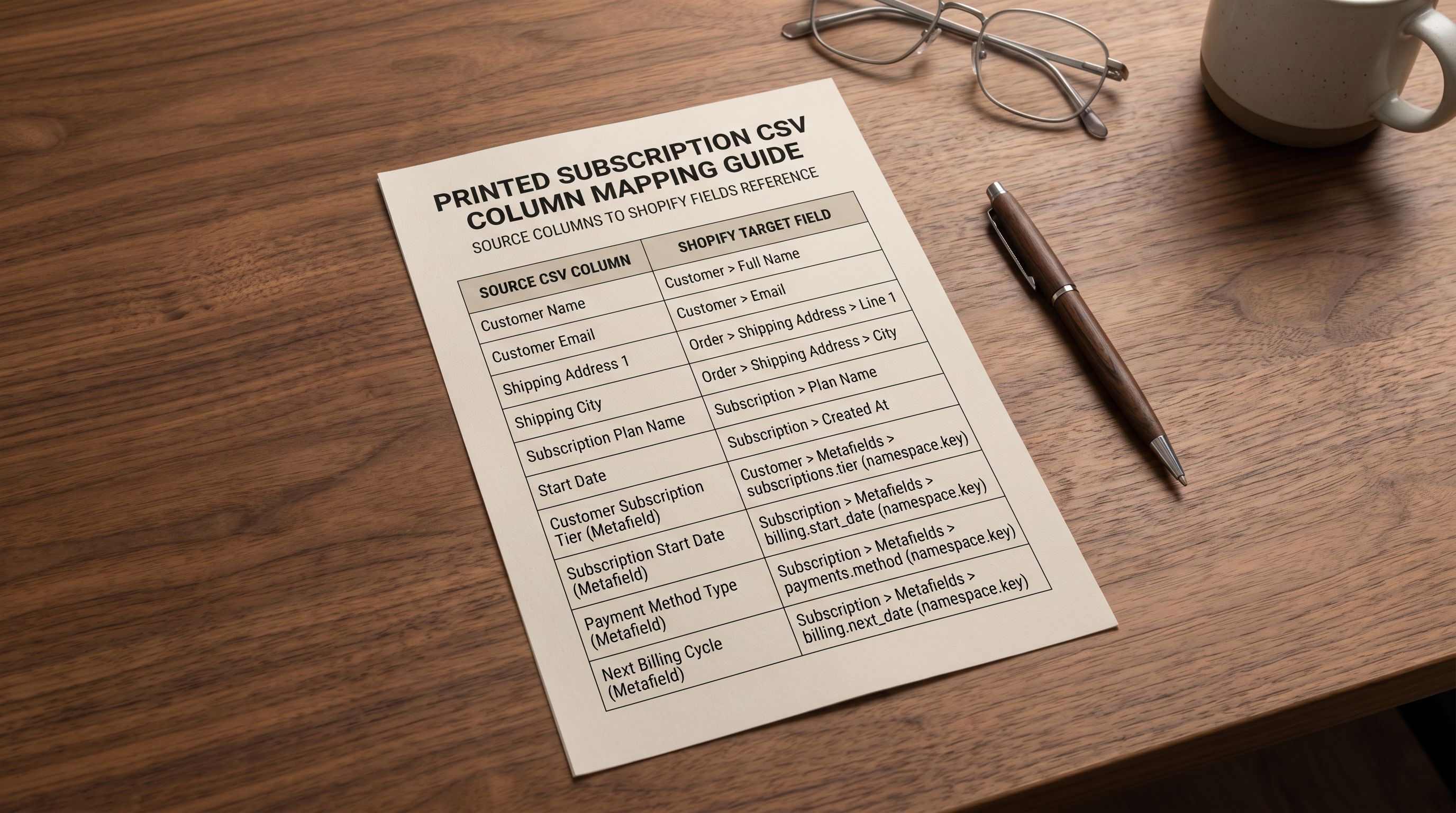
For metafields, Shopify's CSV format accepts metafield columns in the format Metafield: namespace.key [type]. Subscription interval data typically uses the subscriptions namespace:
Metafield: subscriptions.interval [single_line_text_field]: the interval unit (day, week, month)Metafield: subscriptions.interval_count [integer]: the interval count (1 for monthly, 2 for every 2 months)Metafield: subscriptions.min_cycles [integer]: minimum subscription cycles before cancellation is allowedMetafield: subscriptions.max_cycles [integer]: maximum cycles (blank for indefinite)
Not all subscription apps read these specific metafield keys; check the app's import documentation for the exact namespace and keys it expects. Recharge, for instance, uses its own namespace for interval configuration. The principle is the same regardless of which app's format you use: include the metafield columns in the CSV at import time, and the values are written to the correct metafield keys without a post-import manual edit pass.
In Importier's column mapping step, metafield columns from the supplier file map directly to the corresponding Shopify metafield target. For a subscription product file that includes interval data columns, the mapping step assigns each interval column to the correct metafield key in one pass.
For the full column mapping workflow and how metafield columns are handled in the import, the Shopify CSV import guide covers the mapping interface, how to save column mapping profiles for recurring supplier formats, and how to handle multi-variant subscription products where interval options are structured as variants.
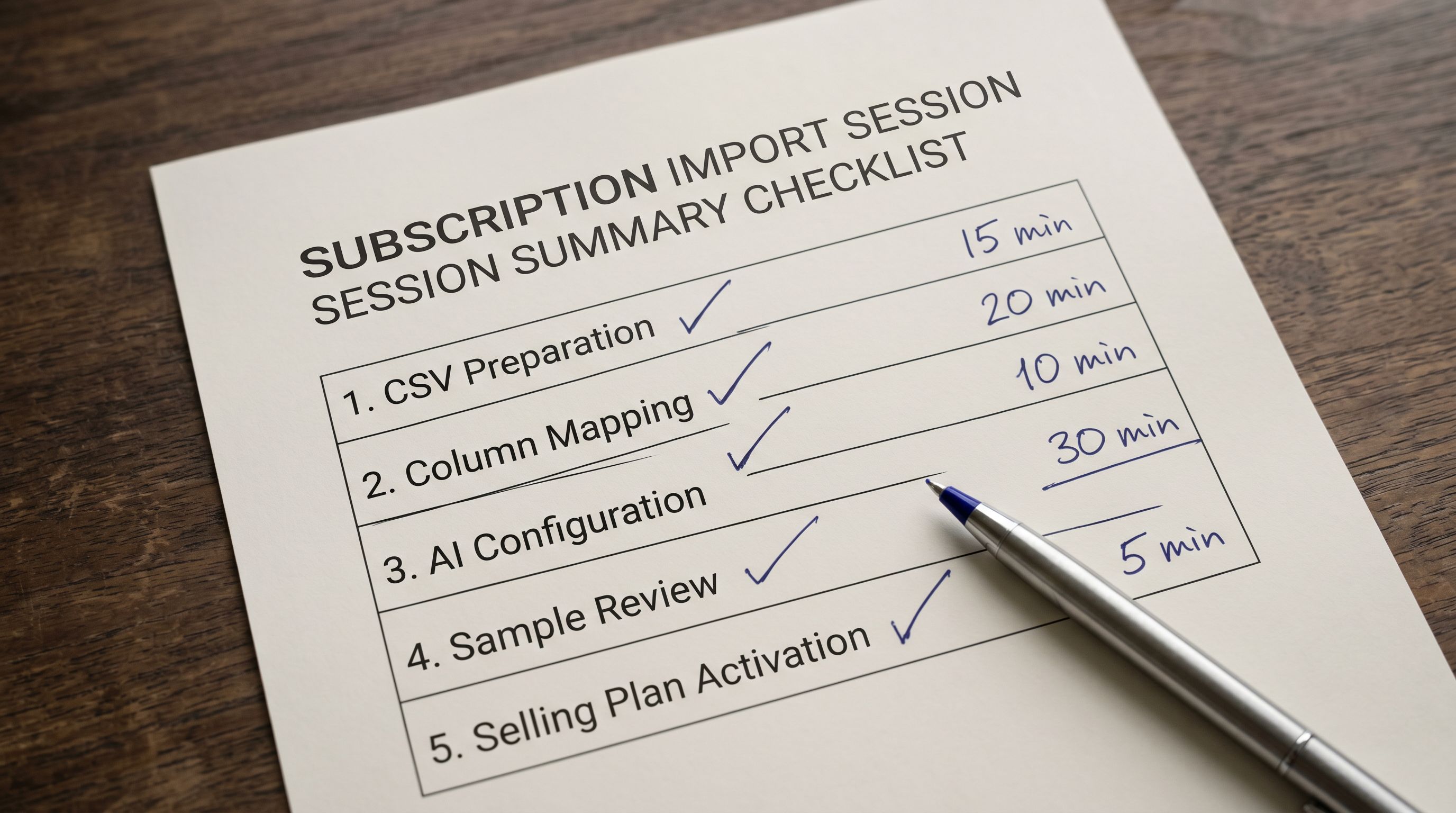
- 01Prepare the subscription product CSV. Add the required columnsTags (with the subscription app recognition tag included), requires_shipping (true for physical, false for digital), and any metafield columns for interval data. Set Status to draft for products that need selling plan configuration before going live.
- 02Upload to Importier and open the column mapping step. Map the standard columns as usual, then map the subscription-specific columnsthe Tags column to Shopify Tags, the metafield columns to their corresponding Shopify metafield targets using the namespace.key format. Save this mapping as a named profile (e.g. 'Subscription Products') so it loads automatically for future subscription imports.
- 03Set the AI configuration. For subscription product descriptions, select Benefits-First or Emotional Storytelling as the description style. Both are optimised for communicating ongoing value rather than a one-time purchase. Select a persona that matches the subscription product categorywellness and self-care for supplement subscriptions, home and lifestyle for subscription boxes, professional tools for software-adjacent subscriptions.
- 04Review the generated descriptions for subscription framing. In the Review step, check that each description communicates the recurring value propositionwhy this product makes sense to receive regularly, what the consistent supply enables, and what the subscribe-and-save pricing means for the buyer. Descriptions that read like standard product listings (describing what the product is without the recurring purchase context) need a persona or style adjustment before confirming.
- 05Confirm the import. After products are live in Shopify (as drafts), open the subscription app and assign the selling plan groups to the relevant products. Once selling plans are assigned, set the products from draft to active. They will then display the subscription purchase option on the product page.
AI Descriptions for Subscription Products
The description style for a subscription product is different from a standard product description in one specific way: it must make the case for buying repeatedly, not just once.
A standard product description answers the buyer's question "should I buy this?" A subscription product description answers a harder question: "should I commit to receiving this regularly?" These are different persuasion tasks. The standard description can lead with features and specifications. The subscription description must lead with the recurring benefit: what consistency of supply enables, what the automatic replenishment removes from the buyer's mental load, what the cost saving over individual purchases amounts to over a year.
Two description styles in Importier are suited to subscription product framing.
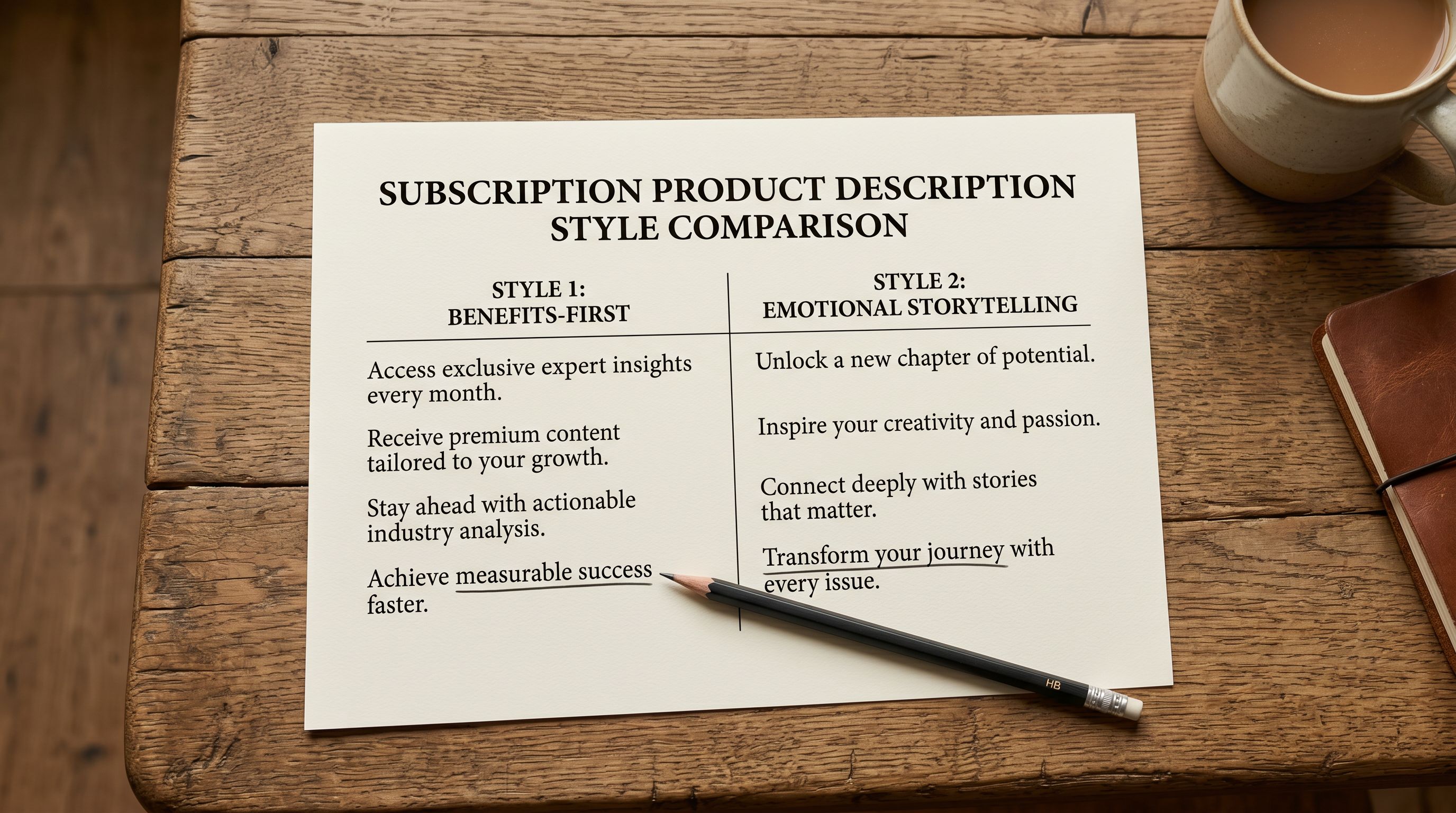
Benefits-First structures the description around outcomes rather than product attributes. For a supplement subscription, Benefits-First leads with the health outcome the consistent supplement intake supports, then explains what the product contains and why the formulation produces that outcome. The buyer sees the reason to subscribe before the product specification.
Emotional Storytelling builds a narrative around the recurring ritual or routine the subscription enables. For a coffee subscription, Emotional Storytelling describes the moment of receiving a curated selection, the ritual of trying each new origin, the anticipation of the next delivery. This style works for subscription boxes where the curation experience is part of the value proposition.
Both styles can be applied in Importier by selecting the style from the description configuration step during import. The AI generates descriptions in the selected style for every product in the batch, producing subscription-ready descriptions without individual rewriting.
- Leads with product features and specifications
- Answers 'should I buy this?'
- One-time purchase persuasion
- No recurring value argument
- No cost-saving or convenience framing
- Leads with recurring benefit or ritual the subscription enables
- Answers 'should I commit to this regularly?'
- Sustained-value persuasion
- Articulates what consistency of supply enables
- Cost saving and replenishment convenience as primary reasons
For the complete description style selection workflow and how expert personas affect the vocabulary and framing of generated descriptions, the Importier AI product descriptions guide covers each style with examples across different product categories.
For brand voice alignment in subscription descriptions, the Shopify product description brand voice guide covers how to configure the AI persona to match the brand's voice across the subscription product range, including how to preserve tone consistency across a multi-SKU subscription catalogue.
A subscription product description that reads like a standard product listing misses the persuasion task. The buyer already knows what the product is. They need to understand why receiving it regularly (automatically, at a consistent price) makes sense for them.
Compliance and Billing Notices
Recurring Billing Compliance Text
Subscription products in markets that require consumer disclosure of recurring billing terms need compliance text in the product listing. In some jurisdictions, this is a legal requirement; in all jurisdictions, it builds the buyer trust needed to convert a first-time purchaser into a subscriber.
The compliance text typically appears in one of two places: in the product description itself (as a short note about recurring billing terms), or in the purchase option widget that the subscription app renders on the product page (which most apps populate automatically from the selling plan configuration).
Where it appears in the description, the framing matters. A legalistic disclosure ("By subscribing you agree to recurring charges at the stated interval") is accurate but counterproductive in a product description; it reads as a warning rather than a feature. A benefit-forward framing of the same information ("Cancel anytime. No commitment required. Your plan is fully flexible.") communicates the same disclosure (you can cancel, the billing is recurring, the terms are clear) in the context of buyer confidence rather than legal obligation.
Importier's AI description generation does not add compliance text automatically, because the specific terms (cancellation policy, minimum commitment, applicable jurisdiction) vary by merchant and subscription app configuration. The correct approach is to add the compliance framing to the description style prompt in the persona configuration, so the AI produces descriptions that include the relevant terms in the brand voice, rather than adding them as a post-import manual edit.
Category Metafields for Subscription Products
Subscription products benefit from category metafield assignment for the same reasons standard products do: Google Shopping feed completeness, AI shopping surface retrieval, and automated collection membership. The subscription context adds one additional reason: subscription apps that filter their product dashboards by category or product type are more efficient to manage when products have consistent taxonomy assignments.
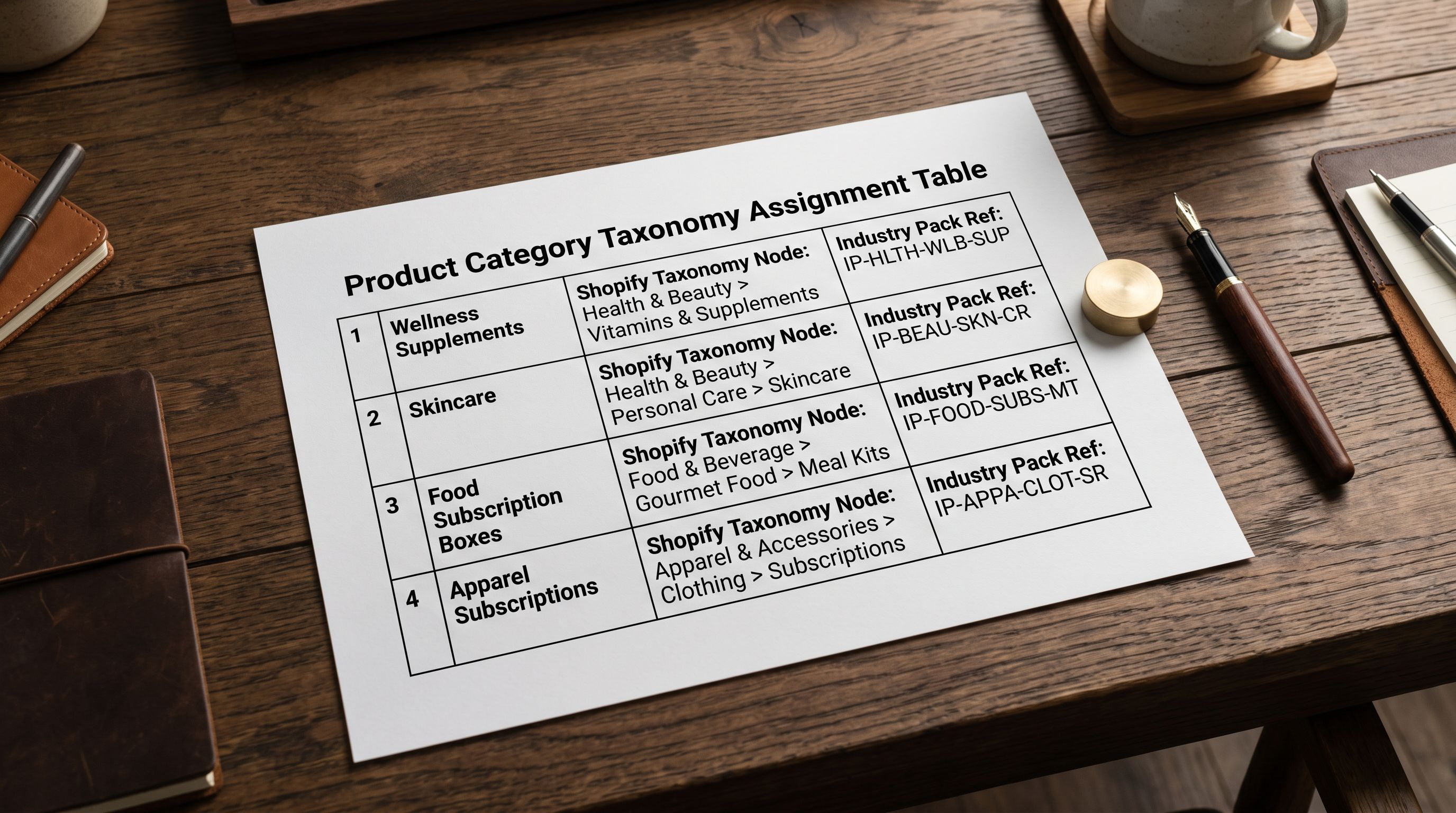
For supplement and wellness subscriptions, the Shopify Standard Product Taxonomy nodes under Health > Vitamins and Supplements or Health > Wellness Products are the correct assignments. For subscription boxes, the relevant taxonomy node is the category of the box contents (Apparel, Food, Cosmetics) rather than a generic "subscription box" node, which does not exist in Shopify's taxonomy.
Importier's 22 Industry Packs with 3,758 attributes include category assignments and attribute mappings for the most common subscription product categories: wellness supplements, skincare and cosmetics, food and beverage, and apparel. For a subscription product catalogue where category metafields are missing, applying the relevant Industry Pack during the fix-reimport assigns the correct taxonomy and populates the attribute fields in one pass.
For the complete category metafield assignment workflow and how Industry Packs map to Shopify's taxonomy nodes, the Shopify category metafields guide covers the assignment process, the attribute fields populated for each category, and how the assignments flow through to Google Shopping and AI shopping surfaces.

Post-Import Configuration in the Subscription App
After the import completes and products are live in Shopify as drafts, the subscription app configuration step assigns selling plans to the products and sets the subscription pricing.
This step is done in the subscription app's interface, not in Shopify admin or via reimport. The selling plan (the specific intervals, pricing tiers, and billing terms available to buyers) is configured in the app and then assigned to one or more products. A product without an assigned selling plan has no subscription purchase option visible to buyers, regardless of whether its tags and metafields are correctly set.
For a catalogue with many subscription products sharing the same interval options (all products available monthly or every two months), the most efficient approach is to create the selling plan group first in the subscription app, then assign it to all relevant products in a single multi-select operation. Most subscription apps support bulk selling plan assignment from the product list view.

Shopify's selling plans documentation covers the selling plan API structure and how selling plan groups interact with product listings, useful context for understanding how the subscription app's configuration maps to what buyers see on the product page. Recharge's product import guide covers Recharge-specific field requirements for subscription product imports, the authoritative reference for merchants using Recharge as their subscription app.
A Lean Import Structure for Subscription Products
For subscription product catalogues that are not yet built and need to be set up from scratch, the most efficient import structure is: create a lean CSV with the standard product fields plus the subscription-specific columns, import to Shopify as drafts, assign selling plans in the subscription app, then activate. The AI description generation runs during the Importier import step, so descriptions arrive ready for the subscription product page without a separate content creation pass.
The combination of a prepared CSV (with subscription tags and metafields), AI descriptions in Benefits-First or Emotional Storytelling style, and a post-import selling plan assignment in the subscription app produces a complete subscription product setup in a single workflow session. The configuration decisions made at import time (style, persona, tags, metafield values) are the same decisions that would need to be made manually for each product post-import; the import workflow consolidates them into a one-time configuration step applied to the whole batch.
Try Importier free at importier.app
Set up your first import in under five minutes.
Importier brings products into Shopify with AI descriptions, category metafields, and data enrichment on every run.