Shopify Metaobject Product References: How to Import Links

On this page
A supplement brand sells 50 products and each product page needs to display the clinical details for every active ingredient it contains. Each ingredient has a standardised name, a regulatory status, a sourcing region, and a dosage reference. Storing this data directly in each product description means 50 products each holding duplicated ingredient text. When a regulatory status changes, someone edits 50 product descriptions individually. When a new ingredient field is required, 50 products need updating.
The shopify metaobjects product import approach solves this at the data layer rather than the content layer. Each ingredient exists once as a metaobject (a structured entry in Shopify's custom data layer), and each relevant product holds a reference to it. Update the metaobject and every product that references it reflects the change automatically.
What Shopify Metaobjects Are and How They Differ from Metafields
Shopify has two mechanisms for attaching custom structured data to product pages: metafields and metaobjects. They solve different problems and require different import approaches.
Metafields store a single value attached directly to a Shopify resource: a product, a variant, a collection, or a customer. A product metafield might store a warranty period (text), a care instruction code (single-line text), or a compliance status (boolean). The data lives on the product itself. If three products have the same warranty period, they each store that value separately.
Metaobjects are independent entries in Shopify's custom data layer, separate from any product. A metaobject has its own defined structure (called a metaobject definition), its own set of fields, and its own handle. A product can then hold a reference to that metaobject via a metafield of type "metaobject reference." The data lives in the metaobject. Multiple products can reference the same metaobject entry.
The distinction matters at import time because they require completely different workflows. Importing a metafield value requires adding a column to the product import file. Importing a metaobject reference requires the metaobject to exist first, then adding a reference column to the product import file.

Use Cases: When Metaobjects Make Sense for a Product Catalogue
Metaobjects are appropriate when the same structured data applies to multiple products and the data has its own lifecycle independent of those products.
Size guides for apparel and footwear
A brand with five product lines (running, hiking, casual, trail, and formal) might have three distinct size guides (standard fit, athletic fit, wide fit). Rather than embedding size guide HTML into 80 product descriptions, each size guide exists as a metaobject with fields for measurement tables, fit notes, and brand-specific sizing adjustments. All 25 products that use the athletic fit guide reference the same metaobject. Updating the guide once updates all 25 product pages.
Ingredient or compound libraries
Food, supplement, cosmetic, and pharmaceutical product ranges routinely share active ingredients across dozens of products. Each ingredient is a metaobject entry with INCI name, sourcing region, regulatory classification, and approved claims. A product's metaobject reference list links to each ingredient it contains. This is the structure that satisfies clean-label transparency requirements without duplicating ingredient data across every product description.
Compliance and certification documents
Electronics, industrial equipment, and medical products carry certifications that apply to multiple SKUs. A CE compliance certificate applies to an entire product line. An ISO certification applies to every product from a specific manufacturer. Storing these as metaobjects, each with fields for certification body, certificate number, issue date, and expiry date, and referencing them from the relevant products keeps compliance data current and auditable without per-product duplication.
Manufacturer and brand profiles
Wholesale distributors and multi-brand retailers often carry products from dozens of manufacturers. A manufacturer metaobject can hold contact details, country of origin, brand standards documentation, and supplier code. This data belongs to the manufacturer, not to any individual product, but that needs to surface on product pages for trade buyers.
A metaobject is updated once. Every product that references it reflects the change on the next page render. For data that applies to hundreds of products and changes over time, a metaobject is structurally superior to embedded product description text.

Shopify Metaobjects Product Import: How References Work Technically
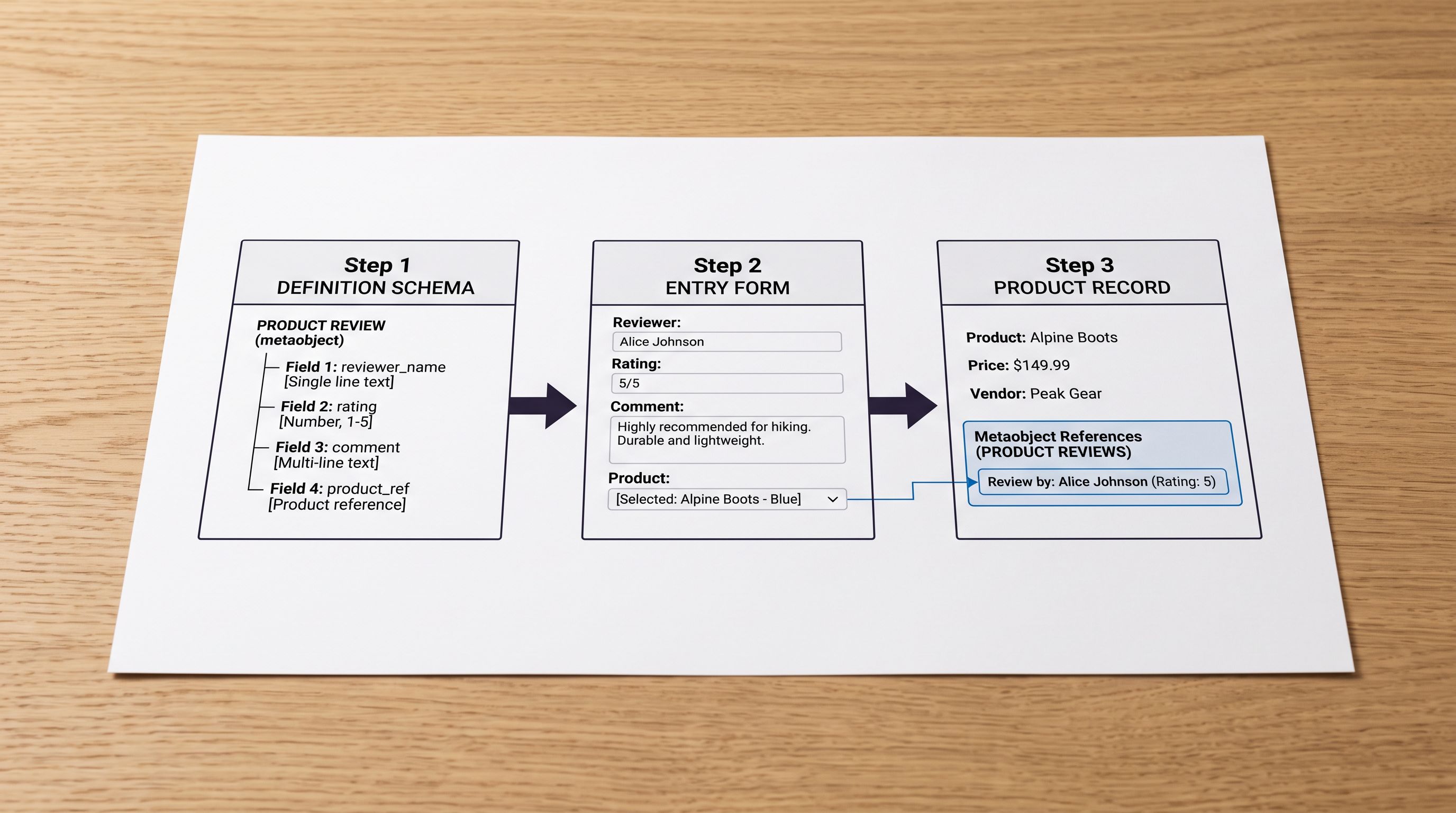
Per Shopify's metaobjects documentation, a metaobject is a structured document that conforms to a metaobject definition. The definition specifies the type (for example, size_guide) and the fields it accepts (name, measurements, fit_notes). Individual entries are created within that definition, each with a unique handle within the type.
A product holds a reference to a metaobject via a metafield. That metafield must have a type of metaobject_reference and must specify which metaobject definition it accepts. When the metafield is set on a product, it stores the metaobject's global ID (GID): gid://shopify/Metaobject/1234567890.
For import purposes, this means:
- The metaobject definition must exist in the Shopify store before any product can reference it.
- The individual metaobject entries must exist before products can reference them.
- The product import needs a column containing the metaobject handle or GID for each product that has a reference.
The critical sequencing problem: most supplier import files do not contain metaobject data at all. A supplier sends product specifications without knowing which metaobject structure the merchant uses. The merchant must either pre-populate metaobject entries in Shopify before the import, or the import tool must handle metaobject creation inline.
Importier's import wizard detects columns that map to metaobject reference metafields. When it finds such a column, it checks whether the referenced metaobject entries (identified by handle) already exist in the store. If they do not, Importier offers to create them from supplementary data columns in the same import file, so the two-step workflow (create metaobjects, then link products) runs as a single import operation rather than two separate processes.
Shopify Metaobjects Product Import: Structuring the Import File
The import file format depends on whether the metaobject entries already exist or need to be created in the same run.
Approach 1: pre-existing metaobjects
If the metaobject entries are already in Shopify (created via the admin, the API, or a prior import), the product import file needs one column per metaobject reference metafield. The column header uses the standard metafield format: metafield.namespace.key. The value in each row is the handle of the metaobject the product should reference.
A product row referencing a size guide might have:
metafield.custom.size_guide=athletic-fit-guide
Shopify resolves the handle to the metaobject's GID during the import and sets the metaobject reference metafield on the product. If the handle does not match any existing metaobject of the correct type, the import skips that field (or fails, depending on the import tool's validation behaviour).
Approach 2: create metaobjects in the same import run
For a first-time import where metaobject entries do not yet exist, the import file can include supplementary columns containing the data for each unique metaobject entry. A size guide import might include:
metafield.custom.size_guide=athletic-fit-guide(the reference)metaobject.size_guide.athletic-fit-guide.fit_notes=Runs true to size...(the metaobject data)metaobject.size_guide.athletic-fit-guide.measurement_table=...(additional field)
Importier reads these supplementary columns, creates the metaobject entry if it does not already exist, and then writes the reference on the product. Products that reference the same handle in the same import run share the single created metaobject; the entry is created once, not duplicated per product.
Importier's guide to Shopify product metafields covers the standard metafield import workflow for non-reference types. For category-specific metafield structures, including how Shopify's taxonomy metafields differ from custom metafields, see Importier's category metafields guide.

- 01Step 1In the Shopify admin, create the metaobject definition for the type you need (Settings > Custom data > Metaobjects > Add definition). Define the type name (for example, size_guide) and add each field the metaobject should contain. This definition must exist before any product can reference it.
- 02Step 2Create the metaobject reference metafield on the product resource (Settings > Custom data > Products > Add definition). Set the type to Metaobject reference and select the metaobject definition from Step 1. Note the namespace and key you assign (for example, custom.size_guide).
- 03Step 3In your import file, add a column for each metaobject reference metafield using the format metafield.namespace.key (for example, metafield.custom.size_guide). In each product row, enter the handle of the metaobject that product should reference.
- 04Step 4If the metaobject entries do not yet exist, add supplementary metaobject data columns to the import file for each unique entry. Importier reads these columns, creates the metaobject entries in Shopify, and then writes the references on the products in the same import run.
- 05Step 5After import, verify that the metaobject reference appears on the product page by checking the product record in Shopify admin under the metafield panel. Confirm the reference links to the correct metaobject entry and that the metaobject's fields contain the expected data.
Common Mistakes When Importing Metaobject References
Referencing a metaobject that does not exist
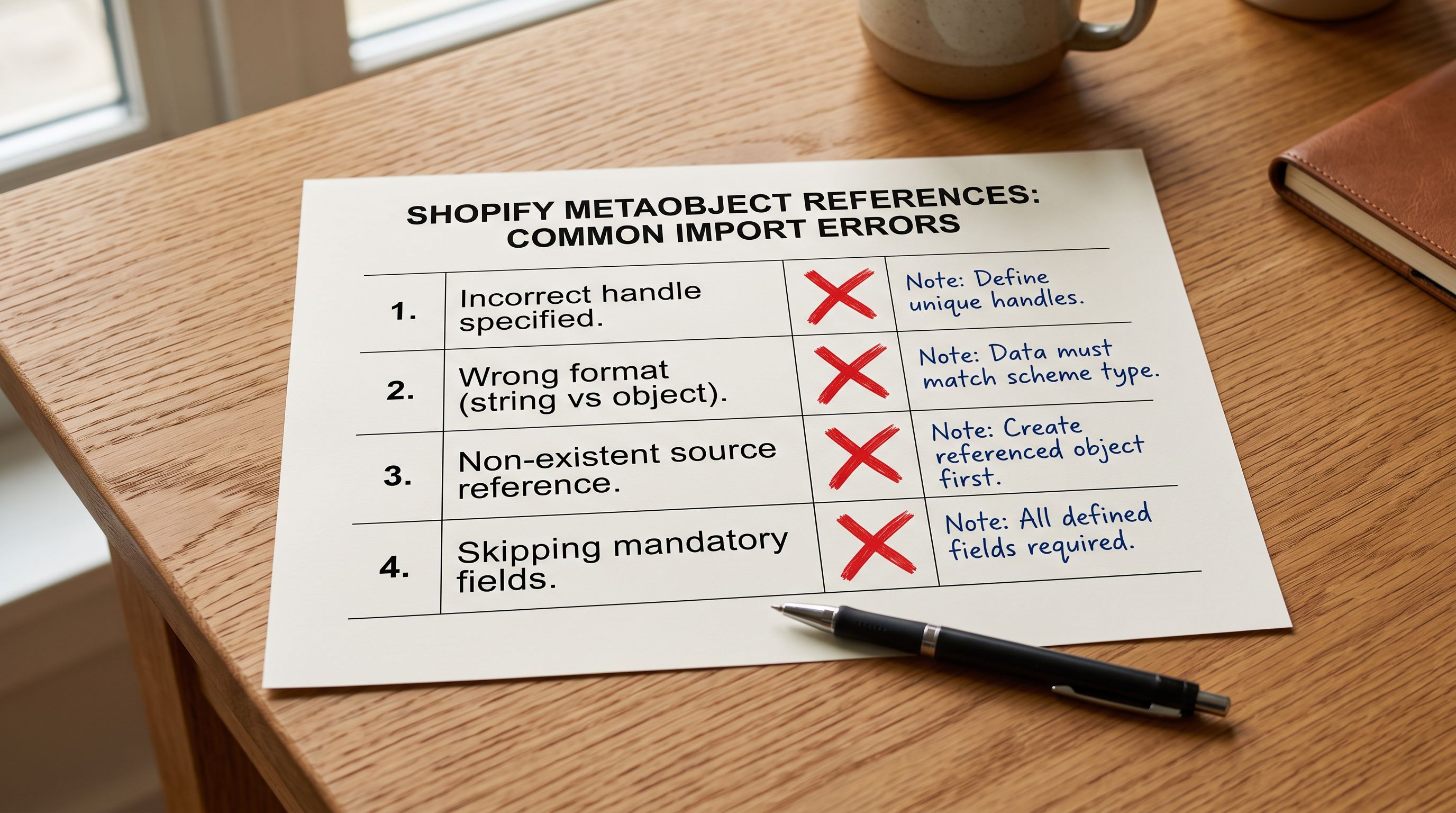
If the import file contains a handle in the reference column that does not match any existing metaobject of the correct type, the import creates a broken reference. The metafield is set on the product but the reference target does not exist. The theme's metaobject rendering code receives a null value and typically renders nothing or throws an error. Most import tools do not validate metaobject handle existence before writing the reference.
Using the wrong metaobject definition
A product can only reference metaobjects of the type specified in the reference metafield's definition. If the metafield custom.size_guide is configured to accept size_guide type metaobjects, a handle pointing to a manufacturer type metaobject will not resolve correctly. The import file must use handles from the correct metaobject type.
Skipping the metaobject definition setup step
Merchants who try to import metaobject references before creating the metaobject definition in Shopify admin will find the import column has nowhere to write. The metafield definition that accepts metaobject references must exist in the store before any import can reference it. The Shopify admin setup in Steps 1 and 2 above is a prerequisite, not an optional step.
Confusing metaobject handles with metaobject GIDs
The import file accepts either the metaobject handle (a human-readable slug like athletic-fit-guide) or the full GID string (gid://shopify/Metaobject/1234567890). Handles are easier to maintain in a spreadsheet. GIDs are unambiguous. Mixing the two formats in the same import column produces inconsistent results. Choose one format and use it consistently.
- Ingredient data duplicated across 50 product descriptions
- Regulatory update requires editing 50 products individually
- Size guide embedded as HTML in each product description
- Compliance certificate stored as text on each product
- No structured data layer for filtering or API consumption
- New data field requires editing every affected product
- Ingredient data stored once in a metaobject entry
- Regulatory update edits one metaobject, all 50 products reflect the change
- Size guide stored as a structured metaobject with individual fields
- Compliance certificate stored as a referenced metaobject with expiry tracking
- Metaobject data available via Shopify Storefront API for structured queries
- New data field added to the metaobject definition applies to all entries automatically
Key Takeaways
Shopify metaobjects product import is the right approach when structured data applies to multiple products, has its own lifecycle, and needs to be queryable or updateable independently of those products.
- Metaobjects are independent structured entries in Shopify's custom data layer. Products reference them via a metafield of type "metaobject reference." The data lives in the metaobject, not the product. Updating one metaobject updates every product that references it.
- The import workflow is two-step by design: the metaobject definition and entries must exist before products can reference them. Importier's import wizard handles both steps in a single import run when the import file includes supplementary metaobject data columns alongside the product reference columns.
- The most valuable metaobject use cases in product catalogues are shared across many products and change over time: size guides, ingredient or compound libraries, compliance certificates, and manufacturer profiles.
- The import file uses the
metafield.namespace.keycolumn format to specify the reference metafield, with the metaobject handle or GID as the value. Handles are easier to work with in spreadsheets; GIDs are unambiguous and preferred for programmatic import files. - A broken metaobject reference (a handle that does not match any existing entry of the correct type) causes the product page to render nothing for that reference field. Validate that all handles in the import file correspond to existing metaobject entries before running the full catalogue import.
- Per Shopify's Metaobject API documentation, metaobjects are queryable via the Storefront API, making structured metaobject data available to headless storefronts, third-party apps, and marketplace feed integrations; a capability that embedded product description text cannot provide.
Set up your metaobject references at import time at importier.app. Map your metaobject data columns in the import wizard and create shared structured entries across your catalogue in a single run.
Set up your first import in under five minutes.
Importier brings products into Shopify with AI descriptions, category metafields, and data enrichment on every run.