Shopify Size Guide Import: Garment Measurement Metafields

On this page
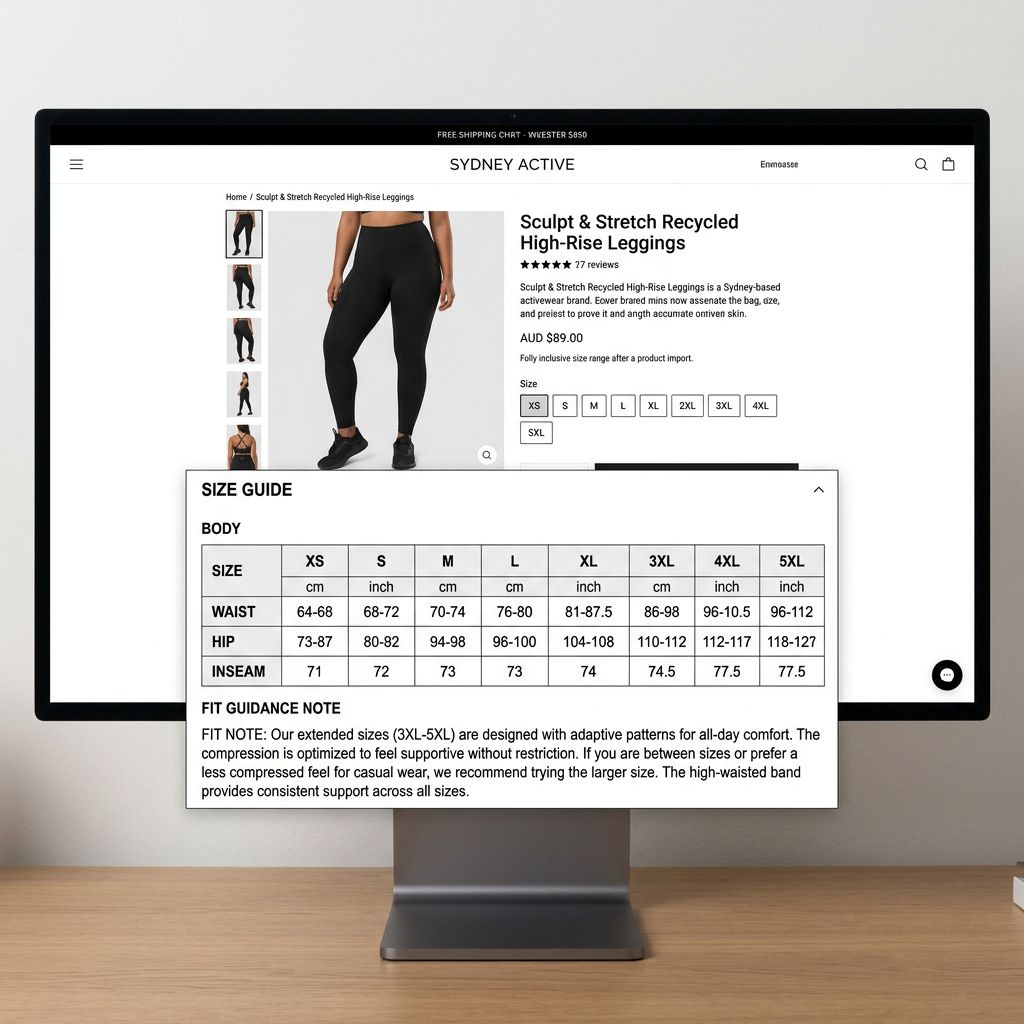
An apparel merchant imports 148 clothing products (blouses, trousers, and jackets) from a supplier CSV. Smart Variant Detection groups the rows correctly: each product shows XS through XL in the Shopify size dropdown. Images transfer. Prices are accurate. Two weeks after launch, returns arrive with notes like "ordered medium, too small" and "did not realise a UK14 was a different fit from a US14." The review inbox fills with sizing questions. The merchant never added a size guide, and the import workflow never flagged this as a gap.
This is the missing step in most shopify size guide metafields garment import workflows. Size guide data almost always exists in supplier spec sheets or product documentation. Standard import workflows never surface it as a required column, so it gets left behind every time.
Why Size Guide Data Gets Left Behind in Shopify Imports
Standard Shopify CSV fields cover titles, prices, images, variant options, and barcodes. None of them are named "size guide." When a merchant maps supplier columns to Shopify fields in the import wizard, there is no obvious destination for measurement data. Variant labels (XS, S, M, L, XL) map cleanly to the Option1 Value column. The measurements that correspond to those labels (chest 86cm, waist 70cm, hip 94cm) have no standard column to land in.
Supplier files compound the problem. Most apparel supplier CSVs include measurements either in a separate tab, in a footnote-style column labelled "spec sheet," or in a linked PDF. Even when the measurement data is in the CSV itself, it is often structured as combined text: "XS: chest 78cm / waist 60cm" in a single cell. That format does not import cleanly into any Shopify field.
The result is that every product arrives in Shopify with the right variant labels and no guidance for choosing between them. Importier's import wizard handles variant grouping for apparel: 150-plus patterns covering alphabetic sizes, numeric sizes (AU/UK/EU/US), waist-inseam (denim), and shoe sizes across multiple country standards. Grouping works. The measurement context that helps customers act on those groups does not transfer automatically.
Why Description Text Is Not the Answer
A common workaround is to paste size guide content into the product description body. This solves the "no information" problem but creates a different one.
Measurement data in the description body renders as unformatted paragraphs. A table of twelve measurements across six sizes prints as a wall of numbers. Shopify OS2 themes have no way to parse description text into comparison columns, interactive size selectors, or measurement-to-size lookups.

A JSON metafield (for example, custom.size_guide) holds the full size table as a structured object. The theme reads each row and column and renders a clean comparison layout next to the size selector. Customers pick their size from a table rather than scanning a text block.
This is the architectural difference: description text is content for reading; metafields are structured data for rendering.
- Renders as unformatted paragraph text
- No column structure or comparison layout
- Cannot be queried or filtered programmatically
- Breaks theme-side size conversion toggles
- Rendered as an interactive comparison table by OS2 themes
- Column headers and sizing rows display correctly
- Queryable and filterable by theme and app integrations
- Supports country-toggle UX for AU, UK, US, EU size systems
Two Layers of Size-Related Data in Shopify
Shopify's apparel and footwear product data has two distinct layers, and both need to be populated at import.
Layer 1: Standard taxonomy attributes. Shopify's Standard Product Taxonomy includes structured size-related attributes for apparel: size_type (regular, petite, plus, tall, big and tall), size_system (AU, UK, US, EU), age_group (adult, kids, baby), and gender. These feed Google Merchant Centre product listings and power Shopify's built-in product filter system.
Importier's Apparel Industry Pack assigns these taxonomy attributes during the import flow. The category matching step identifies the correct Shopify category for each product and populates the taxonomy attributes from 3,758 attribute types across 22 industry packs. A merchant does not need to manually set size_system: AU for every product; the pack assigns it based on category. According to Shopify's standard product types documentation, these category-level attributes feed downstream systems including Google Shopping and Shopify's filter system.
Layer 2: Custom measurement metafields. Actual body measurement data sits outside Shopify's standard taxonomy. Chest, waist, hip, inseam, foot length, and garment dimensions are merchant-specific data that each store structures differently. These require custom metafield definitions, created in Shopify admin under Settings > Custom data > Products, and then populated at import.

Both layers serve different purposes. Layer 1 feeds external systems. Layer 2 feeds the on-page size guide that customers consult when choosing.
From variant labels to measurement data
Structuring Size Guide Data in Your Import File
How measurement data is structured in the supplier file determines how cleanly it maps to Shopify metafields.
The most reliable format is one column per measurement, with the measurement label as the column name. A jacket supplier file might include size_chest_cm, size_waist_cm, size_hip_cm, and size_length_cm as separate columns. Each column contains a single measurement value for the product. This structure maps directly: the column maps to the custom metafield key and the value imports as a text or number field.
For a full size table that includes all measurements across all sizes, a single JSON column is the most practical approach. A size_guide_json column containing a structured object imports as a json type metafield:
{"XS":{"chest":78,"waist":60,"hip":84},"S":{"chest":82,"waist":64,"hip":88},"M":{"chest":86,"waist":68,"hip":92}}
Themes can render this directly as a comparison table without any preprocessing.
One common mistake with supplier size data: do not accept combined text strings like "UK10/US6/EU38" in a single column. There is no reliable way to parse where one size standard ends and the next begins. Request separate columns per size system from the supplier, or split the combined string before import.
Mapping Size Guide Columns to Shopify Metafields at Import
- 01Create custom metafield definitions in Shopify admin before running the import. Under Settings > Custom data > Products, add the keys you needcustom.size_guide_json (json type), custom.size_uk (single_line_text_field), custom.size_us (single_line_text_field), custom.size_eu (single_line_text_field), custom.size_au (single_line_text_field)
- 02In the Importier column mapping step, locate the size guide columns from your supplier file. The import wizard lists every column in your file; map each measurement column to the corresponding custom metafield key
- 03Select category metafields in the import options to run the Apparel Industry Pack. This assigns Layer 1 taxonomy attributes (size_type, size_system, age_group, gender) alongside the product data in the same import run
- 04Review the mapped values in the import preview before pushing. The preview shows the first five products with their metafield valuesconfirm the JSON structure and that size conversions landed in the correct fields
- 05Push the import. Products arrive in Shopify with variant options and measurement metafields set simultaneously, with no follow-up editing required
The mapping step runs the Apparel Industry Pack in the same import that applies custom measurement metafields. Both layers populate together.

Country-Specific Size Conversions as Separate Metafields
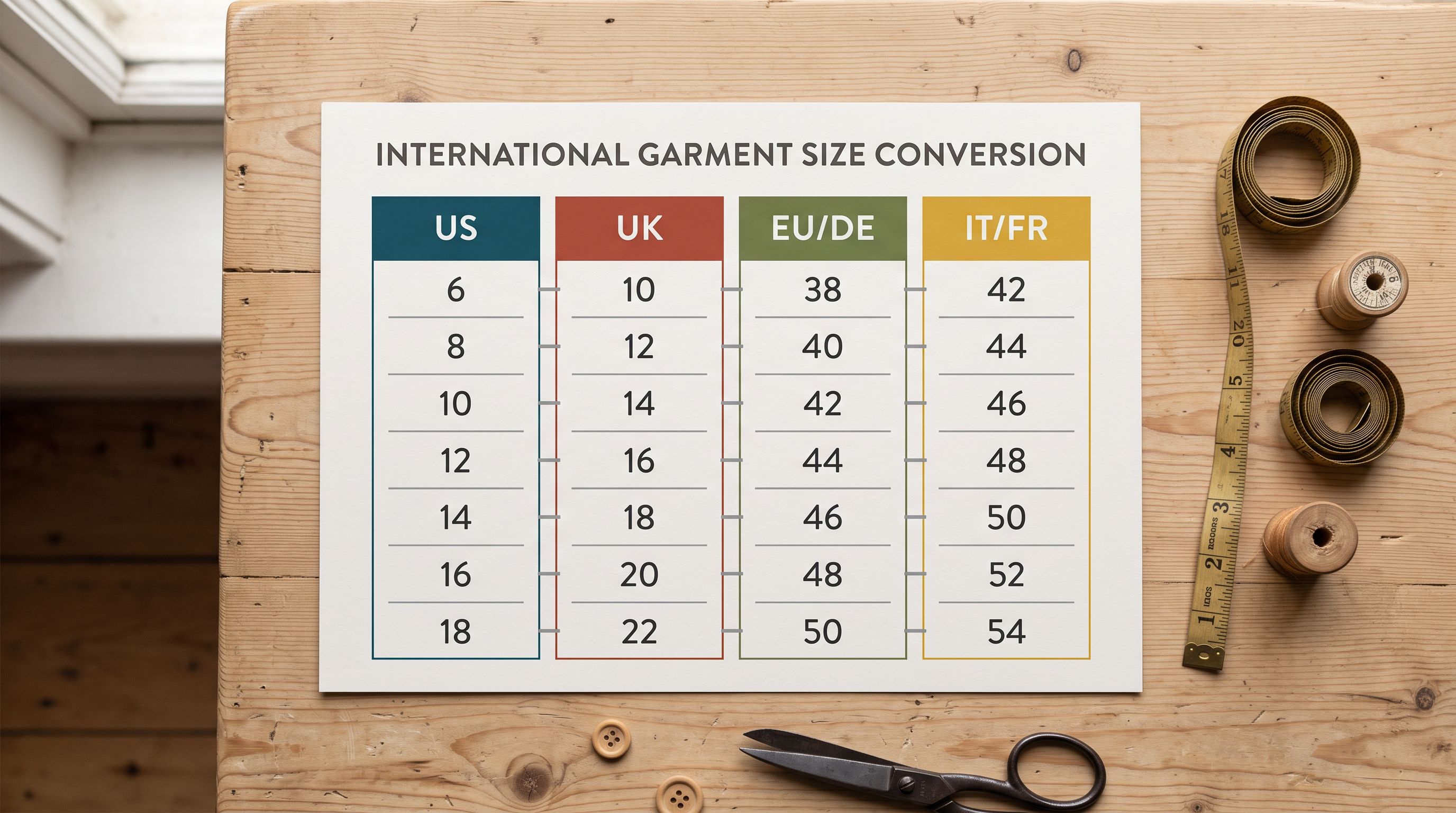
A UK14 in a blouse equates to a US10 and an EU42. In swimwear, the same UK14 becomes an EU40. Country size standards are not universal across garment categories and they diverge more in swimwear, lingerie, and outerwear.
Storing conversions as separate metafields per standard (custom.size_uk, custom.size_us, custom.size_eu, custom.size_au) lets the theme build a country selector that swaps the displayed size label without changing the underlying variant. The customer selects "Australia" and the size selector relabels from UK8 to AU8. That toggle is impossible to build when the size data lives in a combined text field.
Separate metafields per size system let themes build a country selector that swaps size labels without touching variant data. Combined text strings make that impossible.
For merchants who sell across UK, US, EU, and AU markets, setting up four separate size metafield columns in the supplier file adds one hour of setup at import time. Retrofitting that structure to 200 live products after launch requires a Store Scanner enrichment run or a manual export-edit-reimport cycle. The import step is the cheapest time to add this data.
Fit Guide Notes as a Descriptive Metafield
Beyond measurement tables, fit notes describe how a garment is cut and how it sits on the body. "Cut slim through the shoulders, true to waist size" is meaningful to a customer choosing between a medium and a large. This information usually exists in supplier technical documents but rarely makes it into a product description.
A fit note imports as a single_line_text_field metafield from a fit_notes column in the supplier file. Importier's AI description styles can reference the fit note as context when generating the product description. "The jacket runs slim through the shoulders; size up if you have a broad frame" is more useful to a buyer than a measurement number alone.
Fit notes also provide useful copy for collection page descriptions, email product recommendations, and customer service responses. A metafield stores the note in a queryable location; a description buries it in a text block.
What the Apparel Industry Pack Does Not Cover
Importier's Apparel Industry Pack covers the standard Shopify taxonomy attributes for apparel: size_type, size_system, age_group, gender, material. These feed Google Merchant Centre and Shopify's filter system.
The pack does not cover custom measurement tables. That is by design. Shopify's standard taxonomy does not include a garment measurement table field because measurement formats vary too widely across garment types, brands, and markets to standardise. The merchant defines the custom metafield schema for their specific needs.
According to Shopify's metafield documentation, the custom metafield system is designed for merchant-specific data that sits outside the standard product schema. Measurement tables are precisely this: data that is essential to a specific product category but too varied in structure for a platform-wide standard field.
The Apparel Industry Pack and custom measurement metafields complement each other. The pack handles everything Shopify and Google have standardised. Custom metafields handle the measurement data that is specific to the merchant's catalogue and their customers' buying behaviour.
Key Takeaways
- Size guide data gets left behind in imports because it has no standard Shopify CSV field. Variant labels map cleanly; measurement data requires deliberate custom metafield setup before the import runs.
- Storing size guide data as a JSON metafield lets OS2 themes render it as a comparison table. The same data in the description body renders as unformatted text: no column structure, no interactive size lookup.
- Two layers of size data need to be populated at import. The Apparel Industry Pack assigns standard taxonomy attributes automatically. Custom measurement metafields require a mapping step in the import wizard.
- Country-specific size conversions require separate metafields per size standard, not combined text strings. Separate fields enable country-toggle UX in themes; a "UK10/US6/EU38" string in one field does not.
- The import step is the cheapest time to add measurement data. Every product imported without size guide metafields will need a follow-up enrichment run to populate them later.
Import your apparel and footwear products with size guide metafields in place from day one at importier.app.
Set up your first import in under five minutes.
Importier brings products into Shopify with AI descriptions, category metafields, and data enrichment on every run.