Shopify Office Supplies Import: Quantity Packs and B2B Data

On this page
A wholesale stationery distributor has 600 products to import: printer cartridges, toners, pens, notebooks, and paper reams. Each product is available in four pack sizes: single unit, 5-pack, 10-pack, and box of 50. The supplier CSV has 2,400 rows. Every four rows represent one product, with a different SKU and price for each pack size. The challenge is not just importing the data; it is getting 2,400 rows to become 600 Shopify products, each with four pack-size variants, the right manufacturer part number, compatibility data for consumables, and descriptions written for procurement buyers rather than retail customers.
This is what a shopify office supplies import sku compatibility packs workflow actually involves. The row structure, the identifier complexity, and the buyer psychology of business procurement each require specific handling that a standard import workflow is not configured to address by default.
The Quantity Pack Problem in Office Supply Catalogues
Most product categories have variants that differ by attributes customers choose at purchase: colour, size, flavour. Office and business supply products add a second variant dimension that is less common in retail catalogues: quantity. A box of 50 ballpoint pens is not a different product from a single ballpoint pen; it is the same product at a different unit count and price point.
In a supplier CSV, this usually means four rows per product with identical product names and descriptions but different pack-size labels, SKUs, and prices. The rows might look like: "BIC Cristal Ballpoint Pen - Single," "BIC Cristal Ballpoint Pen - 5-Pack," "BIC Cristal Ballpoint Pen - 10-Pack," "BIC Cristal Ballpoint Pen - Box of 50." Four rows that belong to one Shopify product.
Importier's Smart Variant Detection includes Pack Size as one of its 150-plus variant detection patterns across 15-plus industries. When the import wizard processes a file with these row structures, it identifies "Single," "5-Pack," "10-Pack," and "Box of 50" as pack-size variant labels and groups the four rows into one product with four variants under an option named "Pack Size."
The grouping handles price differences correctly: each pack-size variant carries its own price, compare-at price, and inventory quantity. A merchant does not need to restructure the supplier file before import.
Manufacturer Part Numbers vs Supplier SKUs
Office and business supply products carry two distinct identifiers that serve different purposes and must not be conflated in the import.
The supplier SKU is an internal code the distributor uses. It may include pack-size suffixes: "BICC1199-1," "BICC1199-5," "BICC1199-10," "BICC1199-50." This is the inventory code for ordering and stock management. It maps directly to the Shopify variant SKU field.
The manufacturer part number (MPN) is the universal product identifier the manufacturer assigns, independent of pack size. For BIC pens, the MPN might be "C1199" regardless of whether the item is sold as a single or a box of 50. Procurement software, e-procurement platforms, and corporate purchasing systems search by MPN. A business buyer placing an order through a procurement portal enters an MPN, not a supplier SKU.
From supplier rows to procurement-ready products
Storing the MPN as a custom product metafield (for example, custom.manufacturer_part_number) at import time means the MPN is searchable and queryable in Shopify for every product it applies to, independent of pack-size variant. According to Shopify's B2B purchasing documentation, structured product data including part numbers is particularly important for B2B merchants whose customers use purchasing systems that require exact identifier matching.
The import column mapping step handles this in a single pass: the supplier SKU column maps to the Shopify variant SKU field (per-variant, so each pack size gets its own code), and the MPN column maps to the custom product metafield (applied once per product, not repeated for each variant).

Compatibility Metafields for Consumables
The most time-sensitive compatibility data in any office supply catalogue is printer consumables. A buyer searching for toner cartridges needs to know which printer models each cartridge is compatible with before purchasing. Compatibility data that lives only in the product description body is not filterable, not searchable in Shopify's product search, and cannot feed a compatibility lookup widget.
Importing compatibility data as a structured metafield solves this. A custom.compatible_models metafield stored as a multi-line text field or a JSON array allows Shopify themes and apps to present a compatibility lookup: "Find cartridges compatible with your printer model." The same metafield feeds filter options in collection pages when the metafield is set up as a filter in Shopify's Navigation settings.
The column mapping step at import handles this directly. A supplier CSV column labelled "Compatible Printers" maps to the custom metafield key. If the column contains comma-separated model names ("HP LaserJet Pro M404, HP LaserJet Enterprise M507, HP LaserJet MFP M428"), these import as a multi-value text field that themes can parse into individual compatible model entries.
For paper products, compatibility takes a different form: paper size (A4, Letter, Legal) and paper weight (80gsm, 90gsm, 120gsm) are the attributes buyers filter by. Shopify's standard Office Supplies category in the Standard Product Taxonomy includes structured attributes for these fields. Importier's category metafield matching assigns the correct taxonomy category during import, and the category attributes for paper size and weight are assigned from the structured field data in the supplier file.
- 01Map the supplier SKU column to the Shopify variant SKU field; each pack-size variant gets its own code (BICC1199-1, BICC1199-5, BICC1199-10, BICC1199-50)
- 02Map the MPN column to a custom product metafield (custom.manufacturer_part_number); this applies once per product and is shared across all pack-size variants
- 03Map the Compatible Printers or Compatible Models column to a custom metafield (custom.compatible_models) for consumable products
- 04Enable Smart Variant Detection and set Pack Size as the primary variant grouping dimension so the 2,400-row file groups into 600 products with four variants each
- 05Select the AI description configuration for the batchTechnical Gadget style with a Procurement Officer persona for cartridges and consumables; Standard style with a Supply Chain Manager persona for paper and general stationery
- 06Review the preview to confirm variant grouping, MPN metafield population, and compatibility data before pushing to Shopify
AI Descriptions for Procurement Buyers
Retail product descriptions optimise for desire: they describe what the product looks like, how it feels, why a customer should want it. Business procurement buyers optimise for specification match and cost efficiency. A procurement officer evaluating printer cartridges wants to know: page yield, compatible models, OEM equivalence, cost per page, and reorder lead time.
The description style and persona combination that fits office supply products is different from consumer retail. Importier's Technical Gadget description style leads with specifications and structures content for buyers making rational purchase decisions based on technical requirements. The Procurement Officer persona frames output in procurement language: yield figures, unit costs, shelf life, and compatibility scope.

A description generated for a toner cartridge using Technical Gadget style with a Procurement Officer persona leads with page yield and compatible models, then covers storage requirements and OEM equivalence, and closes with cost-per-page economics. A description generated using Benefits-First style for the same product would lead with "save time and money on printing costs," which does not answer the procurement buyer's actual questions.
- Leads with lifestyle benefit or emotional appeal
- Generic specification summary buried in paragraph three
- No compatible models listed specifically
- No cost-per-page or yield comparison data
- Leads with page yield and compatible printer models
- Specifications structured in a decision-relevant sequence
- Compatible model list as a distinct section for procurement reference
- Cost-per-page calculation and OEM equivalence stated directly
The 156 expert personas across 43 industries include B2B-specific roles suited to different office supply categories. Procurement Officer fits consumables. Office Manager fits general stationery. Facilities Manager fits cleaning supplies and safety products. Choosing the right persona at import time means the AI-generated descriptions speak to the buyer who actually makes the purchasing decision, not a generalised retail shopper.

SKU Standards for Business Supply Catalogues
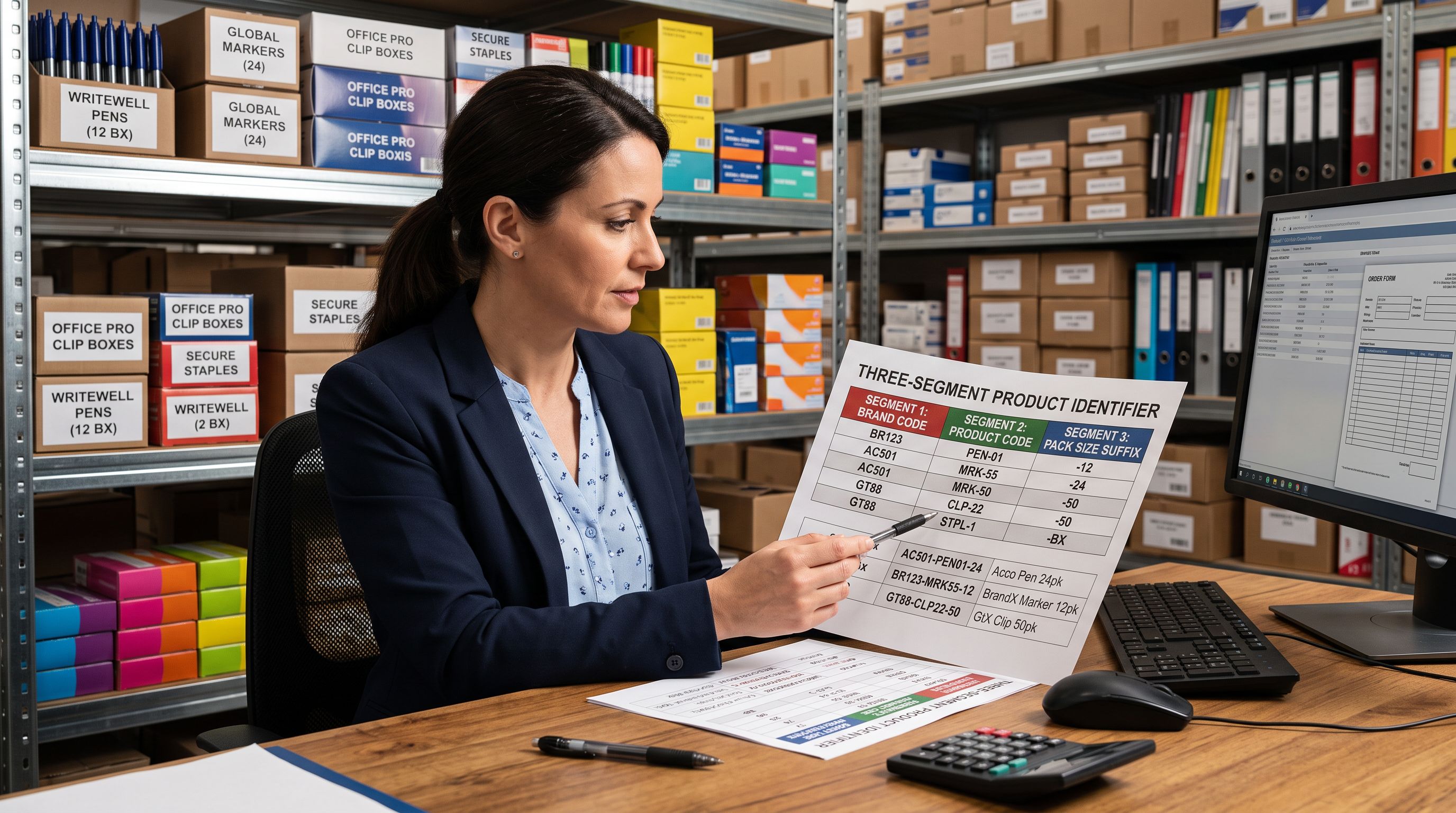
A consistent SKU structure matters more in B2B supply catalogues than in retail catalogues. Business buyers often place repeat orders by SKU. An order management system that processes SKU "BICC1199-10" for a 10-pack of pens will fail if the same product is later found under a different code.
The SKU format recommended for office and business supply imports follows three components: [BRAND]-[PRODUCT]-[PACK]. "BICC1199-10" reads as BIC Cristal C1199, 10-pack. This format is consistent across brands and pack sizes within the same supplier's catalogue.
At import, the variant SKU column populates this structure from the supplier file. If the supplier uses a different internal format, the column mapping step allows the merchant to remap or flag the column for post-import SKU standardisation. For catalogues where SKU standardisation is a prerequisite for an existing order management system, a pre-import normalisation pass using the supplier file (reformat, export, then import) is more reliable than post-import batch editing.
A procurement buyer who re-orders by SKU needs that SKU to be stable. An office supply catalogue with inconsistent pack-size SKU suffixes generates order errors before the first reorder cycle is complete.
Category Metafields for Office and Stationery Products
Shopify's Standard Product Taxonomy includes an Office Supplies and Stationery category structure. Importier's category metafield matching assigns the correct taxonomy category and the associated attributes during the import flow. For printer cartridges, this includes structured fields for cartridge type (ink, toner, laser), compatible brand, and yield. For paper products, this includes paper size, weight, and sheet count.
These category attributes are distinct from the custom metafields for MPN and compatibility data described above. The taxonomy attributes feed Google Merchant Centre product listings and Shopify's built-in filter system. The custom metafields feed on-page compatibility lookups and procurement search.
According to Shopify's custom data documentation, product metafields are the correct tool for merchant-specific attributes that fall outside Shopify's standard product schema. For an office supply catalogue, MPN and detailed compatibility data are exactly this type of data: essential for the specific business context but too varied in format to be standardised across all product categories in Shopify's taxonomy.
Running both taxonomy category matching and custom metafield mapping in the same import session means each product arrives in Shopify with its taxonomy attributes assigned and its procurement-specific data structured. No follow-up enrichment run is needed for either layer.
Key Takeaways
- Office supply CSV files have multiple rows per product for quantity pack sizes. Smart Variant Detection's Pack Size pattern groups 2,400 rows from a 600-product catalogue into 600 Shopify products with four pack-size variants each.
- Manufacturer part numbers and supplier SKUs serve different purposes and need different Shopify destinations. Supplier SKU maps to the variant SKU field per variant; MPN maps to a custom product metafield that applies across all variants.
- Compatibility data for consumables belongs in structured metafields, not description body text. A
custom.compatible_modelsmetafield enables filter-based compatibility lookup in Shopify themes; compatibility data in the description body cannot be filtered or searched. - B2B procurement buyers need specification-first descriptions. Technical Gadget style with Procurement Officer or Office Manager personas generates descriptions that lead with page yield, compatible models, and cost economics rather than retail benefit framing.
- Taxonomy category matching and custom metafield mapping both run in the same import session. Taxonomy attributes feed Google Merchant Centre and Shopify filters; custom MPN and compatibility metafields feed on-page procurement data.
Import your office and business supply catalogue with quantity variants, B2B SKU structure, and procurement-ready descriptions at importier.app.
Set up your first import in under five minutes.
Importier brings products into Shopify with AI descriptions, category metafields, and data enrichment on every run.