Shopify Product Compliance at Import: Age Verification, Warnings and Country Restrictions in Bulk

On this page
Shopify Product Compliance at Import: Age Verification, Warnings and Country Restrictions in Bulk
Most merchants treat compliance settings as a post-launch task. The product goes live, and sometime after that, someone goes into each product record and adds the age gate, warning copy, or country restriction. For a catalogue of 20 products, that sequence is manageable. For a catalogue of 200 or more, the gap between launch and compliance closure is a period of legal exposure.
The correct sequence is the reverse: compliance fields should be on the products before they reach Shopify, not added manually after the fact. Importier's compliance settings cover five scenarios that recur across regulated categories, and each can be configured at the import level so every product in a batch arrives in Shopify with the correct compliance fields already populated.
The Five Compliance Scenarios
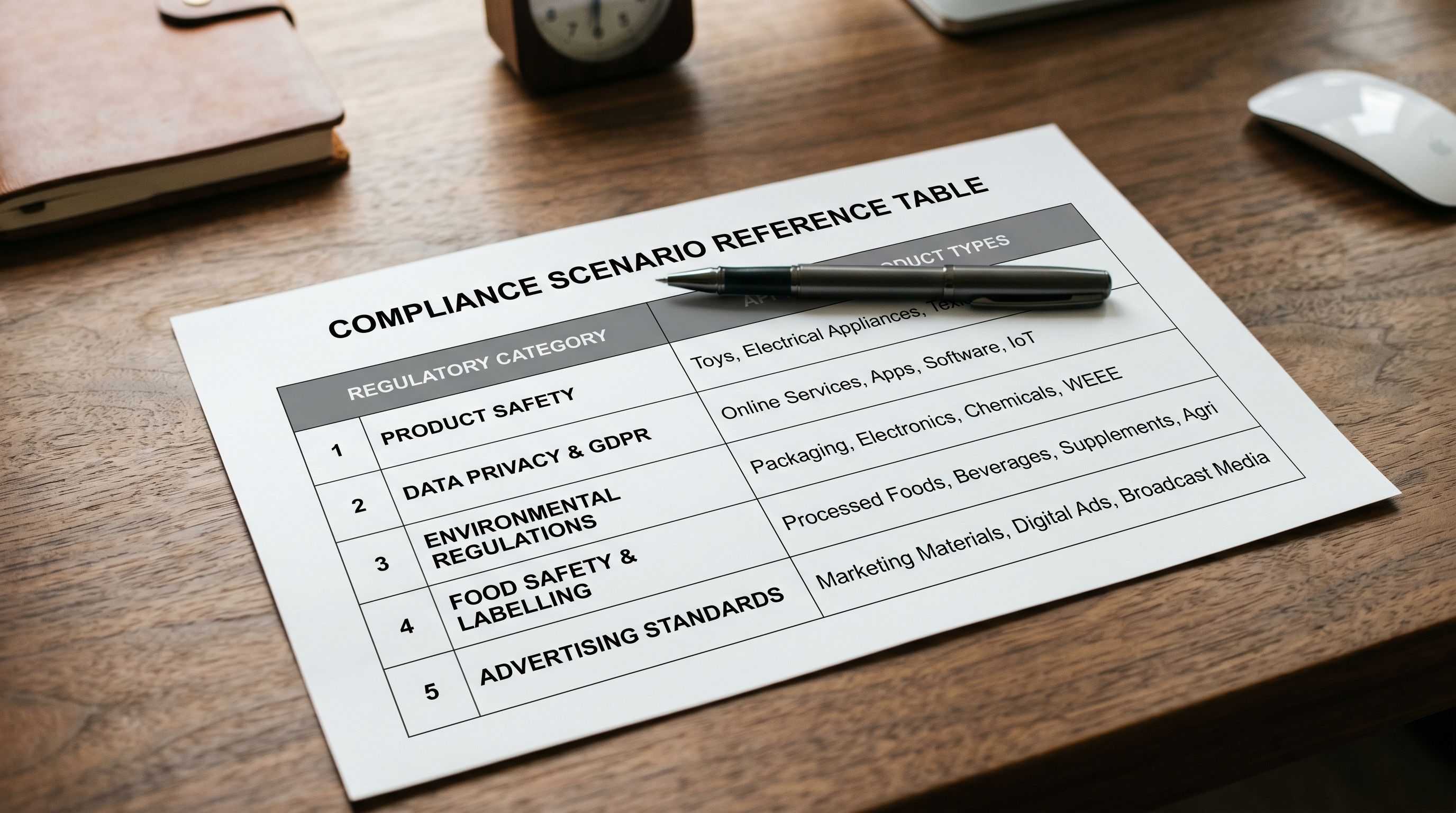
Regulated product categories generate five recurring compliance requirements at import time. Each requires a different configuration in Importier's compliance step.
Age verification (18+): applies to adult content, certain supplements, some knife categories, and other products that require a buyer to confirm they are over 18 before adding to cart. In Shopify, this surfaces as an age confirmation prompt at the product page or checkout. Setting the 18+ flag during import means the prompt is active from the moment the product goes live.
Age verification (21+): a distinct flag from 18+ and required for alcohol products sold in US jurisdictions where the legal drinking age is 21. These two flags are not interchangeable. A product set to 18+ in a US store where 21+ verification is required does not satisfy the compliance requirement.
Alcohol product warnings: in several jurisdictions, including California under Proposition 65, products containing or resembling alcohol must carry specific warning text. The warning copy is prescribed by the regulation and cannot be paraphrased. Importier includes the correct text template for each applicable country so merchants do not need to source the exact wording themselves.
Professional consultation warnings: for supplements, medical devices, and certain cosmetic products, some jurisdictions require a warning recommending consultation with a healthcare professional before use. The wording and display requirement vary by country. Importier's templates cover the major jurisdictions in this category.
Country restrictions: for products that cannot legally be sold in certain countries, a country restriction at import time prevents those products from appearing in storefronts served to customers in the restricted jurisdiction. This applies to products subject to export controls, licensing restrictions, or category-level import bans in the destination market.
Batch-Level vs Per-Product Compliance
Importier allows compliance settings to be applied at two levels: batch-wide (applying to every product in an import session) and per-product (applying only to products identified by a column value in the source file).
Batch-level compliance is appropriate when an entire import session covers a single regulated category. An alcohol retailer importing 300 wine products uses batch-level compliance: the 21+ age verification flag and the required alcohol warning text are set once in the import wizard and applied to every product in the session. No column is needed in the source file.
Per-product compliance is appropriate for mixed catalogues where compliance requirements vary by product. A general health and wellness retailer whose import CSV contains both supplement products (needing a professional consultation warning) and standard nutrition products (no compliance requirement) sets compliance via a dedicated column in the source file. A value in the compliance column triggers the corresponding flag; an empty cell leaves the product without a compliance flag.
The two approaches can be combined. A batch-level country restriction can apply to an entire import while per-product age verification flags vary by product row. This covers the case of a retailer who sells across an age-restricted category in a market with country-specific visibility rules.
- 01In Importier's import wizard, reach the Compliance step. If all products in this import share the same compliance requirement, select the applicable type from the batch-level dropdown. The setting applies to every product in the session.
- 02If compliance requirements vary by product, add a Compliance Type column to your source CSV before uploading. Use the valuesAGE_18, AGE_21, ALCOHOL_WARNING, CONSULT_PROFESSIONAL, or COUNTRY_RESTRICT (one value per cell). Map this column to the Compliance Type field in Importier's column mapping step.
- 03For country restrictions, select the restricted jurisdictions from the country picker. The restriction applies at product visibility level in Shopifycustomers browsing from restricted countries do not see the product.
- 04Review the compliance preview before confirming the import. The preview shows which products will carry which compliance flags. Correct any mapping errors at this stage, because removing a compliance flag from a live product requires editing each product record individually.
- 05Confirm the import. All compliance flags, warning text, and country restrictions are written to each product record as it is created in Shopify.
Age Verification in Shopify
Shopify's age verification feature displays a confirmation prompt when a customer attempts to view or purchase a product with an age flag. The prompt requires the customer to confirm their date of birth or confirm they meet the age requirement before proceeding.
The 18+ and 21+ flags are set independently because the legal requirement differs by jurisdiction and product category. In the UK and most EU markets, an 18+ threshold applies across alcohol, tobacco, and certain adult categories. In the US, alcohol products require a 21+ threshold in most states. A merchant importing alcohol products for a US and UK audience needs per-product compliance flags if the products are destined for both markets, or separate import sessions if the catalogue is country-specific.
Importier's 12+ country coverage includes specific age verification templates for the US, UK, Australia, Canada, Germany, France, the Netherlands, New Zealand, Ireland, and several further markets. The template for each country sets the threshold (18 or 21) and the display copy to match the local legal requirement, rather than requiring merchants to research the correct wording per jurisdiction.
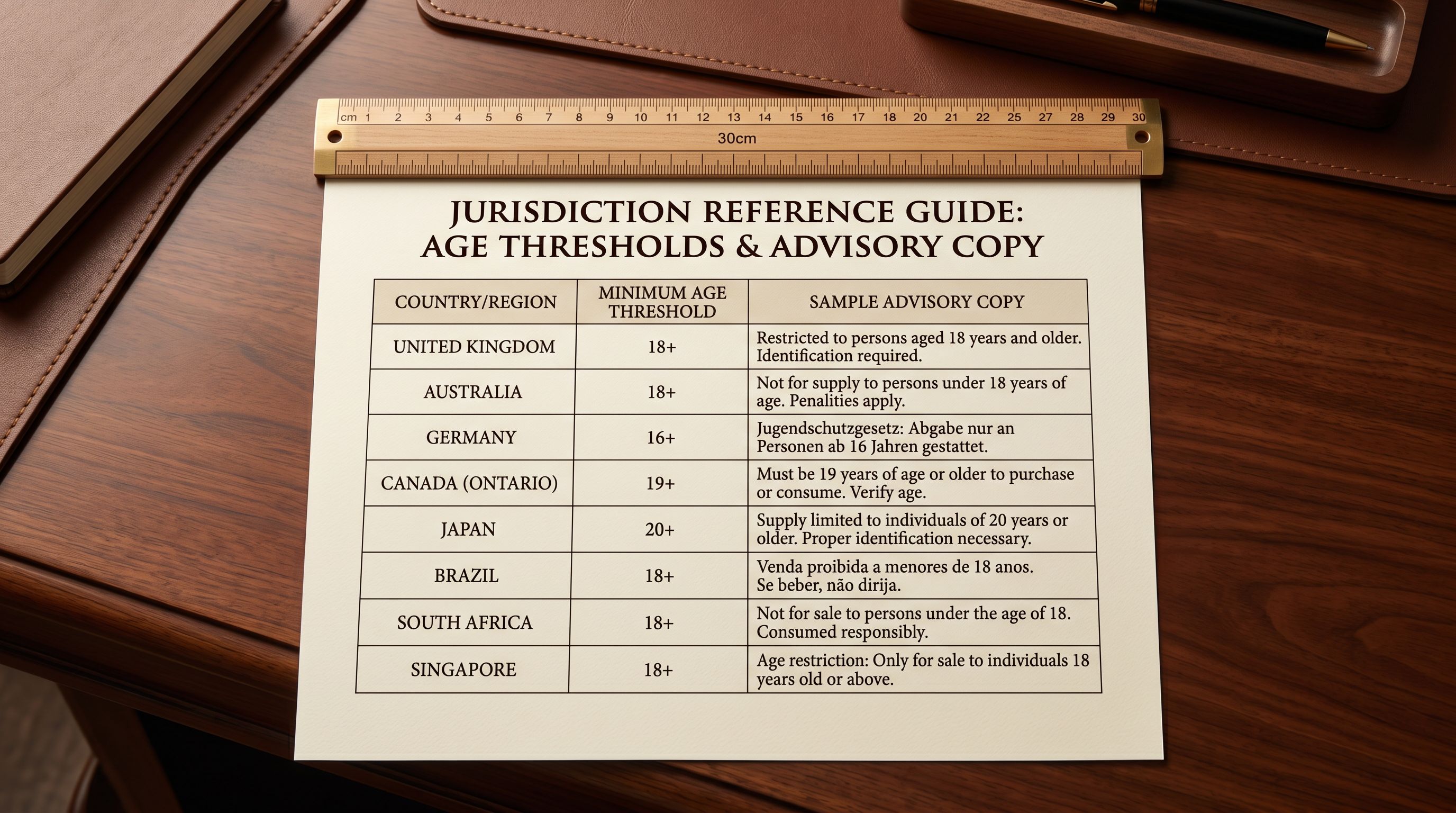
Age verification is not a single setting. The 18+ and 21+ flags are legally distinct, and applying the wrong threshold in a US alcohol context does not satisfy the compliance requirement. It just creates a different compliance gap.
Warning Text and Country Restrictions
Alcohol and Regulated Product Warnings
In California and several other US jurisdictions, products in the alcohol, tobacco, and some supplement categories must display Proposition 65 warning text before purchase. The text is prescribed: the merchant cannot substitute equivalent phrasing. Importier's template for US alcohol compliance contains the current required Prop 65 language, applied automatically when the alcohol warning flag is set.
For UK products under the Weights and Measures Act and related trading standards, alcohol products must display unit count and alcohol by volume. These are product-level data fields rather than warning text in the Shopify sense, but they need to be populated at import time for regulated products. The compliance step in Importier prompts for these fields when the UK alcohol template is selected.
For supplements and medical devices in the EU, the required consumer advisory text under EU Regulation 1169/2011 on food information must appear on the product listing. The regulation requires specific phrasing that Importier's EU template populates rather than leaving the merchant to source from the legal text.
For Shopify's full product compliance documentation on how compliance warnings display in the storefront and checkout, that documentation covers the display mechanics for each warning type.
Country Restrictions at Import
Country restrictions prevent a product from appearing in storefronts served to customers browsing from specific jurisdictions. The restriction is applied at the product record level in Shopify, not at the order or checkout level. A restricted product does not appear in search results, collection pages, or direct URL access for customers in the restricted country.
Common scenarios for import-time country restrictions:
Export-controlled products: certain electronics components, materials, and technology products are subject to export controls under jurisdictions including the US Export Administration Regulations (EAR) and the UK Strategic Export Control lists. Products subject to these controls cannot be sold to customers in embargoed or restricted countries. Applying the country restriction at import time means the product is never visible to customers in those markets.
Category-specific import bans: some product categories are banned for import into specific countries. Certain knife types cannot be imported into Australia. Specific supplement ingredients are prohibited in some EU markets. A country restriction at import time prevents orders from those countries rather than relying on post-order review.
Licensing restrictions: some products require a licence to be sold in specific countries. A product for which the merchant holds a UK licence but not an EU licence needs a country restriction on EU traffic until the EU licence is in place.
Importier's country restriction picker covers 12+ countries. For each restricted product or batch, the selected countries are excluded from storefront visibility when the import completes.
For merchants also managing HS codes and cross-border product data for international shipping, that article covers how HS codes interact with country-level import rules and shipping carrier requirements.

Setting Compliance for a Mixed Catalogue
A compliance column in the source CSV is the most flexible approach for catalogues with multiple regulated categories.
Consider a health and wellness retailer importing from three supplier CSVs in a single session: protein supplements (professional consultation warning), melatonin products (age verification 18+), and standard vitamins (no compliance requirement). Without a compliance column, the merchant must run three separate import sessions with different batch-level compliance settings, or edit each product individually after the import.
With a compliance column, all three product types can import in a single session. The column contains CONSULT_PROFESSIONAL for supplement rows, AGE_18 for melatonin rows, and is empty for vitamin rows. Importier applies the flags per row during the import, and every product arrives in Shopify with the correct compliance status from the moment it goes live.
The compliance column also simplifies re-imports. When a merchant updates pricing or descriptions across the full catalogue and reimports via Importier's Handle-based update matching, the compliance column in the updated CSV preserves the existing flags. Products that already have compliance settings retain them without the merchant needing to re-enter compliance configuration in the import wizard.
For detailed guidance on the general product data quality approach that covers compliance alongside descriptions, barcodes, and taxonomy, that article covers the full catalogue health workflow.


Compliance as Part of the Standard Import Workflow
The practical outcome of compliance at import time is that regulated products are compliant from the first moment they are live in Shopify. There is no compliance debt to work through after launch. Customers browsing an alcohol product on launch day see the age verification prompt because it was set in the import wizard, not because someone remembered to add it three days later.
For merchants in regulated categories, this shifts compliance from a recurring post-launch task to a standard part of the import workflow. Every new batch, every seasonal re-import, every catalogue expansion runs through the same compliance step. The Shopify international tax compliance guide covers the related question of VAT, IOSS, and tax settings that also need to be correctly configured when selling regulated products across jurisdictions.
Try Importier free at importier.app
Set up your first import in under five minutes.
Importier brings products into Shopify with AI descriptions, category metafields, and data enrichment on every run.