From Amazon Seller to Shopify Merchant: Building Your D2C Channel
On this page
From Amazon Seller to Shopify Merchant: Building Your D2C Channel
Amazon gives sellers volume. Shopify gives sellers a brand. The two are not mutually exclusive, but the decision to add a Shopify direct-to-consumer channel involves more than pointing a domain at a store and copying your Amazon listings across.
The practical barrier most Amazon sellers hit first is product data. Amazon listings are built to satisfy the A9 search algorithm: keyword-dense titles, bullet-pointed features, backend search terms, browse node assignments. That content is optimised for a marketplace buyer scanning results, not for a direct buyer who has chosen to land on your website specifically. Copying Amazon product data straight into Shopify produces a store that reads like a marketplace listing, undercuts your brand perception, and misses the structural requirements Shopify's catalogue demands.
The transformation workflow, not the platform migration, is where the real work is.
Why Amazon Sellers Build Shopify Channels
The business case is straightforward. Amazon charges referral fees of 8-15% of the sale price depending on category, plus FBA fulfilment fees if you use their warehousing. On a $49 product with standard FBA handling, the combined fee burden often sits between $12 and $18, leaving a margin window that is difficult to grow within. A Shopify D2C channel at the same price point recovers most of that fee margin.
Beyond cost, Amazon does not provide seller access to customer data. Every buyer transaction on Amazon is an Amazon transaction: you ship the product, Amazon retains the customer relationship. Email addresses, purchase history, and lifetime value data belong to the platform. Building a D2C channel is partly about margin recovery and partly about building the customer relationship asset that Amazon withholds.
Brand control is the third driver. On Amazon, your product listing competes with sponsored results, competitor listings below yours, and Amazon's own recommendations. Your listing design is constrained by Amazon's template. A Shopify store is an uninterrupted brand environment where the presentation, the tone, the post-purchase experience, and the upsell path are entirely within your control.

The Product Data Problem
Amazon's catalogue format and Shopify's catalogue format share some fields and diverge significantly on others. Understanding what needs to transform before the import saves significant rework after products are live.
Titles: Amazon titles are long and keyword-stuffed. A title like "Stainless Steel Water Bottle 750ml BPA Free Insulated Vacuum Flask Thermos Cup Travel Mug Hot Cold Drinks" is optimised for A9 keyword matching. The same product on Shopify warrants "750ml Insulated Stainless Steel Water Bottle": shorter, cleaner, brand-led. Long keyword-stuffed titles damage brand perception on a D2C storefront and do not serve Shopify's search, which works differently to Amazon's.
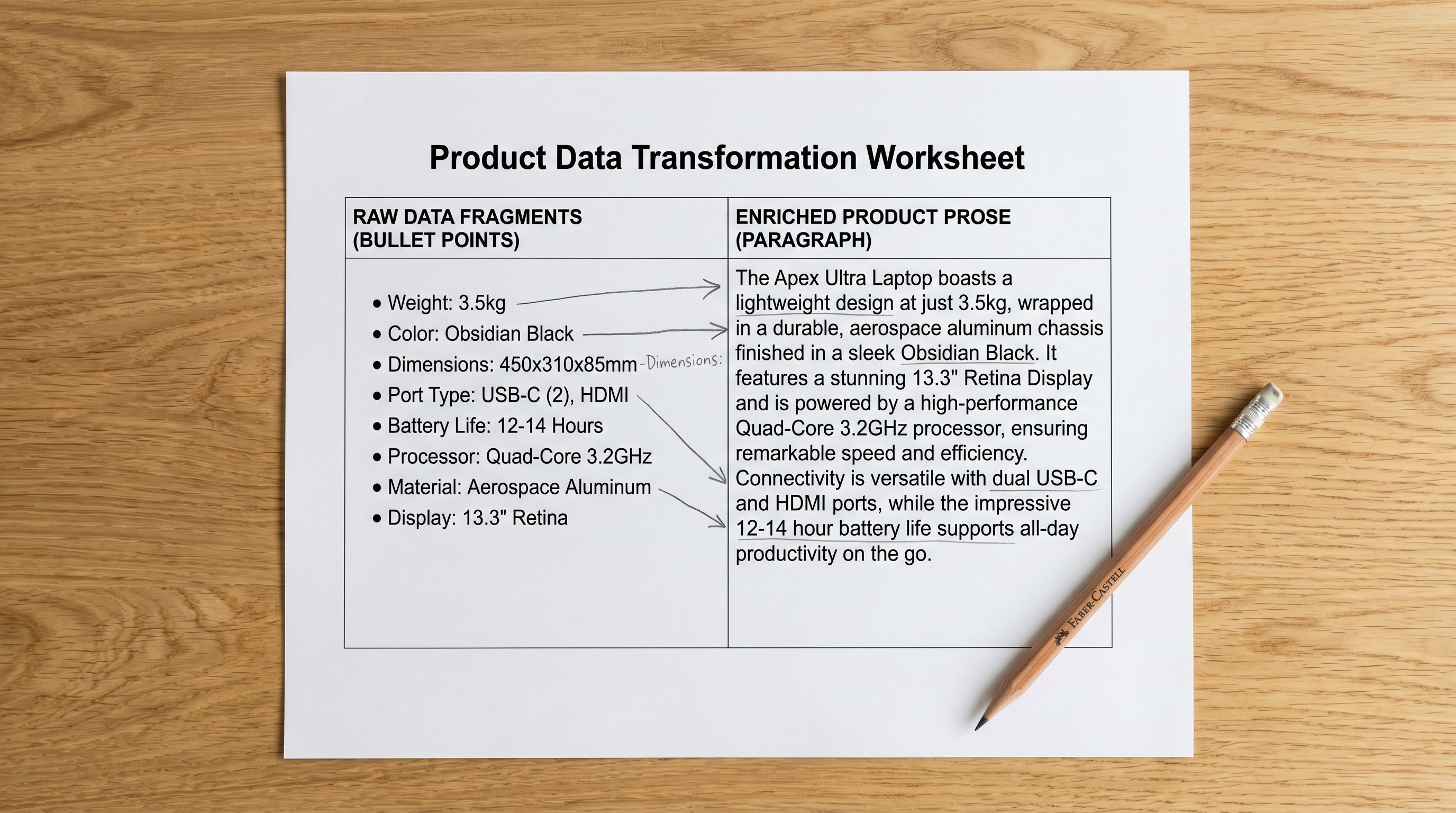
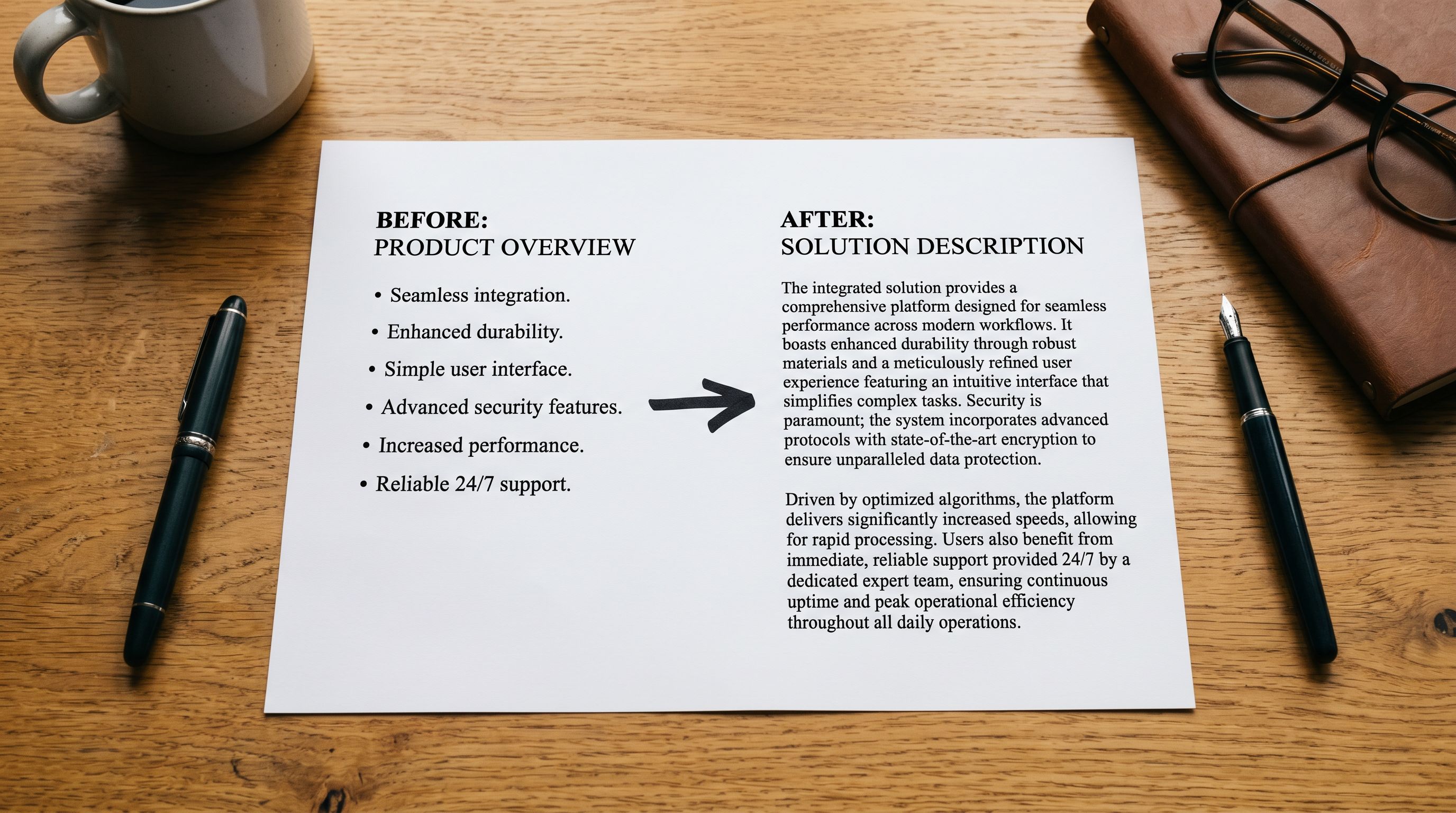
Descriptions: Amazon bullet-pointed feature lists are not product descriptions in the D2C sense. They answer "what does this product have?" rather than "why would I want this?" A D2C description opens with the buyer's context, moves through the product's specific advantage, and closes with a concrete outcome. The Amazon bullet list becomes raw material for the rewrite, not the final content.
Categories and taxonomy: Amazon uses browse nodes: a proprietary hierarchical category system that does not map to Shopify's product taxonomy. An Amazon browse node of "Sports & Outdoors > Sports & Fitness > Exercise & Fitness > Strength Training Equipment > Weight Benches" does not translate to a Shopify collection or product type. Shopify's taxonomy uses product types that reflect your store's navigation structure, not Amazon's marketplace hierarchy.
Pricing: Amazon seller pricing typically includes a buffer for Amazon's referral fee and, if relevant, FBA costs. A product priced at $49 on Amazon with a 13% referral fee and $4.50 FBA costs has an effective net of about $37. On Shopify, that same product at $49 recovers the full margin. The import is the moment to review whether D2C pricing should differ from Amazon pricing. Often it should, given the different margin structure.
Images: Amazon requires clean product shots against white backgrounds, a requirement driven by their search result grid presentation. D2C stores benefit from lifestyle images that show the product in context. The white background images import correctly into Shopify but may not represent the full image set a D2C store needs.
- 01Export your Amazon product catalogue. In Amazon Seller Central, go to Reports > Business Reports > Detail Page Sales and Traffic by ASIN, or use the inventory export under Manage Inventory > Actions > Download Inventory File. This produces a flat file with your ASINs, titles, prices, and category data.
- 02Clean the export for import. Remove Amazon-specific columns that have no Shopify equivalent (ASIN, Browse Node ID, Amazon standard identification fields). Keeptitle, description bullet points, price, main image URL, variant data (size, colour, weight).
- 03Upload to Importier and map columns. The Amazon inventory flat file format varies by category. In the column mapping step, map the title column to Shopify Title, the description or bullet points column to Body (HTML), the price column to Variant Price (with a price adjustment if your D2C pricing differs), and the main image URL to Image Source.
- 04Configure AI description generation. Select the Narrative or Lifestyle description style (not Technical or Benefits-First, which produce Amazon-like copy). Choose an expert persona matching your product categorya Culinary persona for kitchen products, a Fitness persona for exercise equipment. The AI takes your Amazon bullet points as input and rewrites them as D2C product descriptions.
- 05Map category metafields. Your Amazon browse node categories do not transfer to Shopify automatically. In Importier's metafield mapping step, assign the correct Shopify product type and category for each product range. If your catalogue spans multiple categories, segment the import by category and apply the appropriate metafield mapping per segment.
- 06Set variant data. Amazon variants (size, colour) typically export in the flat file as separate rows with the same parent ASIN. In the import column mapping, confirm that variant rows are grouped by the parent product identifier and that option values are mapped to the correct Shopify option fields (Option1 NameSize, Option2 Name: Colour).
- 07Preview before confirming. The five-row preview shows how titles, descriptions, prices, and variant structures will appear in Shopify. Check that descriptions are D2C prose rather than bullet lists, that prices reflect D2C pricing rather than Amazon pricing, and that variant rows are grouped correctly.

Rewriting Amazon Copy for D2C
The most consequential transformation in the workflow is the description rewrite. Amazon bullet-pointed content fails in three ways on a D2C storefront.
First, bullet points signal marketplace shopping, not brand discovery. A visitor who finds your Shopify store through Instagram, a recommendation, or a Google search is in a different mindset than an Amazon search result browser. Bullet points on a D2C product page feel transactional and impersonal, out of place in a brand-forward environment.
Second, Amazon keyword density reads as spam to D2C visitors. "BPA Free Insulated Vacuum Flask Thermos Cup" is a search-term cluster, not a product description. D2C visitors notice keyword stuffing and it damages trust.
Third, Amazon descriptions are written to convert a buyer who is already comparison-shopping. D2C descriptions need to convince a buyer who may not have been looking for this specific product before they encountered your brand. The framing and tone are fundamentally different.
Importier's AI generation uses the Amazon bullet points as structured input: extracting the factual content (the specifications, the features, the claims) and rewriting it in the selected style and persona. The factual accuracy is preserved; the presentation changes from algorithm-optimised to buyer-optimised.
- Premium quality stainless steel water bottle
- BPA Free vacuum insulated double wall
- Keeps drinks hot 12 hours cold 24 hours
- Wide mouth lid with secure closure
- Perfect for gym hiking camping travel
- Opening sentence framing the buyer's context and the product's role in their day
- Specific material and thermal performance claims presented as benefits, not specs
- Use case grounded in one primary scenario (not a list of occasions)
- Brand-appropriate closing sentence reinforcing the lifestyle fit
- Meta description written separately for search result click-through
Category Metafields for Shopify Taxonomy
Amazon browse nodes are designed for Amazon's search and discovery system. Shopify's product taxonomy serves a different purpose: collections, filters, and Shopify's Standard Product Taxonomy (used for Google Merchant Centre and other integrations).
When you import Amazon products into Shopify, the browse node data does not map to Shopify's taxonomy automatically. Without the correct Shopify product type and category assignment, products land in Shopify without collection membership, without filter values for faceted navigation, and without the category metadata that Google Merchant Centre uses for shopping feed classification.
Importier's category metafield assignment step in the import workflow lets you map product ranges to the correct Shopify Standard Product Taxonomy category. For a sports equipment importer with Amazon browse nodes across "Strength Training", "Cardio Equipment", and "Yoga", the metafield mapping step assigns each product range to the equivalent Shopify taxonomy node in a single configuration pass.
The metafield assignment runs during import; products arrive in Shopify already categorised, not in a holding state waiting for manual taxonomy work. For a D2C launch where collections need to be populated immediately, this removes a significant post-import setup step.
For a complete walkthrough of how category metafields work in Shopify and how Importier assigns them at import, the Shopify category metafields guide covers the taxonomy structure, the metafield types, and how the assignment affects collection membership and feed health.
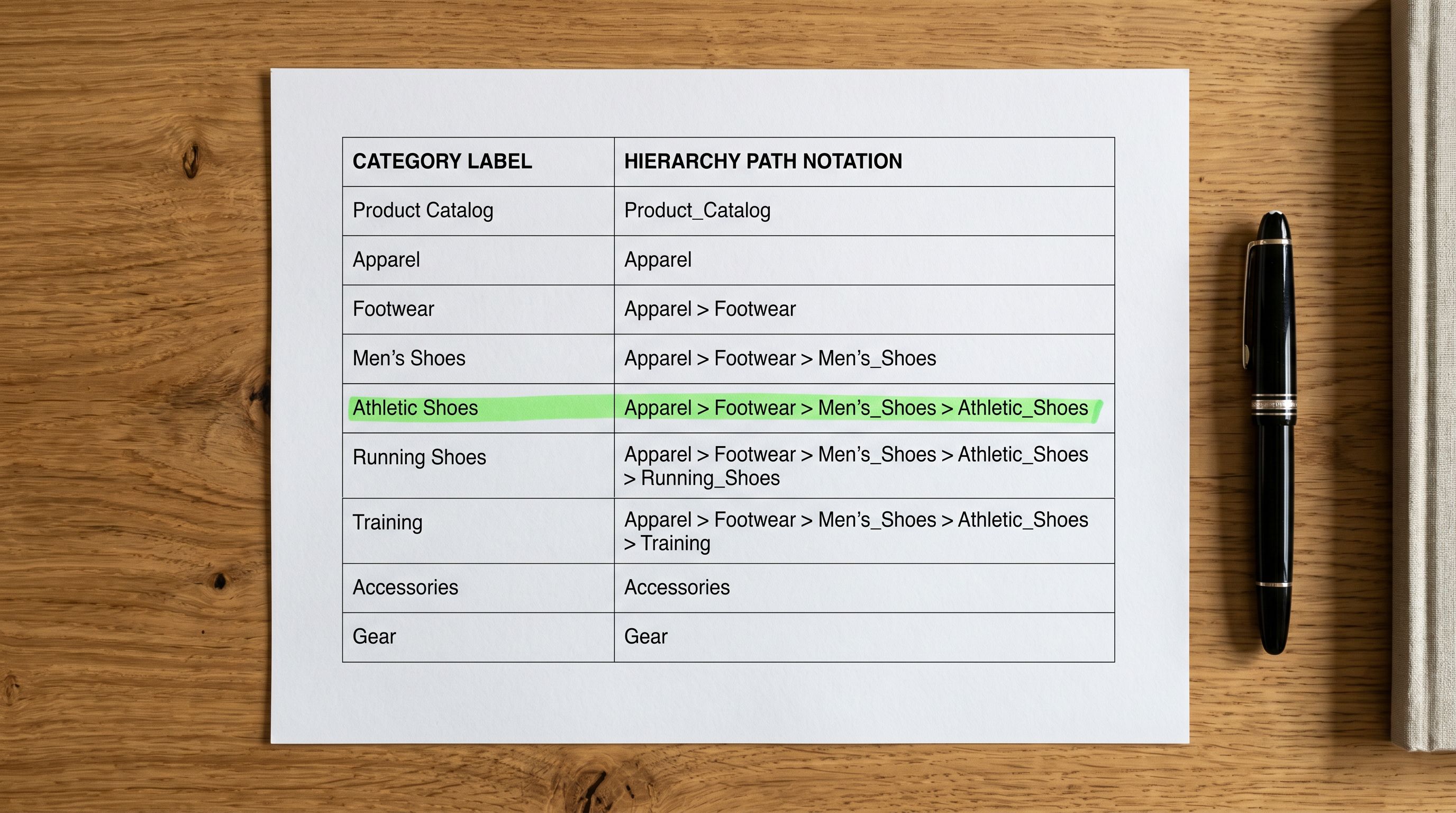
Amazon browse nodes serve Amazon's search system. Shopify's Standard Product Taxonomy serves collections, filters, and external feed classification. They are not the same structure, and mapping one to the other is import configuration work, not automatic.
Pricing the D2C Channel
Amazon seller pricing includes a built-in buffer for platform costs. When those costs are removed in a D2C transaction, the margin structure changes and pricing decisions follow.
The most common approaches for D2C pricing alongside an Amazon channel:
Price parity: maintain the same retail price on both channels. The margin difference is the seller's D2C advantage, not passed to the buyer. This avoids channel conflict (Amazon buyers do not find the Shopify store cheaper and feel overcharged) and is the most defensible approach when Amazon drives significant volume.
D2C price reduction: price slightly lower on the D2C store to incentivise direct purchases. Works when the goal is to shift buyers off Amazon over time. Creates a risk of Amazon policy conflict if the price difference triggers Amazon's price parity enforcement in markets where it applies.
D2C value addition: same price, with a bundle, a gift, or a loyalty programme exclusive to direct buyers that is not available on Amazon. Protects Amazon pricing while giving buyers a reason to purchase direct.
In Importier's import configuration, the price multiplier field adjusts imported prices by a fixed multiplier before the products reach Shopify. For a seller who wants to price D2C products at 95% of Amazon pricing, a multiplier of 0.95 applied to the Amazon price column produces the correct D2C price for every product in the batch.
For the data quality audit that should precede any large catalogue import, the Shopify product data quality guide covers the checks for missing fields, incorrect variants, and incomplete taxonomy that apply equally to an Amazon migration as to any other import source.
After the Import
What to Check After Your Products Go Live
A D2C launch from Amazon product data has predictable post-import tasks that are not product data problems; they are D2C channel setup steps.
Collection membership: products with correctly assigned metafields and product types should be eligible for automated collection rules. After import, verify that each product appears in the expected collections and that the automated collection conditions match the product type and metafield values assigned during import.
Description review: AI-generated descriptions are a starting point. For a D2C brand where copy voice is central to the brand identity, a human review pass on the top-selling SKUs ensures the AI output matches the brand's specific tone. The Importier AI product descriptions guide covers how to edit AI-generated descriptions in Shopify admin after they are live.
Image audit: Amazon-sourced white-background images may need lifestyle image additions for the D2C context. The import brings across the images that exist; the image strategy for the D2C store is a separate decision.
Amazon listing review: if you are selling on both channels simultaneously, your Amazon listing terms of service permit maintaining a Shopify store. The constraint is on third-party resellers repricing your products on Amazon; your own D2C store is permissible. Verify the current terms in your Amazon Seller Central account before launch.
Amazon's multi-channel selling documentation covers FBA multi-channel fulfilment options if you want to use Amazon's warehousing for D2C orders as well as Amazon orders, relevant for sellers who are not ready to manage separate fulfilment for the Shopify channel.
For merchants coming from Amazon as an import source rather than as a D2C channel builder, the Amazon products to Shopify import guide covers the Marketplace Import workflow for bringing Amazon listing data directly into Shopify without an Amazon seller account.
Shopify's documentation on selling on multiple channels covers how to manage inventory, orders, and fulfilment across Amazon and Shopify simultaneously once both channels are active.
The Import Is the Launch
For an Amazon seller building a D2C channel, the import workflow is the launch moment. Products that arrive with D2C descriptions, correct taxonomy, properly structured variants, and correctly priced for the direct channel are ready for immediate traffic. Products that arrive with Amazon copy, missing metafields, and mispriced variants require a cleanup sprint before the store is presentable.
The transformation steps (AI description rewrite, category metafield assignment, price adjustment, variant structure review) all run during the import configuration rather than as post-launch cleanup. The five-row preview before confirmation is the moment to verify that the products arriving in Shopify are D2C-ready, not Amazon-formatted.
Try Importier free at importier.app
Set up your first import in under five minutes.
Importier brings products into Shopify with AI descriptions, category metafields, and data enrichment on every run.