Shopify Paid Ads: How Product Data Drives Ad Performance

On this page
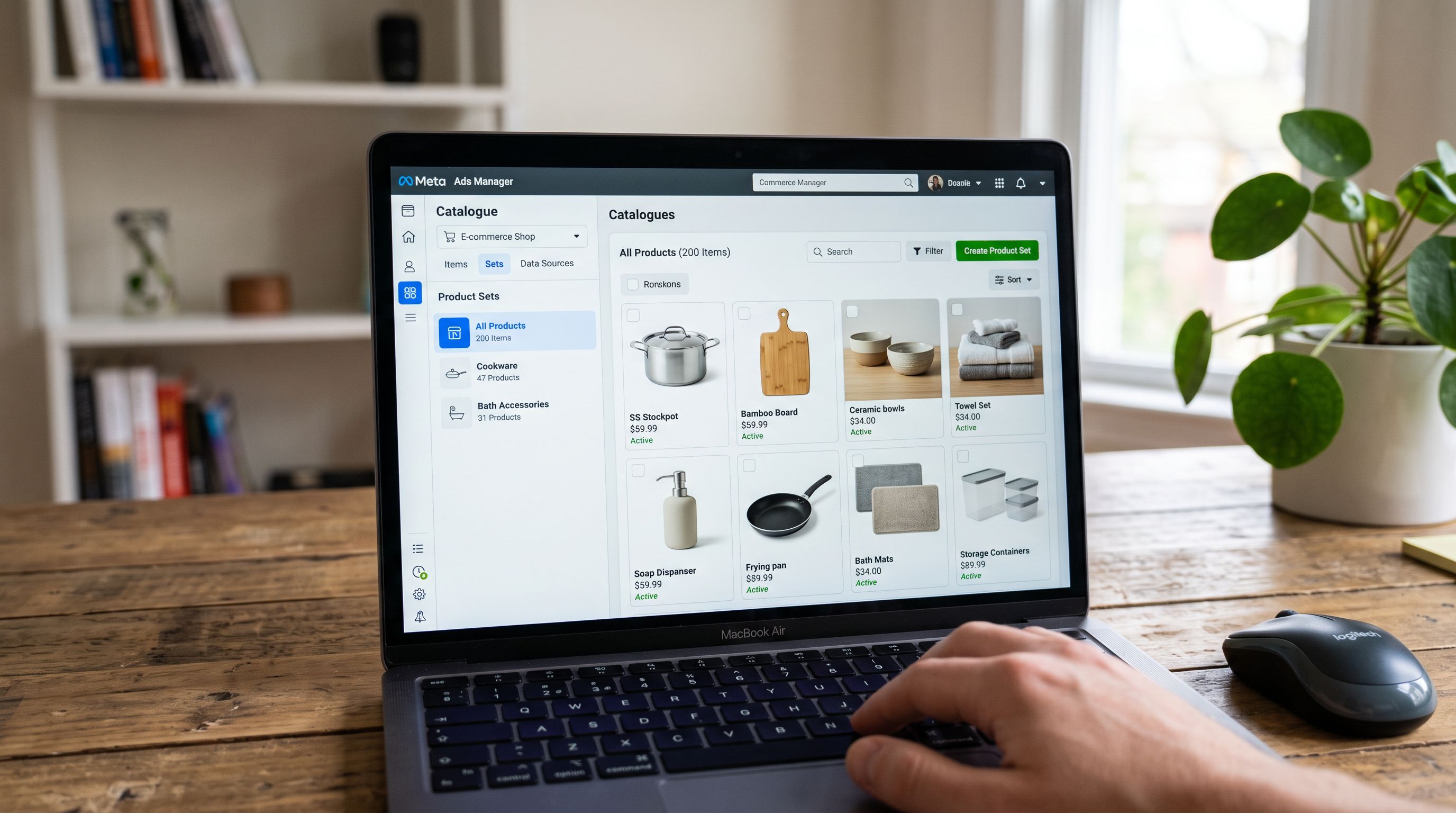
A homeware brand ran Google Shopping and Meta dynamic ads simultaneously. The Google Shopping campaigns showed all 200 products in a single product group with no bid differentiation. Meta retargeting served bathroom accessories to buyers who had browsed kitchen cookware. Both problems had the same root cause: the import had assigned product_type = "Homeware" to every product in the catalogue.
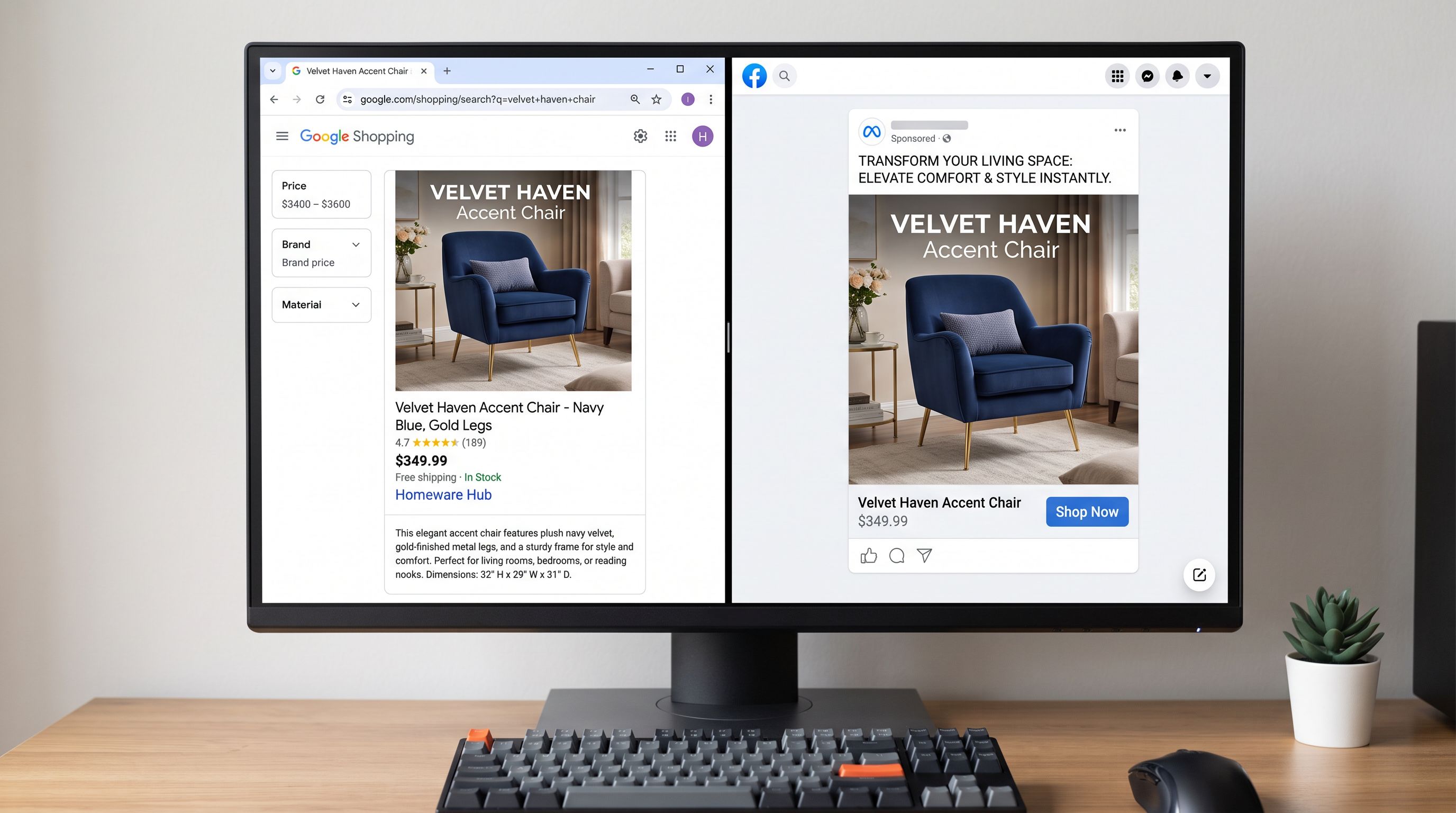
Google Shopping uses product type to group products for bidding. Meta dynamic ads use product type to create product sets for retargeting. When every product shares the same product type, both platforms treat a kitchen saucepan and a bathroom mirror as interchangeable items. Neither platform can serve buyers based on what they actually browsed.
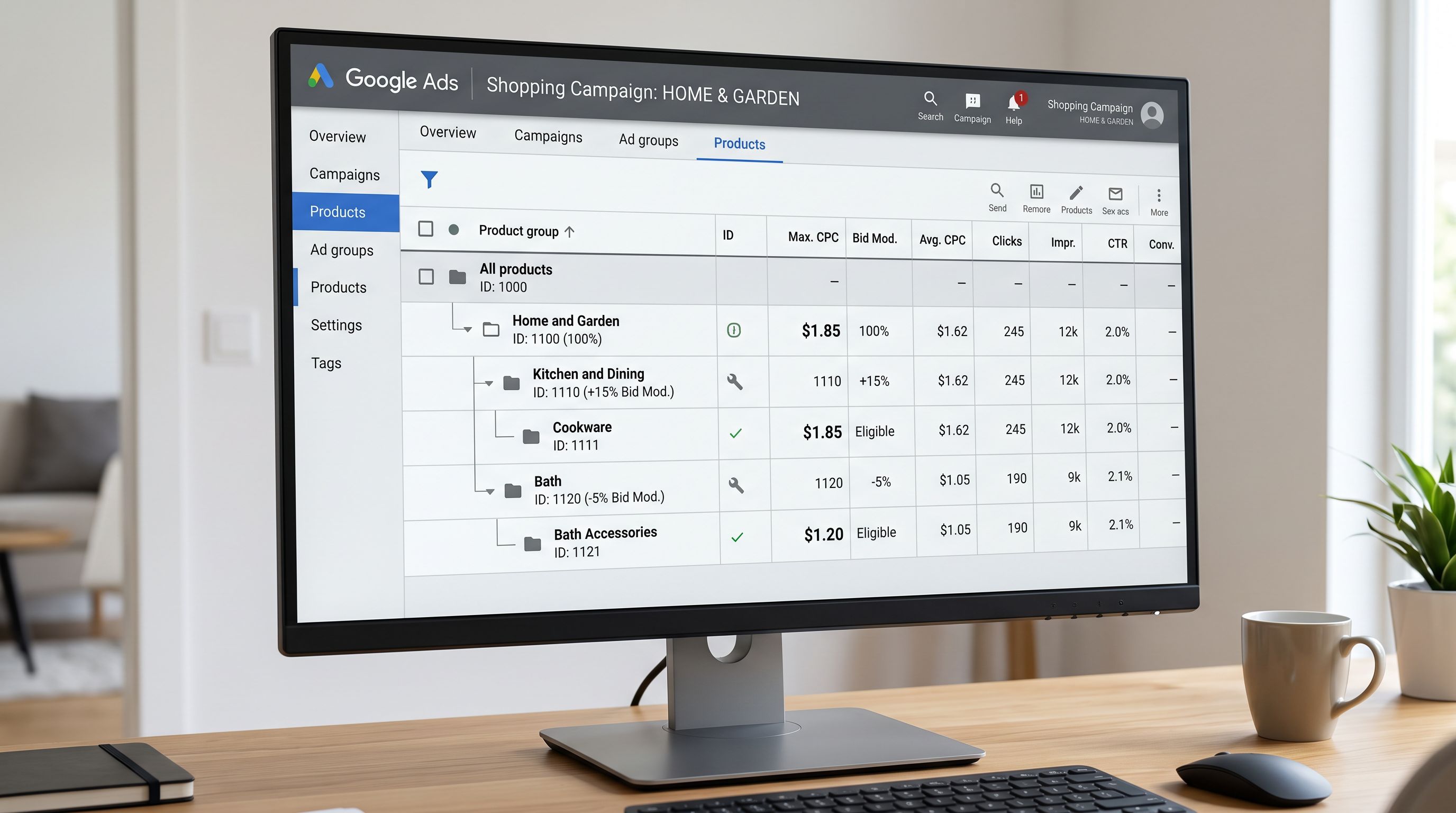
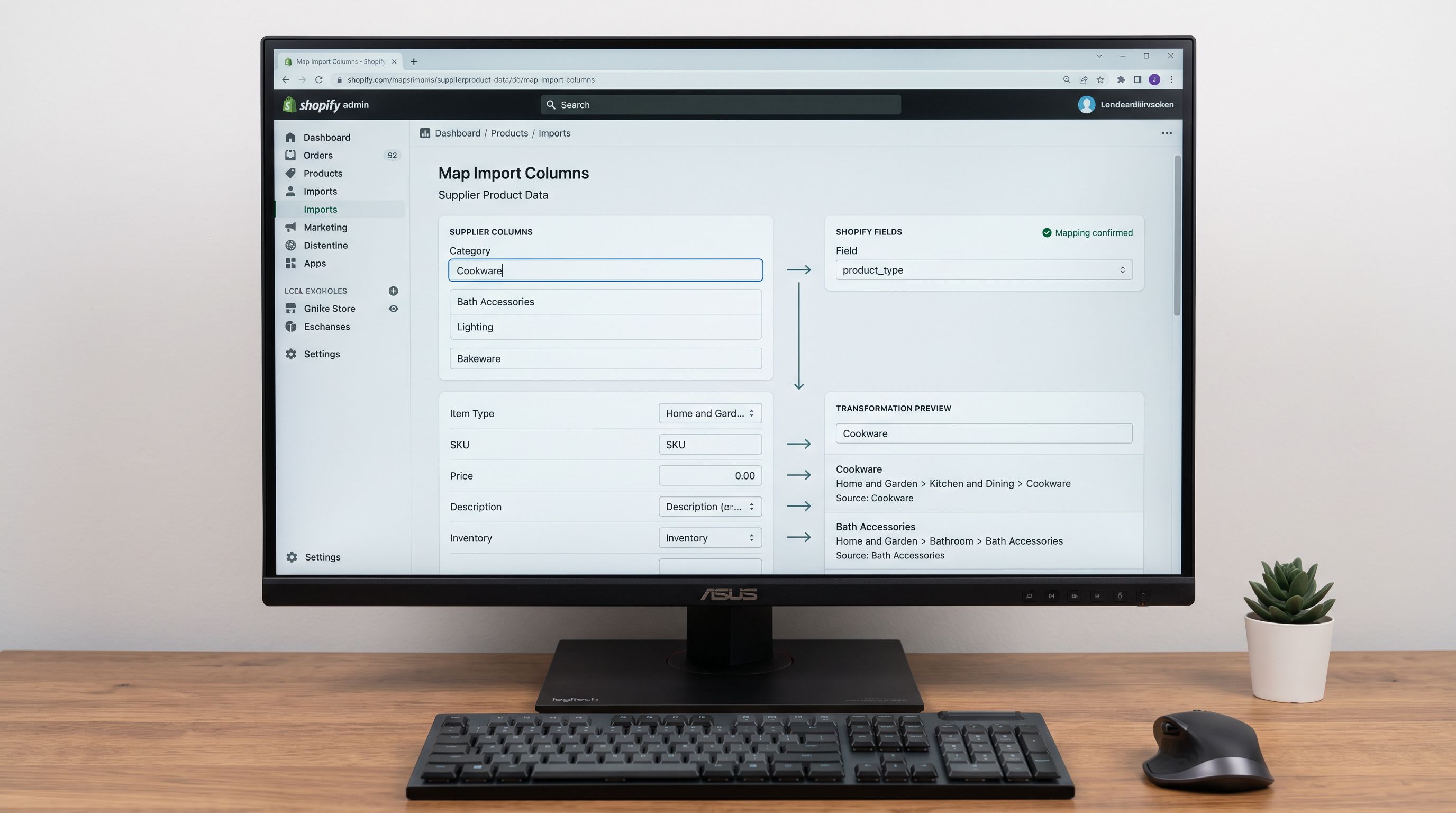
The fix was a re-import that mapped each product to a three-level hierarchical product type: "Home & Garden > Kitchen & Dining > Cookware", "Home & Garden > Bath > Bath Accessories", and so on across 14 distinct paths. Google Shopping could now bid by category. Meta retargeting could now match product type to browsing history. The campaign structure that had been impossible with flat product types became a one-afternoon configuration.
The product type field in the import file is the root of both platforms' category intelligence. Import it flat, and both platforms are blind to category.
How Google Shopping Uses Product Data for Campaign Structure
Google Shopping connects to Shopify through the Google Merchant Centre. The feed it reads contains every field from the Shopify product: title, description, price, GTIN, category, and any custom labels configured. Understanding which fields Google acts on for campaign structure (not just feed eligibility) changes how an import is designed.
Product type for product groups. Google Shopping organises products into product groups for bidding. Product groups can be defined by any feed attribute: category, brand, product type, product ID, or custom label. A product type of "Homeware" creates one product group. A product type hierarchy of "Home & Garden > Kitchen & Dining > Cookware" creates a navigable tree: Google Shopping can target the full "Home & Garden" subtree, or narrow to "Kitchen & Dining", or further to "Cookware". Each level can carry a distinct bid.
Custom labels for margin and priority segmentation. Google Merchant Centre supports five custom label fields (custom_label_0 through custom_label_4) for campaign segmentation. These are free-form text fields that Google does not interpret for eligibility; they exist purely for the merchant's campaign structure. Common uses: custom_label_0 = high-margin, custom_label_1 = clearance, custom_label_2 = seasonal-hero. Importier can map product tags to custom labels during import using the column mapping step. A product tagged margin-high in the import file can be routed to custom_label_0 = high-margin so that Google Shopping campaigns can bid more aggressively on high-margin products without touching the product's public-facing data.
Title and description for auction relevance. Title structure determines which search queries Google matches a product against in the Shopping auction. A well-structured product title (brand + product name + key attributes, within 150 characters) affects the auction relevance score in addition to feed eligibility. Description quality influences ad relevance scoring for performance campaigns.
How Meta Dynamic Ads Read Product Data
Meta's dynamic ad catalogue reads from Shopify through the Facebook Sales Channel or a direct product feed. The fields it uses for product set creation and retargeting logic differ from Google's campaign structure.
Product type as the primary product set dimension. Meta uses product_type to create product sets within a catalogue. A product set filtered by product_type contains "Cookware" returns all products in the cookware path. Meta's retargeting engine then matches visitors who viewed cookware products with ads from the cookware product set. When product_type = "Homeware" for every product, Meta cannot build a cookware-specific product set: all 200 products are in one undifferentiated set, and the retargeting engine shows any product to any visitor.
The hierarchical format Meta reads most reliably is Category > Subcategory > Type with forward-slash or space-delimited levels: "Home & Garden > Kitchen & Dining > Cookware". Meta can filter product sets at any level of the hierarchy.
Brand for audience matching. Meta uses the vendor field (which maps to brand) to match products against audience interests and purchase intent signals. For multi-brand catalogues, accurate vendor values allow Meta to create brand-specific product sets and match products against users with known brand affinity.
Description for dynamic creative. Meta's dynamic creative generates ad copy from product data. The description field contributes to the benefit claim in the auto-generated creative. Descriptions that open with a buyer benefit (the same standard as email preview copy) produce better dynamic creative than descriptions that open with specifications or SKUs.
Meta's product set architecture depends on product_type hierarchy. A product type path of "Home & Garden > Kitchen > Cookware" creates three filterable levels. "Homeware" creates one, and every retargeting ad becomes a random selection from the full catalogue.
The Import Decisions
Three Product Data Fields That Serve Both Platforms
Both Google Shopping and Meta dynamic ads draw from the same Shopify product data. Three fields determine campaign capability on both platforms simultaneously.
Product type (hierarchical). Google Shopping uses it for product groups and bid differentiation. Meta uses it for product set creation and retargeting targeting. The requirement is the same for both: a hierarchical path with at least two levels. Google's Shopping policy recommends aligning with the Google Product Taxonomy (a controlled vocabulary of roughly 6,000 categories); Meta reads any hierarchical string. Importing a Google-taxonomy-aligned path satisfies both platforms.
The import workflow: map the supplier's category field to the Shopify product_type field in the column mapping step, with a transformation that converts flat supplier categories to hierarchical paths. A supplier category of "Cookware" becomes "Home & Garden > Kitchen & Dining > Cookware". Importier's category metafields from its 22 industry packs contain the taxonomy-aligned product type values for each product category, the same values that feed both Google and Meta feeds.
Custom labels (via tags). Shopify does not have a native custom label field. Custom labels are fed to Google Merchant Centre via the Google Sales Channel's product attribute mapping, which can read Shopify product tags. A product tagged margin-high can be mapped to custom_label_0. Meta does not use custom labels directly, but product set filters can operate on tags: a Meta product set filtered by tag margin-high creates the same high-margin segment for Meta's bidding.
Designing the tag taxonomy for custom labels at import time (alongside the email segmentation tags from the previous article in this series) means the same import pass serves three systems: Google Shopping custom labels, Meta product set filters, and email marketing segments.
Description quality for both auction relevance and dynamic creative. Google uses description content for Shopping ad relevance scoring in Performance Max and Standard Shopping campaigns. Meta uses it for dynamic creative generation. The benefit-first description standard that serves email preview copy serves both paid search platforms by the same mechanism: the opening sentence determines how the product is represented in automated content generation.
Building the Import for Paid Search Readiness
- 01Map supplier category fields to hierarchical product_type values before the import runsdefine the target taxonomy paths (aligned with Google Product Taxonomy where possible), create a mapping table from supplier category names to the three-level paths, and apply the transformation in the import column mapping step
- 02Design the custom label tag taxonomydecide which custom label dimensions are relevant (margin tier, seasonal flag, inventory level, promotional status) and assign consistent tag values for each (margin-high, margin-low, seasonal-hero, clearance); these will be imported as product tags and mapped to Google custom labels and Meta product set filters
- 03Map the vendor/brand field from the supplier file to the Shopify Vendor field; for multi-brand catalogues, accurate vendor values are required for both Google brand-based product groups and Meta brand-audience matching
- 04Review description opening sentences for the benefit-first standardthe first 150-200 characters feed both Google Shopping's relevance scoring and Meta's dynamic creative generation; descriptions that open with SKU codes or specifications produce lower-quality automated content on both platforms
- 05Run the import and verify product_type distribution in Shopifyexport the catalogue and check that each hierarchical level is populated correctly; a product_type of Home and Garden > Kitchen and Dining should appear as a distinct value, not as three separate fields
- 06After the import, verify feed ingestion in both Google Merchant Centre and Meta Commerce Managercheck that product sets in Meta can be filtered by the imported product_type values, and that Google Shopping shows product groups at each taxonomy level
What Flat Product Types Cost in Campaign Performance
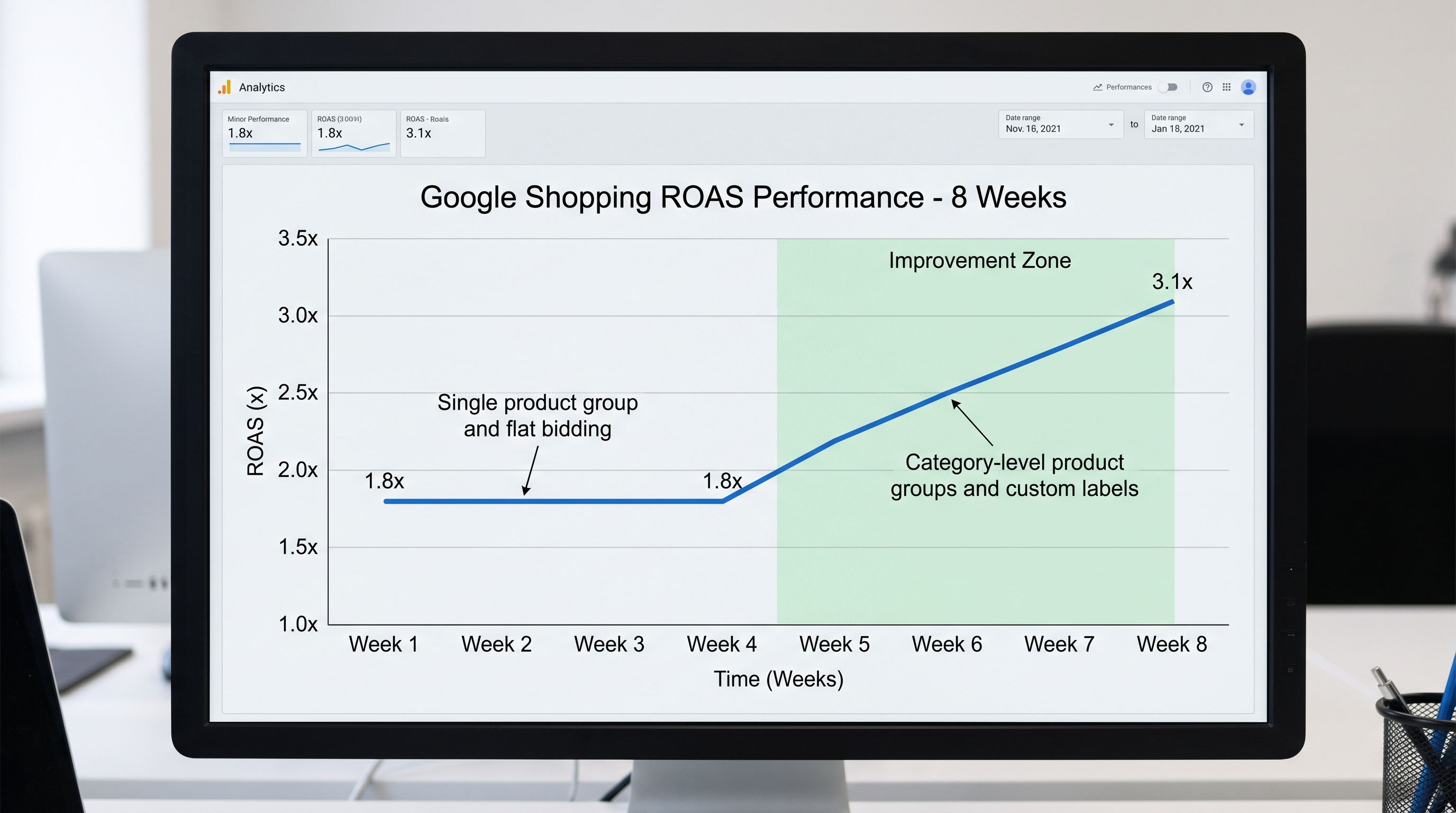
The homeware brand's campaign performance before and after the product type re-import was measurable within two weeks. Before: one Google Shopping product group, no bid differentiation, no custom label segmentation. After: 14 product type paths, product groups at category and subcategory level, high-margin products in a separate custom label group with a 20% bid uplift.
According to Google's Shopping ads guidance, product group segmentation by category and product type is among the most impactful structural changes for Shopping campaign ROAS. The data required to implement it (hierarchical product type, custom labels) comes from the product feed, and the product feed comes from the Shopify catalogue import.
Meta's product catalogue documentation identifies product_type as the primary dimension for product set creation. The retargeting capability that drives Meta dynamic ad performance (showing buyers products from the same category they browsed) depends on this field being populated with a filterable hierarchy, not a flat generic string.
- product_type = Homeware for all 200 products; Google Shopping creates one product group; no bid differentiation by category possible
- Meta dynamic ads create one product set containing all 200 products; retargeting shows random products regardless of browsing history; kitchen buyers receive bathroom accessory ads
- No custom label values; all products bid at the same rate regardless of margin or seasonal priority
- Description fields open with specifications; Google Shopping relevance scoring lower; Meta dynamic creative uses specification text as ad copy
- Campaign segmentation requires manual product list maintenance outside the import workflow; no automation path for seasonal or promotional updates
- 14 hierarchical product_type paths aligned with Google Product Taxonomy; Google Shopping product groups at category and subcategory level; high-level and granular bids available
- Meta product sets filterable by product_type at three levels; cookware retargeting targets cookware browsers; bath accessories retargeting targets bath accessory browsers
- Custom label tags (margin-high, seasonal-hero, clearance) mapped to Google custom labels and Meta product set filters at import; bid structure follows product economics
- Descriptions open with buyer benefit statements; Google Shopping relevance scoring higher; Meta dynamic creative uses benefit copy as ad headline
- Seasonal updates re-import tag values to update custom label assignments; no manual list maintenance; promotional products flagged automatically at import time
The homeware brand's re-import took two hours: 14 product type paths mapped, custom label tags assigned to 60 of 200 products by margin tier and seasonal relevance, descriptions reviewed against the benefit-first standard. Google Shopping's product group segmentation was configured that afternoon. Meta product sets were updated the same day. Two weeks later, Google Shopping ROAS had improved from 1.8x to 3.1x as category-level bidding concentrated spend on the highest-converting product groups. Meta retargeting click-through rate increased as category-matched retargeting replaced random-product retargeting.
The campaigns had not changed. The product data had.
Try Importier free at importier.app.
Set up your first import in under five minutes.
Importier brings products into Shopify with AI descriptions, category metafields, and data enrichment on every run.