Shopify Food and Beverage Import: Allergen and Compliance

On this page
An artisan food merchant imports 240 products from a supplier catalogue CSV. The import completes without errors. Six weeks later, the merchant receives a compliance notice from a distributor: several product pages are missing structured allergen declarations. The allergen data exists in Shopify, but it is embedded inside the main product description as running prose ("Contains: milk, wheat, soy"), not as a declared field. The distributor's compliance integration reads structured metafields, not prose. Three weeks of manual editing follow to extract allergen text from descriptions and place it in the correct fields.
The merchant did not import the wrong data. They imported it into the wrong place, in the wrong format. That is the central shopify food beverage import compliance problem.
Why Allergen Data Belongs in Metafields, Not Descriptions
Shopify's native product description field is a rich text editor. It accepts any HTML, including allergen declarations formatted as a sentence, a table, or a bulleted list. The problem is that unstructured text in the description field is not parseable by the systems that need to read it.
Three systems on a Shopify product page need to read allergen data: the storefront display (what customers see), external compliance integrations (what distributors and marketplace connections pull), and accessibility tools (what screen readers announce). All three require structured, predictable allergen data rather than prose embedded inside a paragraph.
Allergen data is a legal requirement in most markets, not a design choice. EU Regulation 1169/2011 mandates declaration of 14 specific allergens on every packaged food product sold in the EU: cereals containing gluten, crustaceans, eggs, fish, peanuts, soybeans, milk, nuts, celery, mustard, sesame, sulphur dioxide and sulphites, lupin, and molluscs. UK allergen guidance for food businesses maintains equivalent requirements for the UK market. Every jurisdiction adds its own scope and enforcement on top.
Category metafields solve this by separating allergen data from description copy. Shopify's Standard Product Taxonomy defines structured attribute fields for food products, including allergen declarations. When Importier imports a food product with the Food and Beverage Industry Pack active, allergen data lands in dedicated allergen metafields, not inside the description. The metafields render separately on the product page, parse correctly in compliance integrations, and are addressable by accessibility tools as distinct data elements.

Why Supplier CSVs Create This Problem
Most food supplier catalogues were built for internal ordering systems, not for Shopify imports. Allergen data appears in at least four different formats across supplier files: a single "Contains" column with a comma-separated string such as milk, wheat, soy; separate per-allergen columns with true/false values such as Contains_Gluten: Yes; allergen text embedded inside a "Description" or "Notes" column with no dedicated allergen field; or no allergen column at all, with allergens implied from the ingredient list.
Nutritional data varies just as widely. Some suppliers export per-100g values only. Some export per-serving values. Some combine both in a single formatted string (Energy 340kJ per 100g; 170kJ per serving). Some split values across separate columns for each nutrient, which requires consolidation before mapping.
Batch and lot codes present the same inconsistency. They appear as a freeform text column, a prefix on the SKU, a separate "Lot Number" field, or are absent entirely from the export.
Column Mapping for Food Compliance Fields
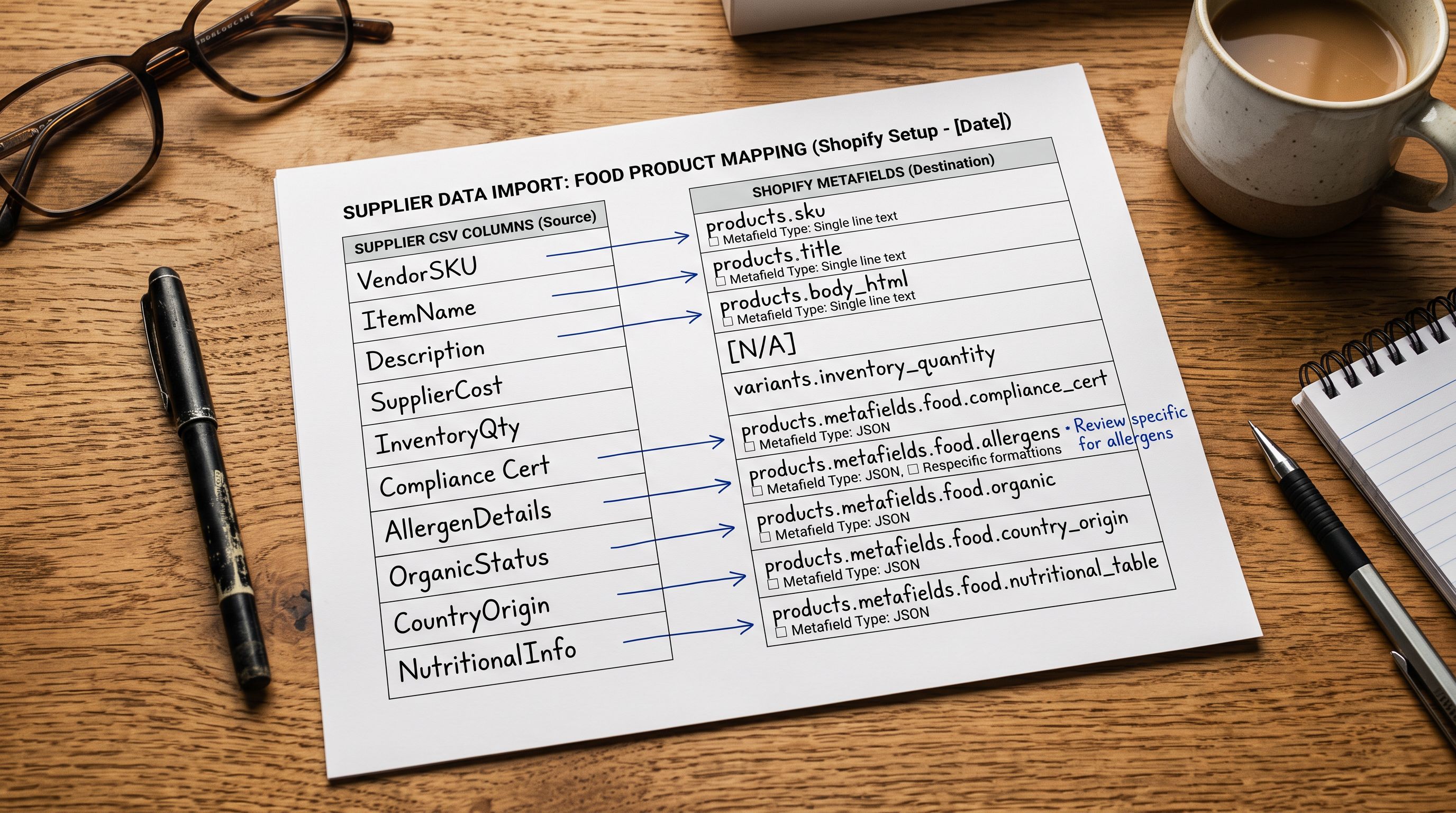
Importier's import wizard includes a column mapping step that runs before any data is processed. Every column in the supplier file is presented for review and assignment to a Shopify field. For a shopify food beverage import, this step is where compliance data gets routed correctly rather than defaulting into the description.
Allergen columns map to the Food and Beverage Industry Pack's individual allergen metafields. If the supplier uses a single "Contains" string, Importier parses the comma-separated values and distributes them across the per-allergen metafields. If the supplier uses per-allergen boolean columns, each column maps directly to its corresponding metafield.
Nutritional data maps to Shopify's nutrition metafields: energy (kJ and kcal), protein, carbohydrate, sugar, fat, saturated fat, fibre, and sodium. Per-100g and per-serving values stay as separate metafields rather than combined strings. This separation matters for compliance: most markets require both values displayed independently, not merged.
Batch and lot codes map to a custom variant-level metafield. For products with multiple active batches, the batch code sits at variant level to match the per-row supplier data and keeps the value separately addressable for traceability.
Country of origin maps to the corresponding Shopify taxonomy attribute field, which Google Merchant Centre reads for food product listings and which compliance frameworks require as a declared product attribute.
The Food and Beverage Industry Pack
What the Industry Pack Sets Up at Import
The Food and Beverage Industry Pack (one of Importier's 22 Industry Packs covering 43 industries and 3,758 category attribute types) activates Shopify's Standard Product Taxonomy fields for food and beverage products. This creates a pre-configured set of category metafields on every imported product.
The pack sets up fields including: allergen declarations per allergen (gluten, milk, eggs, fish, shellfish, tree nuts, peanuts, wheat, soy, sesame); nutritional panel values (energy, protein, carbohydrate, sugar, fat, saturated fat, fibre, sodium) as separate per-100g and per-serving metafields; dietary certifications (organic, Halal, Kosher, gluten-free, vegan, non-GMO); country of origin; storage conditions; and shelf life.
Once the pack is active, Importier's two-phase matching process fills each field from the supplier data. A "Contains: milk, wheat" string in a supplier notes column becomes two checked allergen metafields on the Shopify product, not a sentence in the description. A "Best before: 18 months from manufacture" note becomes a shelf life metafield.
The pack also activates Importier's compliance settings for 12+ country configurations. Each country configuration adds the required disclosure reminders to the import flow without embedding compliance text inside the product description.
- 01Step 1Activate the Food and Beverage Industry Pack in Importier's import settings before running the import. The pack pre-configures allergen, nutritional, and compliance metafields that Shopify's Standard Product Taxonomy defines for food products.
- 02Step 2At the column mapping step, assign each supplier column to the correct Shopify field. Pay particular attention to allergen columns (map each to its corresponding allergen metafield), nutritional data (keep per-100g and per-serving values as separate fields), and batch codes (map to a custom variant-level metafield, not to the SKU or description).
- 03Step 3Enable the country-specific compliance settings for the markets where the products will be sold. Importier supports 12+ country configurations covering the EU, UK, US, Australia, Canada, and others.
- 04Step 4Select the AI description style. Use Ingredient Spotlight for functional foods and supplements where composition drives the purchase decision. Use Sensory-Rich for artisan, gourmet, and experience-led products. Both styles cover the consumer experience only; allergens and nutritional data are in metafields, not the description.
- 05Step 5Run the import. Before pushing the full batch, review a sample of generated descriptions alongside the populated metafields. Confirm allergen metafields are populated, nutritional values are split by per-100g and per-serving, and batch codes appear at variant level.
Batch Codes and Traceability
Batch and lot codes serve a different purpose from most product data. They are not consumer-facing; buyers do not search by batch code. They are the traceability link between a sold unit and the production batch it came from, enabling targeted product recalls if a food safety issue is identified.
Shopify has no native batch code field. A food merchant without a structured import approach for batch codes typically ends up with one of three outcomes: batch codes embedded in the SKU as a prefix (making SKU-based filtering unreliable when the batch changes), batch codes buried in the description (invisible to any system reading product data programmatically), or batch codes absent from the Shopify record entirely.
The correct approach is a dedicated metafield at the variant level. When a supplier file includes a batch column, Importier's column mapping routes it to a batch_code metafield. The value is stored separately from the description and the SKU, addressable by any system that reads Shopify product metafields, including recall management integrations and third-party traceability platforms.
For products with short shelf lives where the active batch changes frequently, Importier's Scheduled Imports feature (available on Scale and Enterprise plans) automates the recurring import. A weekly scheduled import keeps the batch code metafield current without manual re-import every time the supplier refreshes the batch.
Batch codes in product metafields remain addressable by recall tracking systems. Batch codes buried in descriptions or SKUs are invisible to every system that matters when a food safety issue occurs.
AI Descriptions for Food and Beverage Products
With allergen declarations, nutritional data, and batch codes handled by metafields, the AI-generated description is free to cover the consumer experience without regulatory copy competing for space.
For artisan and gourmet food products, Importier's Sensory-Rich description style generates copy that leads with taste, texture, aroma, and occasion. A jarred pasta sauce imports with a description that opens on the San Marzano tomatoes, the slow-cooked depth, and the occasion: bruschetta, pasta, baked dishes. The allergen metafield separately declares the applicable allergens in structured form. The two data types do not mix.
For functional foods and supplements, the Ingredient Spotlight style leads with active ingredients, concentrations, and function, which is what health-focused buyers read first. Protein content, amino acid profile, and certifications appear in the opening sentences. The nutritional metafields carry the full panel independently.
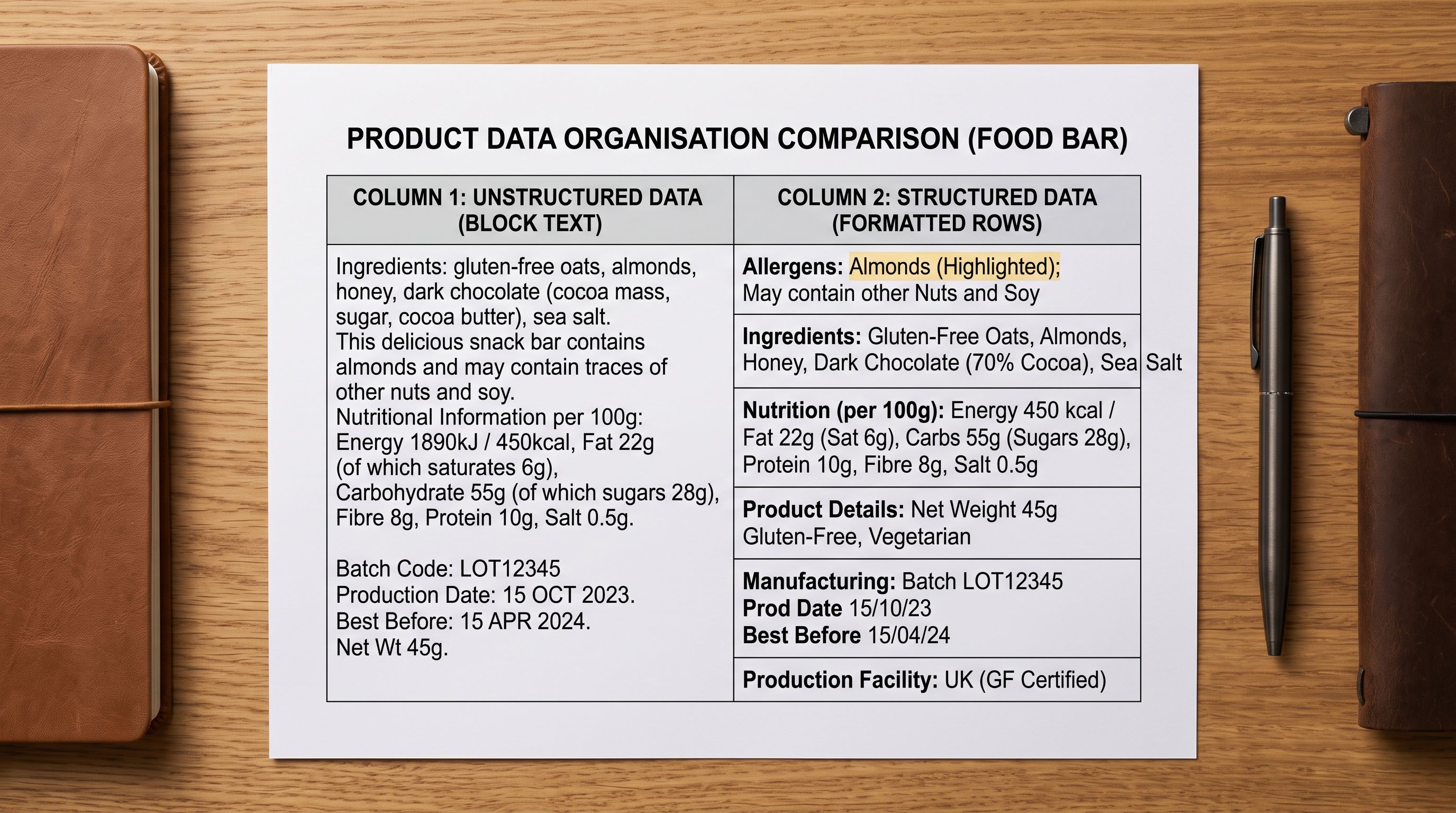
- Allergen text embedded in description field
- Nutritional data as an unformatted paragraph
- No batch code metafield
- Country of origin as free text in notes
- Description mixes consumer copy with compliance text
- Allergen declarations as individual per-allergen metafields
- Nutritional panel as separate per-100g and per-serving metafields
- Batch code as a dedicated variant-level metafield
- Country of origin in Shopify taxonomy attribute field
- Description covers consumer experience only
Importier's category metafields guide covers the full taxonomy mapping system that the Food and Beverage pack uses. For merchants managing cross-border compliance requirements across multiple markets, Importier's international tax and compliance settings handle the country-specific disclosure blocks that accompany food product listings.

Shopify Food and Beverage Import: Key Takeaways
Getting shopify food beverage import right requires routing compliance data to structured metafields rather than embedding it inside the description field.
- Allergen declarations are a legal requirement in most markets, not a formatting preference. Shopify's description field cannot parse them correctly for compliance integrations, accessibility tools, or marketplace connections. The Food and Beverage Industry Pack creates individual allergen metafields at import so the data lands in the right place from day one.
- Supplier CSVs format allergen, nutritional, and batch data inconsistently across file formats. Importier's column mapping step routes each compliance field to the correct Shopify destination before any data is processed or pushed to the store.
- Nutritional data should import as separate per-100g and per-serving metafields, not as a formatted string inside the description. Most markets require both values displayed as independent figures.
- Batch and lot codes belong in a variant-level metafield. Embedded in the SKU or description, they are invisible to the recall tracking systems that need to read them.
- The AI description covers the consumer experience (taste, ingredients, occasion, function). Allergens, nutritional panels, certifications, and batch codes go in metafields. Separating these through the import configuration produces better copy and correct compliance structure at the same time.
- Importier's 22 Industry Packs include the Food and Beverage pack, covering 3,758 category attribute types across Shopify's Standard Product Taxonomy. The pack activates the correct metafield structure without requiring manual field configuration on each product.
Import food and beverage products with the right compliance structure at importier.app. The Food and Beverage Industry Pack routes allergen, nutritional, and traceability data to the fields that compliance systems, accessibility tools, and marketplace integrations can read.
Set up your first import in under five minutes.
Importier brings products into Shopify with AI descriptions, category metafields, and data enrichment on every run.