Shopify Stationery Import: Paper Weight, Formats, and Pack Sizes

On this page
An office supplies distributor imported 200 products from their supplier's catalogue. The CSV file had 2,400 rows. Each product came in three paper weights (80gsm, 100gsm, 160gsm), four format sizes (A4, A3, A5, Letter), and two pack quantities (Single, 5-Pack). That is twelve variant combinations per product. Each combination occupied one row in the supplier file.
The import completed. The Shopify admin now showed 2,400 products.
Each of the 2,400 individual rows had been imported as a separate Shopify product. "A4 80gsm Ruled Notebook Single" and "A4 100gsm Ruled Notebook Single" were two different products with no relationship to each other. A customer searching for the A4 notebook would face 12 individual product listings for the same notebook rather than one product with three weight and four size options. The catalogue was technically accurate and practically unusable.
The import itself was the problem. Without variant detection that recognises paper weight, format, and pack quantity as option dimensions, a stationery import defaults to creating one product per CSV row.
Why Stationery Imports Are Structurally Different
Most product categories have one or two variant dimensions. Clothing uses size and colour. Footwear uses size and width. Stationery routinely arrives with four variant dimensions in the same supplier file: paper weight (gsm), format (A4, A3, A5, Letter, Legal), pack quantity (single, ream, box), and ruling style (ruled, blank, dotted, graph).
Shopify supports three option types per product. A notebook that comes in 4 weights × 4 formats × 3 pack quantities has 48 variant combinations, but the option structure needs to fit within three named option fields.
The import-time decisions for stationery are therefore different from apparel:
- Which three dimensions become Shopify option types (visible to buyers in the variant picker)?
- Which dimension gets routed to a product attribute or metafield instead?
- How should each option value be named in the CSV so the variant picker displays cleanly?
These decisions cannot be undone without re-importing. A store that imports 200 products with ruling style as an option type (instead of as a metafield) and later wants to consolidate to three options will need to re-import all 200 products. Getting the structure right at import time is the only way to avoid that work. The complex variants import guide covers the broader approach for products with multiple interdependent option dimensions.
Paper Weight as a Shopify Option
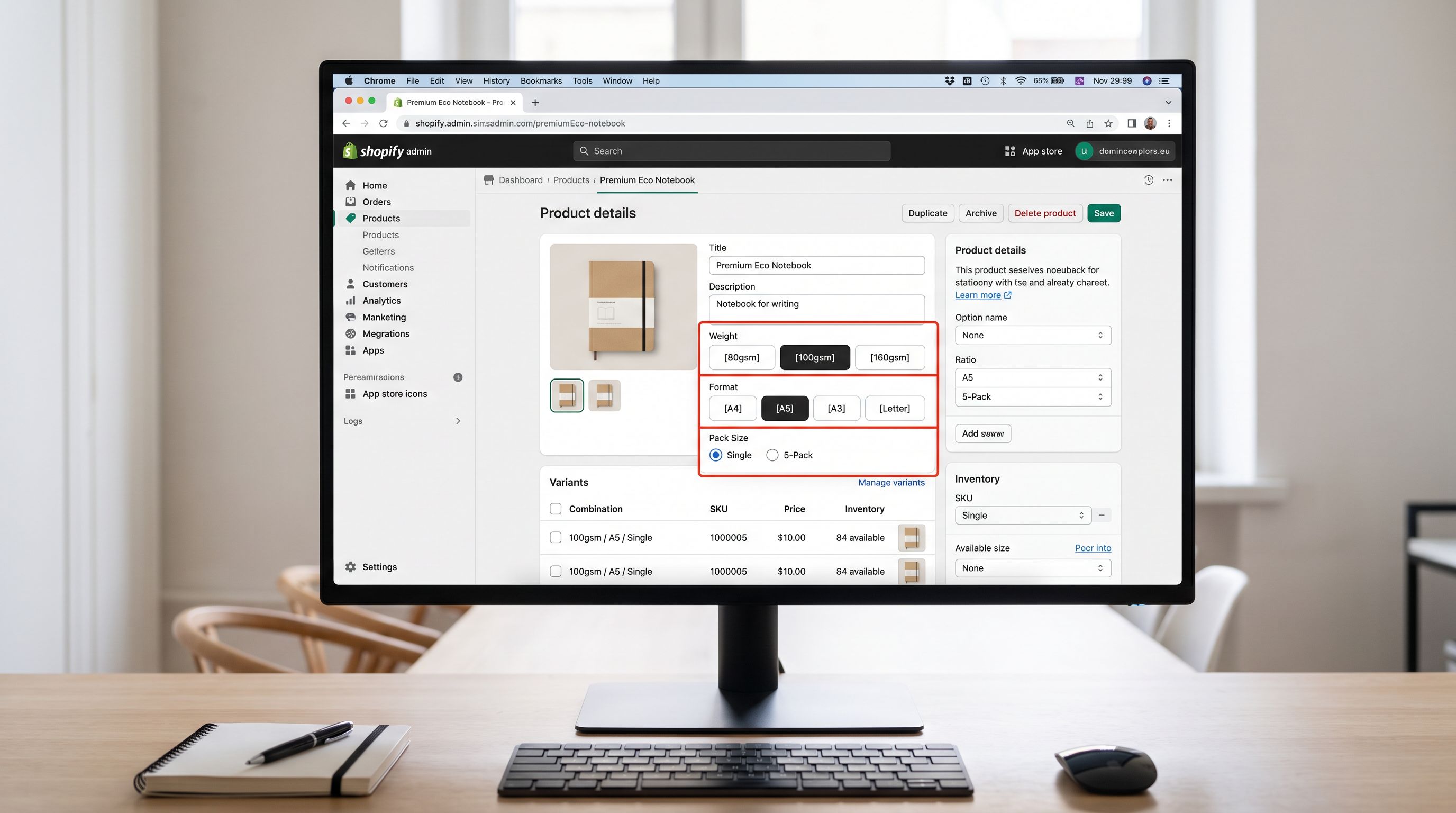
Paper weight (measured in grams per square metre, gsm) determines the physical quality and appropriate use of a paper product. 80gsm is standard office paper. 100gsm is presentation paper. 160gsm is card stock. For most stationery products, paper weight directly affects price: a 160gsm notebook costs more than an 80gsm notebook of the same format and ruling. Weight should therefore be a Shopify option type, not a metafield.
The naming convention in the supplier CSV determines how paper weight appears in the Shopify variant picker. Three common formats appear in supplier files:
- Numeric only:
80,100,160: creates options labelled "80", "100", "160" with no unit. Buyers have no context for the numbers. - With unit:
80gsm,100gsm,160gsm: creates options labelled by the full value. Clear but verbose if there are many weight values. - Descriptive:
Standard (80gsm),Premium (100gsm),Card Stock (160gsm): maps weight to a buyer-facing quality tier. Works well for B2C, less precise for B2B buyers who specify by gsm.
For a B2B stationery distributor, the 80gsm, 100gsm, 160gsm format is the most useful: procurement buyers specify paper weight by gsm in purchase orders, and the Shopify variant picker should match the language they use. For a B2C gift stationery store, the descriptive format reduces decision friction.
The option name in Shopify (not the value, but the label for the whole option) should be set to "Weight" or "Paper Weight" at import. Importier's column mapping step lets you set both the option name and the option values from the supplier CSV column.
Format Variants: Regional Naming and the A-Series Problem
Paper format variants (A4, A3, A5, Letter, Legal) present an import problem that does not appear in other categories: regional naming standards. ISO 216 A-series paper sizes (A4, A3, A5) are the standard in Australia, the UK, and Europe. North American markets use Letter (8.5 × 11 inches) and Legal (8.5 × 14 inches). A distributor selling internationally may have both in the same catalogue.
The import decision: should A4 and Letter be separate option values (for customers who search by name), or should the physical dimensions be included in the option value name ("A4 (210×297mm)" vs "Letter (215×279mm)")?
For a domestic Australian distributor, the A-series names alone are unambiguous. For a distributor with international shipping, including the dimensions in parentheses eliminates confusion for buyers who do not know the A-series system.
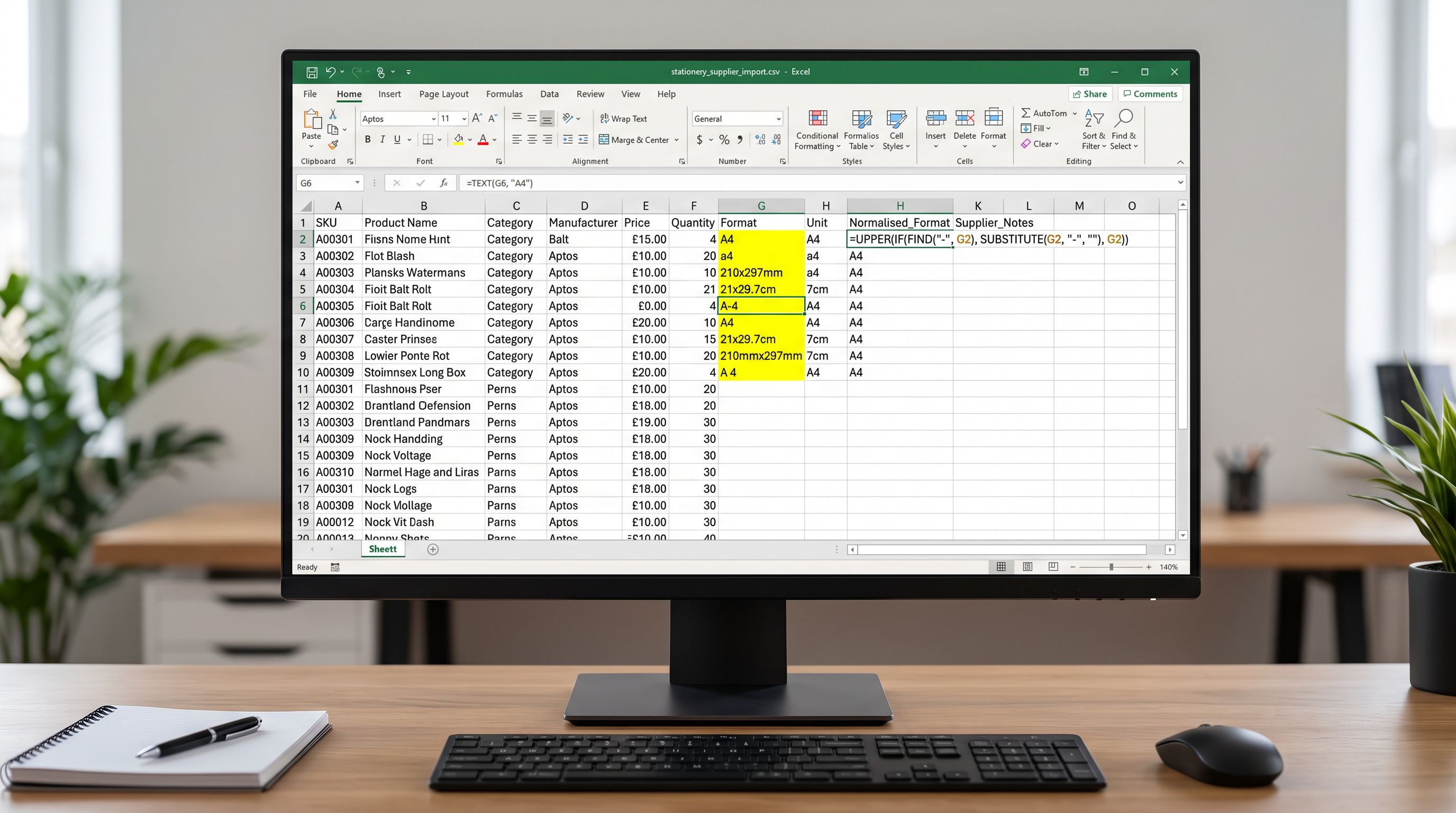
The supplier CSV should be normalised before import to a consistent format convention. Mixed naming ("A4", "a4", "210x297", "21x29.7cm") across rows in the same column creates separate option values for what should be the same format. A pre-import normalisation step that standardises all A4 variants to the chosen naming convention prevents the variant picker from showing the same format under different labels.
A4 and "210×297mm" are the same format. If both appear as separate values in the supplier CSV's format column, Shopify treats them as different variants. Pre-import normalisation is the only place to resolve this.
Pack Quantity Structure
Pack Quantity: B2B Naming vs B2C Naming
Pack quantity is the most commercially significant variant dimension for stationery: a single A4 notebook, a 5-pack, and a 25-pack have different prices and different buyer intent. A retail buyer purchases a single notebook. A corporate procurement team purchases a box of 25.
The naming convention for pack quantities in the supplier CSV determines both what appears in the variant picker and how the product shows up in search. Common supplier formats:
1,5,25: numeric-only pack quantities. The Shopify variant picker shows a number with no context. "1" vs "25" is not a self-explanatory purchase choice.Single,5-Pack,25-Pack: explicit quantity labels. Clear for B2C buyers.Single Unit,5-Pack (Trade),Case of 25: labels that indicate the buyer tier. The "Trade" qualifier signals to B2B buyers that the 5-Pack is a trade quantity.1 Notebook,5 Notebooks,25 Notebooks: restates the product type in the option value. Useful if the variant picker will be used standalone without a product title.
For a wholesale distributor, the pack quantity naming should reflect the language used in the trade. "Ream" (500 sheets) and "Case" (typically 5 reams or 2,500 sheets) are standard trade terms for paper. Importing a pack quantity column that uses "500 Sheets" instead of "Ream" creates a disconnect between the Shopify variant picker and the language procurement buyers use in their purchase orders.
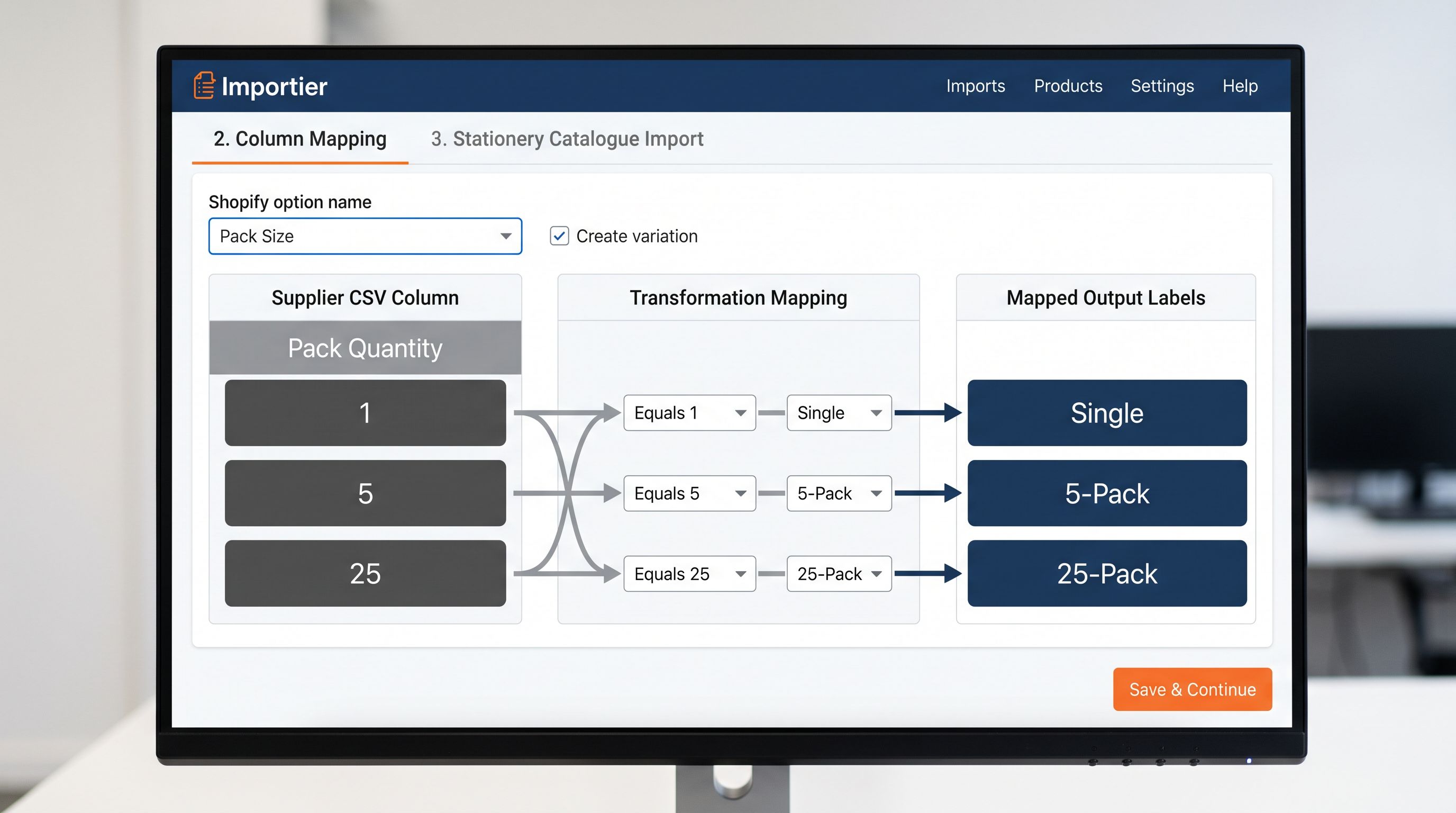
The column mapping step in Importier can apply a value transformation to normalise pack quantity names from supplier format to buyer-facing format. A supplier column that uses 1, 5, 25 can be transformed to Single, 5-Pack, 25-Pack at import without modifying the source file.
Resolving the Four-Dimension Problem
The office supplies distributor's supplier CSV contained four variant dimensions: paper weight (gsm), format size, pack quantity, and ruling style (ruled, blank, dotted, graph). Shopify supports three option types per product. One dimension had to be handled differently.
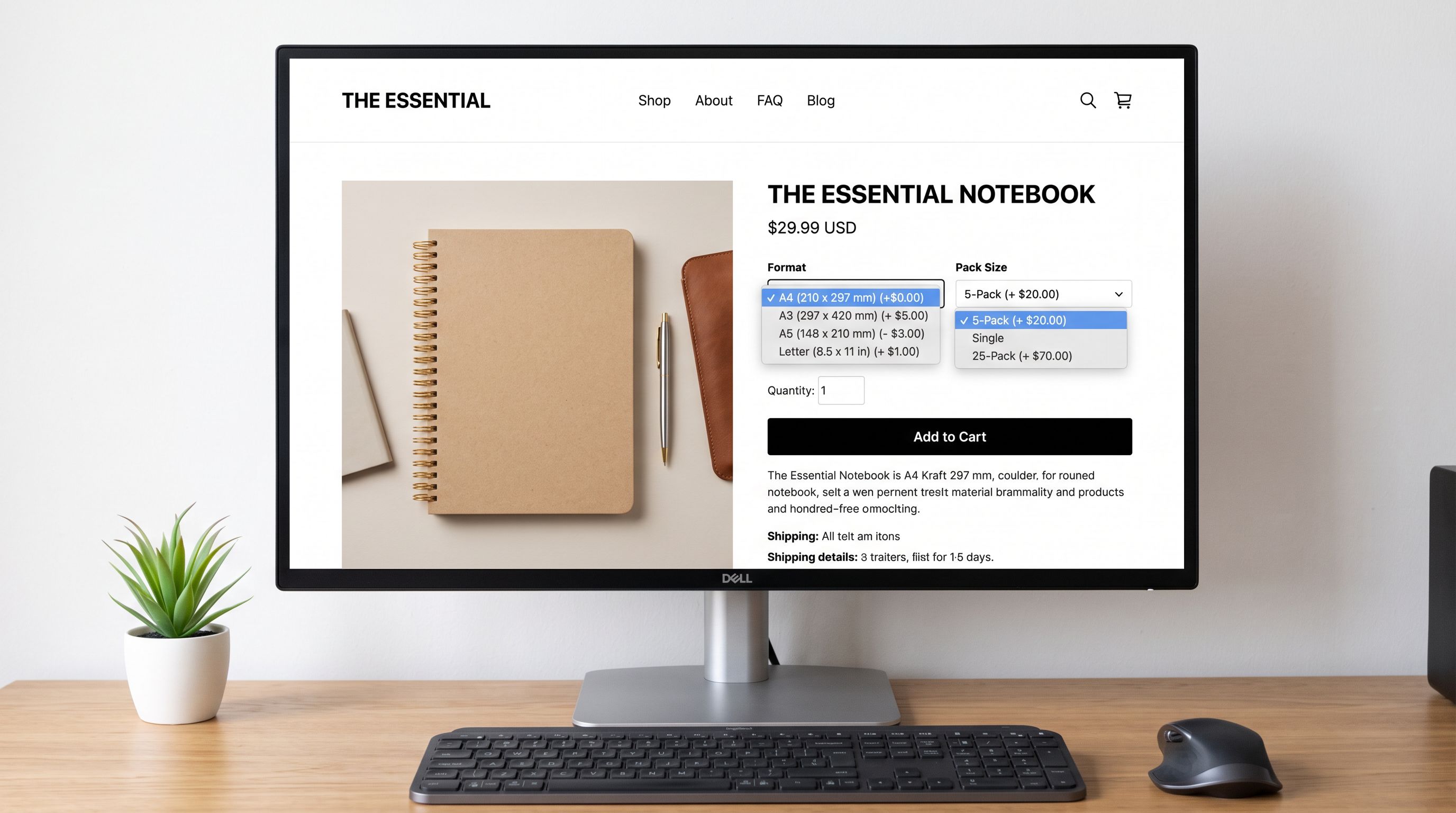
The decision matrix:
| Dimension | Affects price? | Buyer filters by it? | Best assignment |
|---|---|---|---|
| Paper Weight | Yes | Yes (B2B) | Shopify option type |
| Format Size | Yes | Yes | Shopify option type |
| Pack Quantity | Yes (primary) | Yes | Shopify option type |
| Ruling Style | No (same price across rulings) | Sometimes | Product metafield |
Ruling style (ruled, blank, dotted) does not change price for most notebook products: a ruled A4 100gsm notebook costs the same as a dotted A4 100gsm notebook. Buyers do filter by ruling style, but the filtering happens at catalogue level (using Shopify's product filter), not at the variant-picker level. Routing ruling style to a metafield means it can appear in storefront filters and on the product page, but does not add a fourth option type that would exceed Shopify's three-option limit.
The metafield configuration: create a custom.ruling_style metafield definition in Shopify admin with a list-of-text type and the four allowed values (Ruled, Blank, Dotted, Graph). Map the supplier's ruling style column to this metafield in the import column mapping step. Each product receives its ruling style value as a metafield attribute. The product metafields import guide covers how to create metafield definitions and map supplier columns to them at import time. Shopify's custom data documentation explains how to expose metafields to storefront filters.
For products where ruling style does affect price (some premium notebooks charge more for dotted), promote ruling style to a Shopify option type and route pack quantity to a metafield instead; pack quantities can be handled as separate product listings for very large pack differences (single unit vs pallet quantity).
- 01Audit the supplier CSV for all variant dimensionsidentify every column that represents a variant attribute (paper weight, format, pack quantity, ruling style, colour, finish); count the distinct dimensions; if more than three, plan which one routes to a metafield
- 02Decide the metafield dimensionthe dimension that does not affect price is the best metafield candidate; create the metafield definition in Shopify admin (custom namespace, list-of-text type, restricted to allowed values) before the import runs
- 03Normalise option value naming in the supplier CSVstandardise paper weight to a consistent gsm format, normalise format names to eliminate regional variant spellings, convert numeric pack quantities to descriptive labels; these transformations can be done in Importier's column mapping step
- 04Set option names in the import mappingassign Weight or Paper Weight as the option name for the gsm column, Format or Paper Format for the size column, Pack Size for the quantity column; these become the visible labels in the Shopify variant picker
- 05Run the import with variant detection enabledImportier's variant detection groups rows that share the same base product name and assigns each variant dimension as the correct option type; verify that 200 products appear in Shopify rather than 2,400
- 06Verify the variant matrix for a sample of 10 productsopen the Variants section in admin and confirm that all expected combinations are present, all pricing is populated at variant level for dimensions that affect price, and the ruling style metafield value is correctly populated on each product
What Correct Structure Enables
The office supplies distributor's second import collapsed 2,400 rows into 200 products with correct option structures. Each product had three Shopify option types (Paper Weight, Format, Pack Size) and a ruling style metafield. The Shopify admin showed 200 products instead of 2,400.
The downstream effects became visible immediately:
Storefront filters worked. The theme's product filter panel could now filter by ruling style (from the metafield), by format, and by pack quantity. A buyer looking for "A4 dotted notebooks" could filter by format (A4) and by ruling style (Dotted) and receive the correct results from 200 products rather than hunting through 2,400 individual listings.
Variant-level pricing worked. The 160gsm variants were priced higher than the 80gsm variants within each product. The variant picker showed the price update correctly as the buyer selected a different weight. Without the grouped variant structure, price differences would have required the buyer to navigate between separate products to compare.
Product titles were clean. Each product had a single title ("Spirax Ruled Notebook") rather than twelve titles ("Spirax Ruled Notebook A4 80gsm Single", "Spirax Ruled Notebook A4 80gsm 5-Pack", etc.). The variant picker handled the specificity; the product title handled the identity.
According to Shopify's documentation on product variants, variants are the correct Shopify construct for product options that buyers need to select before adding to cart. Routing dimensions that buyers filter but do not actively select (ruling style preference that is pre-decided before arriving at the product page) to metafields is consistent with this intended use.
- 2,400 individual Shopify products created from 2,400 CSV rows; A4 80gsm Single Notebook and A4 100gsm Single Notebook are unrelated products with no shared context
- Storefront search for notebook returns 2,400 results; buyer cannot filter or compare by paper weight within a single product listing
- No variant-level pricing; price differences between gsm weights require navigating separate product pages
- Catalogue management requires editing 2,400 individual products for any description update; changing a product description affects only one row at a time
- Theme filters return partial results; filtering by ruling style (Blank) returns 600 products (one per combination containing Blank) rather than 200 products with Blank as a metafield attribute
- 200 Shopify products, each with 12 variant combinations (3 weights × 4 formats); buyer sees one product with option pickers for Weight, Format, and Pack Size
- Storefront search for notebook returns 200 results; buyer filters by format (A4) and ruling style (Dotted) to narrow to the relevant product subset
- Variant-level pricing: 160gsm variants show higher price in the picker; buyer sees the price update on weight selection without navigating away
- Description updates apply to 200 products; any change to a product description affects the product across all its variants simultaneously
- Ruling style metafield powers the theme filter; filtering by Dotted returns 200 products matching that metafield value across all format and weight combinations
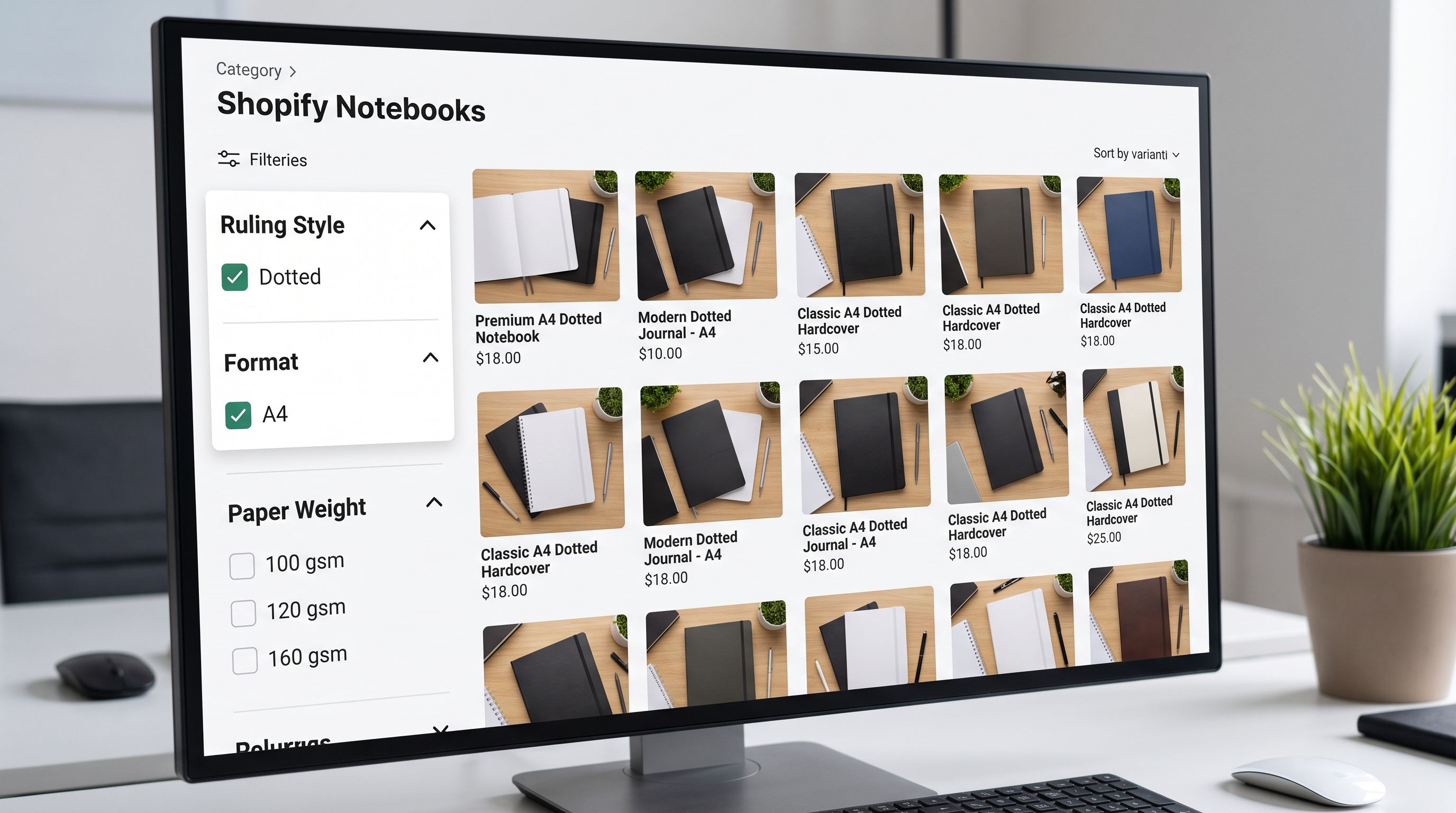
The office supplies distributor ran their second import in 40 minutes: four dimensions identified, ruling style assigned to a metafield, pack quantity labels normalised from 1/5/25 to Single/5-Pack/25-Pack, variant detection enabled. The 2,400-row supplier file became 200 Shopify products with clean option structures. The storefront filter worked on the first customer session after the re-import.
The supplier CSV had not changed. The import configuration had.
Try Importier free at importier.app.
Set up your first import in under five minutes.
Importier brings products into Shopify with AI descriptions, category metafields, and data enrichment on every run.