Shopify Standard Product Taxonomy: How Category Data Works

On this page
A home goods merchant sells sofas, armchairs, and coffee tables on Shopify. Their collection pages have one filter: Product Type. Customers see three options (Sofa, Armchair, Coffee Table) and nothing else. A competitor's store in the same category has filter panels showing Frame Material (Wood, Metal, Powder-Coated Steel), Seating Capacity (2-seat, 3-seat, 4-seat), Colour Group (Natural, White, Charcoal), and Indoor/Outdoor Use. Customers on the competitor's site find what they need in two clicks. The difference is not a third-party app or a custom theme. It is Shopify's Standard Product Taxonomy, and whether a store's products are assigned to a leaf-level category in that taxonomy.
What Shopify's Standard Product Taxonomy Is
Shopify's Standard Product Taxonomy is a hierarchical catalogue of product categories that Shopify introduced in 2023 and has expanded since. It contains more than 5,000 product categories organised into a tree structure. At the top are broad categories like Home & Garden, Apparel & Accessories, Electronics, and Health & Beauty. Each broad category branches into subcategories, and each subcategory branches further until it reaches a leaf node, a specific product type that cannot be subdivided further.
The path from root to leaf looks like: Home & Garden → Furniture → Living Room Furniture → Sofas & Sectionals. Each leaf category in the taxonomy has a defined set of standard attributes. Sofas & Sectionals, for example, has attributes like Frame Material, Fill Material, Seat Depth, Seating Capacity, Upholstery Fabric, Colour Group, and Indoor/Outdoor Use. These attributes are not freeform text fields. They have pre-defined, controlled vocabulary: Shopify specifies what values are valid for each attribute. Frame Material can be Wood, Metal, Upholstered, or a handful of other values. Shopify will not accept a value that is not in the list for that attribute.
A product assigned to the Sofas & Sectionals leaf category can have all of those attributes filled. A product assigned to the parent Furniture category has no standard attributes at all; the taxonomy does not define attributes at that level. A product with no taxonomy category assigned has no category metafields, period.
Why the Leaf Category Makes the Difference
The attributes that matter for filter navigation and Google Shopping are attached to leaf categories, not parent categories. This is the distinction most merchants miss.
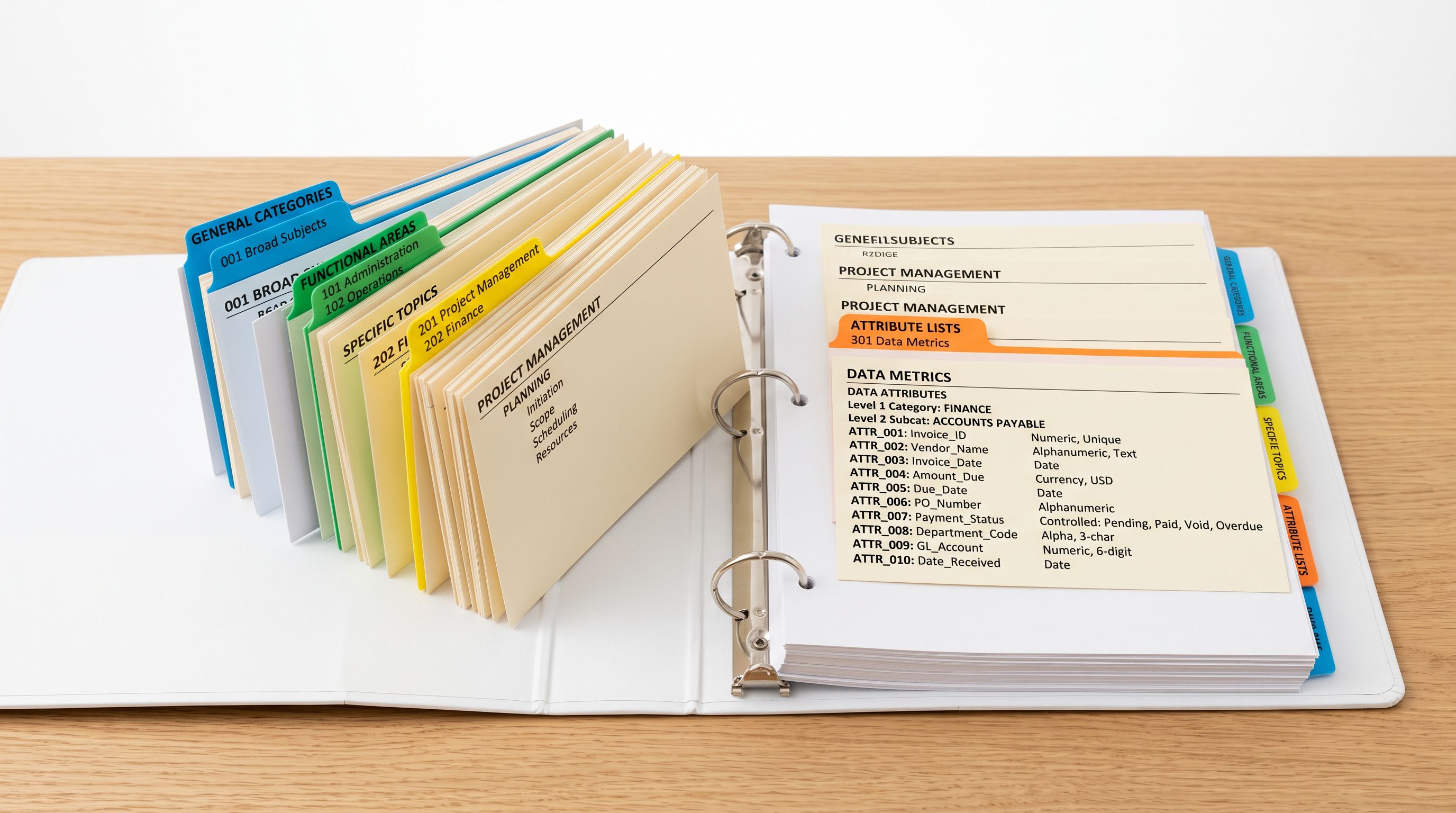
A merchant who assigns their sofas to the "Furniture" category (a parent node) gets no taxonomy attributes. Filter navigation has nothing to show beyond the category name itself. A merchant who assigns the same sofas to "Sofas & Sectionals" (the leaf node) gets all seven standard attributes for that category, which Shopify's Search and Discovery app can use for filter navigation.
Shopify's Search and Discovery app builds filter panels from two sources: product tags and category metafields. Tags are freeform and inconsistent across a catalogue. Category metafields use a controlled vocabulary: every attribute value is a term from Shopify's taxonomy. This consistency is what makes the filter panels reliable and searchable. A tag-based filter for Frame Material might show "Wood", "wood", "solid wood", and "oak" as four different filter options because merchants entered the values differently. A category metafield filter shows exactly one option per valid taxonomy value, because Shopify controls the vocabulary.
A product assigned to "Furniture" has no standard attributes. The same product assigned to "Sofas & Sectionals" has seven attributes ready for filter navigation the moment values are filled.
Google Shopping also uses the taxonomy category. Shopify automatically maps the product's assigned category to a Google Product Category when building the Google Shopping feed. A product in "Sofas & Sectionals" maps to Google's furniture subcategory and reaches customers searching specifically for sofas in Shopping campaigns. A product in the parent "Furniture" category maps to a broader Google category and competes with everything from shelves to lamps.
How Importier's Industry Packs Assign Taxonomy Categories
Assigning 800 products to the correct leaf category and filling their taxonomy attribute values manually is not a realistic workflow. The Shopify admin assigns one product at a time and requires a merchant to navigate the taxonomy tree for each one.
Importier's Industry Packs are pre-built attribute templates that cover Shopify's Standard Product Taxonomy. Twenty-two Industry Packs cover the leaf categories where most merchants operate: Apparel, Electronics, Beauty, Food & Beverage, Sports & Outdoors, Home & Garden, Automotive, and others. Each pack contains the attribute types defined by Shopify's taxonomy for those leaf categories, 3,758 in total across all 22 packs.
From supplier CSV to taxonomy-ready product
The category assignment process in Importier uses two phases. In the first phase, text matching reads the product's type field, title, and keywords from the supplier CSV and matches them against the taxonomy's leaf categories. A product with type "Sectional Sofa" and title "3-Seat Linen Sectional Sofa with Chaise" matches to "Sofas & Sectionals" through text pattern recognition. This phase handles straightforward cases quickly.

In the second phase, products that text matching could not confidently assign go to AI matching. The AI reads the product title, description, specifications, and any other available fields and reasons about which leaf category fits. The AI is constrained to pick from Shopify's taxonomy vocabulary: it cannot invent a category or attribute value. A product described only as "3-piece living room set" is ambiguous at the text-matching phase. AI matching reads the description and specifications to determine whether it belongs in "Sofas & Sectionals", "Living Room Furniture Sets", or another leaf category.
After category assignment, Importier fills the attribute values for that category. For a sofa assigned to "Sofas & Sectionals", the AI reads the product data and fills Frame Material, Seating Capacity, Colour Group, and the other available attributes from the taxonomy's controlled vocabulary. A linen sofa with a solid wood frame gets Frame Material: Wood, Upholstery Fabric: Linen, Colour Group: Natural. These values come from Shopify's taxonomy list, not from freeform text.
- 01Load the supplier CSV into Importier's import wizard and map columns.
- 02Select the relevant Industry Pack for the product category. Importier displays the 22 packs with their product coverage descriptions so the match is obvious.
- 03Run the import. Importier text-matches products to their taxonomy leaf categories first. Products that text matching cannot confidently assign go to AI matching.
- 04The AI fills attribute values for each assigned category from Shopify's controlled vocabulary.
- 05Preview the attribute assignments in the review table before pushing. Each product shows its assigned category and the attribute values that will be written as category metafields.
- 06Push the import. Products arrive in Shopify with their taxonomy category assigned and their attribute metafields populated, ready for filter navigation.
What Taxonomy-Assigned Products Gain
Filter navigation is the most immediate benefit. Once products have category metafields populated, Shopify's Search and Discovery app can build filter panels from those attributes without any additional configuration. A collection containing sofas, armchairs, and ottomans can offer filters for Frame Material, Seating Capacity, and Indoor/Outdoor Use because all three product types share attributes defined by their taxonomy leaf categories.
The filter values are consistent across the collection. Every product that has Frame Material set to "Wood" uses the same taxonomy term. Customers filtering by Frame Material: Wood see every matching product regardless of how the individual merchants wrote the title or type field.
Google Shopping benefits accrue without additional configuration. The Shopify-to-Google feed mapping uses the assigned taxonomy category to set the Google Product Category attribute. More specific leaf categories result in more specific Google Product Category assignments, which affects which searches trigger product impressions in Shopping. A sofa reaching customers who searched "linen sectional sofa" rather than just "furniture" is the compounding effect of leaf-level taxonomy assignment across a catalogue.
What a Partial Taxonomy Looks Like in Practice
The filter panel problem emerges when a store's catalogue mixes taxonomy-assigned and unassigned products. Filter panels built from category metafields show only the values that exist in the collection. A collection of 200 sofas where 180 have taxonomy assignments and 20 do not shows filter options from the 180 assigned products. Customers who filter by Frame Material: Wood see 95 products instead of 100, because five wood-frame sofas are missing the attribute.
For Google Shopping, unassigned products fall back to broader category matching and miss the targeted audience segments that leaf-level categories reach.
The practical fix is to import with an Industry Pack applied to the whole batch. Products that cannot be confidently matched by text or AI during import receive a manual assignment flag in the review table, so the merchant can assign the category before pushing. No product should leave the import wizard without a taxonomy assignment if an Industry Pack covers its category.
- Product type field only (freeform text from supplier CSV)
- No category metafields
- Filter navigation shows Product Type only
- Google Shopping uses broad parent category matching
- New products need manual category assignment one by one in admin
- Leaf-level taxonomy category assigned during import
- Category metafield attributes filled from controlled vocabulary
- Filter navigation shows Frame Material, Colour, Seating Capacity, and other taxonomy attributes
- Google Shopping maps to specific leaf category for targeted impressions
- 800 products assigned and attribute-filled in a single import run
For stores with existing unassigned products, Importier's Store Scanner can identify products missing category metafields and run batch attribute assignment without a re-import. Shopify Industry Packs explains what the 22 packs cover and which product categories each one applies to. For the full workflow of running an import with an Industry Pack and reviewing the attribute assignments before they push, Importier's Industry Pack guide covers the end-to-end steps. For category metafields specifically and how they display in the Shopify admin and on the storefront, Shopify category metafields guide explains what gets stored and where.
Shopify's Standard Product Taxonomy documentation covers the full category tree and the attribute sets defined for each leaf category. For how Google uses product category data in Shopping feeds, Google Merchant Centre's product category specification documents the Google Product Category attribute and how it connects to taxonomy assignment.
Key Takeaways
Shopify's Standard Product Taxonomy organises more than 5,000 product categories into a hierarchy from broad roots to specific leaf nodes. Taxonomy attributes, along with the filter navigation and Google Shopping benefits they enable, only activate at the leaf category level. Parent-category assignments have no standard attributes.
- Leaf categories carry the attributes. A product in "Furniture" has no taxonomy attributes. The same product in "Sofas & Sectionals" has Frame Material, Seating Capacity, Upholstery Fabric, and more, all ready for filter navigation and Google Shopping category matching.
- Category metafields use controlled vocabulary. Attribute values come from Shopify's taxonomy list, not freeform text. This consistency is what makes filter panels reliable and prevents duplicate filter options from different spelling conventions.
- Industry Packs assign taxonomy categories at import time. Two-phase matching (text-based first, AI-based for ambiguous products) assigns each product to its leaf category and fills attribute values from the taxonomy vocabulary in a single import run.
- Partial assignment creates partial filter panels. Unassigned products in a collection do not appear in attribute-based filters, reducing the visible filter value counts.
- Store Scanner handles existing products. Stores with products already in Shopify can run batch taxonomy assignment through Store Scanner without a full re-import.
Assign your products to the right taxonomy leaf category from import day one at importier.app.
Set up your first import in under five minutes.
Importier brings products into Shopify with AI descriptions, category metafields, and data enrichment on every run.