# Shopify Upsell Cross-Sell Import: Add Relationships in Bulk
> Upsell and cross-sell relationships lift AOV, but adding them manually is impractical at scale. Here is how to build them during a bulk Shopify import.
- Published: 2026-07-29
- Author: Importier Team
- Category: Import Guides / File Imports
- Canonical: https://www.importier.app/blog/shopify-upsell-cross-sell-import
---
A kitchen appliance merchant imports 400 products from a supplier. Cutlery sets, chopping boards, knife sharpeners, cast iron pans, kitchen scales. Every product has natural companions: the cast iron pan pairs with the silicone oven mitt and the splatter guard; the knife set pairs with the sharpening steel and the magnetic knife strip. The merchant knows these relationships. The supplier knows them. But after import, every product page has empty recommendation slots. Configuring these Shopify upsell cross-sell import complementary product relationships individually in the Shopify admin would take six weeks.
Shopify upsell cross-sell import covers one of the most overlooked parts of a product catalogue migration. The import is treated as a data transfer exercise when it is actually the best window to set up the merchandising layer that drives average order value from day one.
## What Shopify Supports for Complementary Products
Shopify has two systems for connecting products to recommendations. Understanding them before import determines which import workflow is appropriate.
**Complementary products (explicit relationships)**
The Shopify Search and Discovery app (available free in the Shopify App Store) reads a specific metafield, `shopify--discovery--product_recommendation.complementary_products`, to populate the "Complementary products" block on product pages. This metafield takes a list of product references, which are product IDs or GIDs in Shopify's format. When a product has this metafield populated with a list of other products, those products appear in the complementary products widget wherever the merchant's theme renders it.
This is an explicit, curated relationship. The merchant (or their supplier) controls which products appear as complementary. It survives product title changes, price changes, and collection moves, because the relationship is stored by product ID, not by product title or URL.
**Related products (algorithmic relationships)**
Shopify's algorithmic product recommendations are generated automatically based on shared tags, shared collections, and purchase history. A product in the "Cast Iron Cookware" collection with the tags `hob-compatible`, `induction`, `oven-safe` will be recommended alongside other products that share some combination of those signals.
This system does not require explicit setup, but the quality of its output depends entirely on the quality of the import. Products imported with no tags and a single generic collection get generic recommendations. Products imported with specific, accurate tags get accurate recommendations.
Shopify supports explicit complementary products (via the Search and Discovery app metafield) and algorithmic related products (via tags and collection membership). Both systems draw their input from data that must already be in the product record. Import is the most efficient point to set that data correctly for the full catalogue.
## The Scale Problem With Manual Relationship Setup
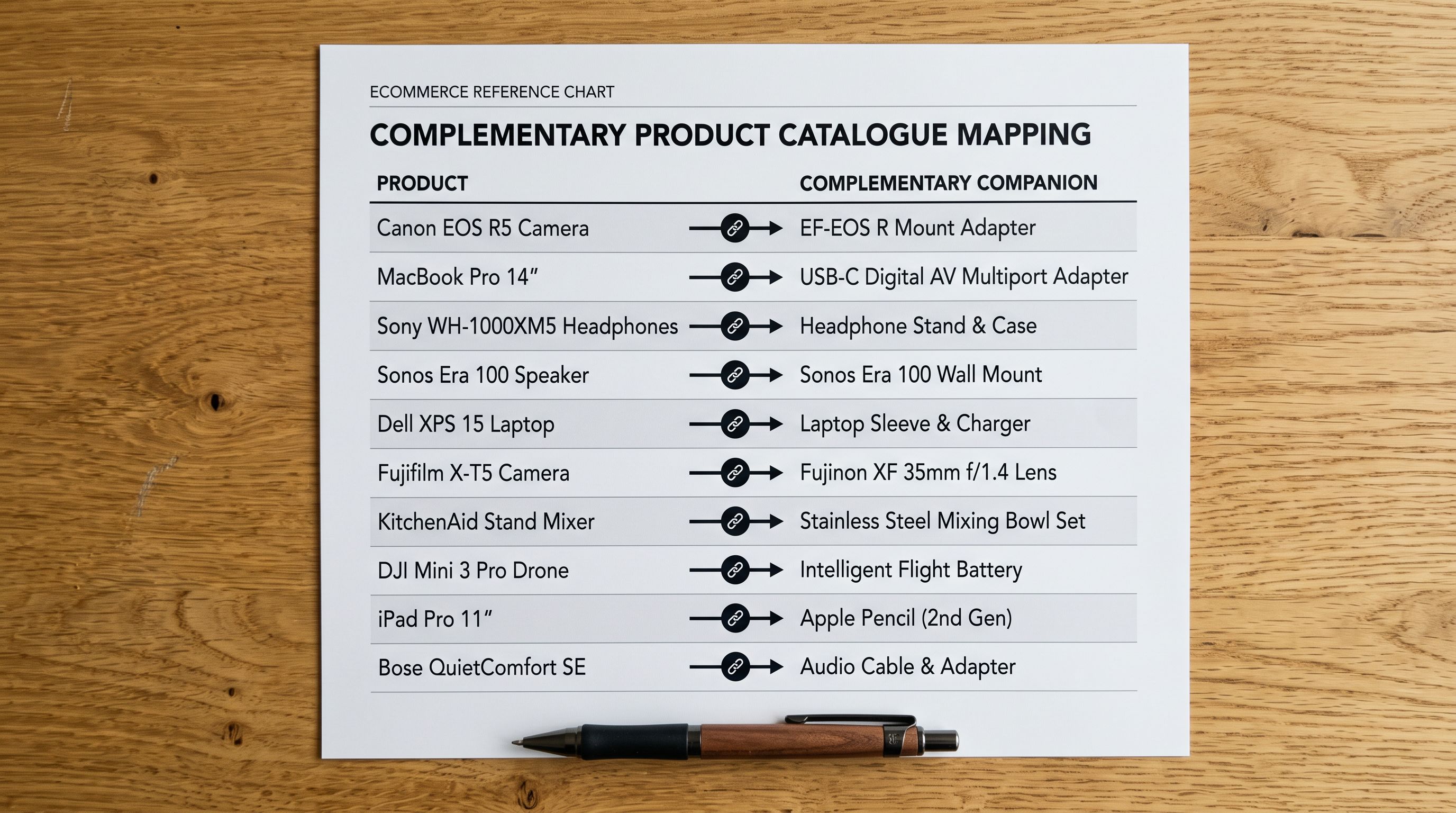
Setting up complementary product relationships in the Shopify admin is a per-product task. For each product, the merchant opens the product record, locates the complementary products metafield panel (once Search and Discovery is installed), and selects the companion products from a search list. For a 400-product catalogue with an average of three complementary products each, this is 1,200 individual product searches and selections in the Shopify admin.
At two minutes per product for the full relationship setup (find the product, add three companions, save), that is 13 hours of configuration work that produces no content and no new products. It just maps relationships that the merchant already knows exist.
The algorithmic system is theoretically automatic, but it cannot generate useful recommendations from a flat tag structure. A catalogue imported with 400 products all in one collection and no tags will generate recommendations based on purchase history, which takes months of sales data to produce anything reliable. A catalogue imported with accurate category tags on day one starts generating relevant algorithmic recommendations immediately.
Complementary product relationships are the highest-ROI merchandising layer in any product catalogue. Setting them up at import costs no additional time. Setting them up after launch costs 13 hours for a 400-product catalogue, and the opportunity cost of every sale that completed without a cross-sell in the gap.
## Shopify Upsell Cross-Sell Import: Mapping Relationship Data
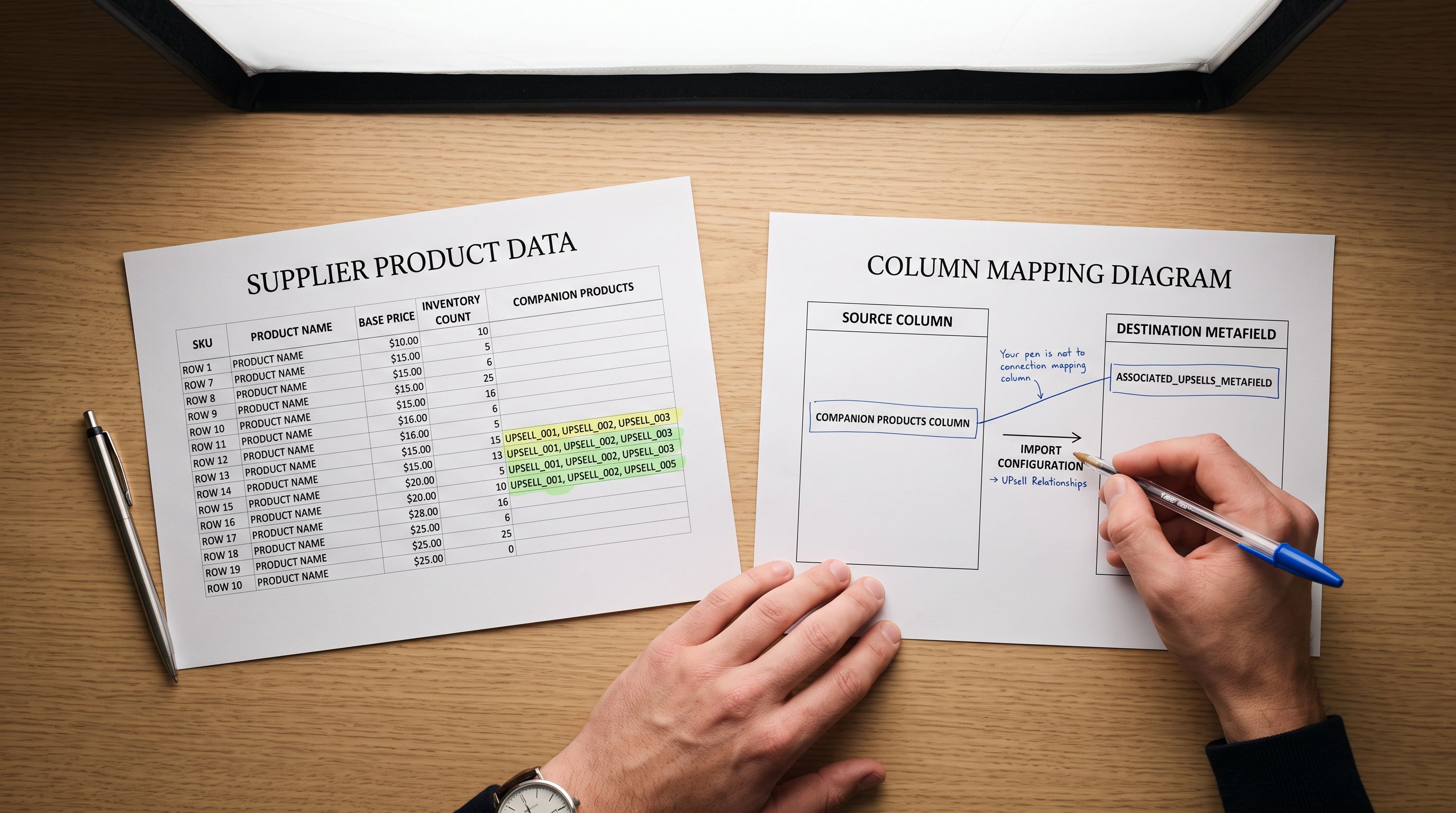
For merchants whose suppliers provide a data file with a "related products" or "recommended with" column, the import workflow can map these relationships directly to Shopify at import time.
The supplier file might have one of two formats:
- A `related_products` column with product handles separated by commas: `silicone-oven-mitt, splatter-guard-30cm, cast-iron-lid`
- A `complementary_skus` column with the supplier's own SKU numbers for the companion products
Product handles are the preferred format because they map directly to the Shopify complementary products metafield without translation. A handle is stable across product edits. If a supplier provides SKU numbers instead, the import needs to resolve those SKUs to Shopify product handles or IDs before setting the metafield.
Importier's column mapping step accepts a `related_products` column and maps it to the `shopify--discovery--product_recommendation.complementary_products` metafield. The import parses the comma-separated handle list, resolves each handle to a Shopify product GID within the store, and writes the metafield as a list of product references. After import, the Search and Discovery complementary products widget reads this metafield and renders the correct companions on each product page.
This means a supplier who provides a "recommended with" column in their data file can fully configure Shopify's complementary products system across the entire catalogue in a single import run, with no manual product-by-product work in the admin.
## How Product Tags Enable Post-Import Upsell App Configuration
Not every merchant receives a companion products file from their supplier. For merchants whose supplier data includes only product attributes and category information, the most valuable action at import time is tagging with upsell intent.
Most third-party upsell and cross-sell apps (Frequently Bought Together, ReConvert, LimeSpot, Bold Upsell) build their recommendation rules based on product tags, product types, and collection membership. A rule like "show all products tagged `cast-iron-compatible` on any cast-iron product page" is configured once in the app and applies automatically to every matching product.
The import is the correct point to add these tags because it applies them across the entire catalogue in a single pass. Adding `pairs-with-cast-iron` to 40 cast iron accessory products at import time means the upsell app rule works on day one. Adding those tags manually after launch, across 40 separate product records, is another multi-hour admin task that delays revenue.
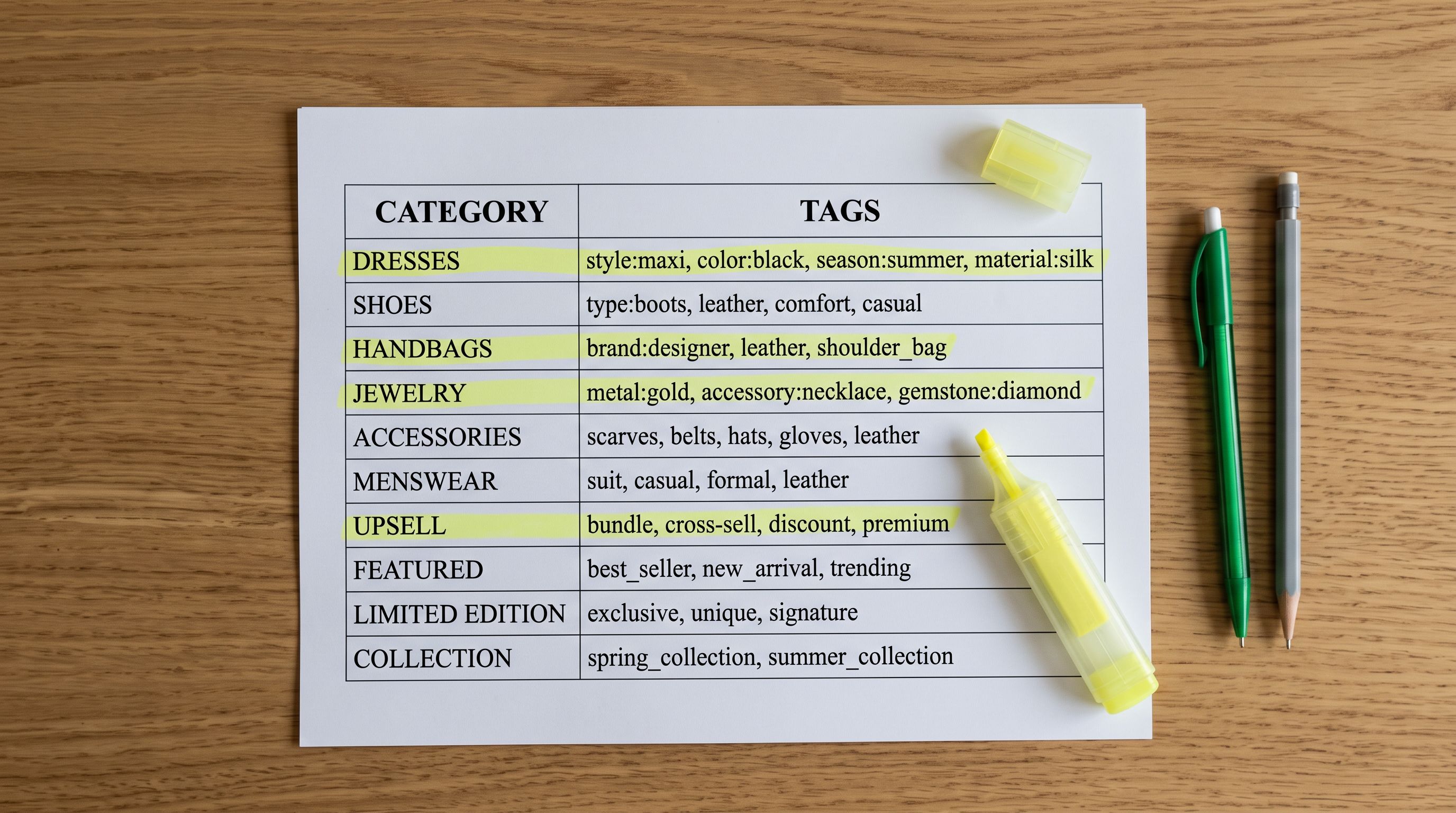
Importier's column mapping step can map a supplier's `category` or `subcategory` column to both the Shopify product type field and a set of structured tags simultaneously. A supplier row for a silicone oven mitt with `category: Cookware Accessories` and `subcategory: Heat Protection` maps to:
- Product type: `Cookware Accessories`
- Tags: `cookware-accessory`, `heat-protection`, `pairs-with-cast-iron` (set via a tag template in the mapping step)
This structured tagging approach means the algorithmic recommendation system, the Search and Discovery app, and any third-party upsell app all have correctly structured data to work with immediately after import.
## AOV Impact of Pre-Configured Complementary Data
According to [Shopify's research on upselling and cross-selling](https://www.shopify.com/blog/upselling-and-cross-selling), upselling and cross-selling are among the highest-ROI tactics for increasing revenue from existing traffic. The conversion happens on a page the customer already intended to buy from — the incremental cost is near zero compared to the cost of acquiring the session.
 The average order value lift from effective cross-sell recommendations varies by category but consistently outperforms acquisition spend as a revenue lever, because it converts traffic that is already on the product page and already intending to buy.
The timing argument for import-time setup is straightforward: every week the cross-sell system operates after launch generates incremental revenue. A catalogue that launches with complementary relationships configured starts generating that revenue in week one. A catalogue that launches with empty recommendation slots and sets them up over the following months loses that revenue permanently.
For a 400-product kitchen catalogue with an average order value of $85 and 300 orders per month, a 12% cross-sell conversion rate with an average add-on of $22 generates $792 per month in incremental revenue. Three months of delayed configuration is $2,376 in missed revenue from traffic the store was already paying to acquire.
## Shopify Upsell Cross-Sell Import: Key Takeaways
Building shopify upsell cross-sell import complementary products relationships into the catalogue from day one is a merchandising decision that pays back every week the store operates.
- Shopify has two recommendation systems. Explicit complementary products (via the Search and Discovery metafield `shopify--discovery--product_recommendation.complementary_products`) are curated relationships that appear in a dedicated widget. Algorithmic related products are generated from shared tags, collection membership, and purchase history. Both draw from data that must be in the product record at import time.
- A supplier who provides a "recommended with" column in their data file can have that data mapped directly to Shopify's complementary products metafield in Importier's column mapping step. One import run configures the recommendation widget for the entire catalogue.
- Product handles are the correct format for complementary product references. They are stable across product edits. If your supplier provides SKUs rather than handles, Importier's mapping step resolves them to handles before writing the metafield.
- Accurate product tags at import time enable upsell app rules to work from launch. A tag like `cast-iron-compatible` set across 40 accessory products at import means a single upsell app rule covers all 40 products immediately after launch, without any per-product manual setup.
- The revenue cost of delayed cross-sell configuration is real and calculable. For a 300-order-per-month catalogue, three months of empty recommendation slots is a measurable revenue gap from traffic that was already converting.
- The [Shopify Storefront API's productRecommendations query](https://shopify.dev/docs/api/storefront/latest/queries/productRecommendations) powers both complementary products and algorithmic recommendations. Apps that read this query benefit directly from the data mapped at import time.
Build your complementary product relationships at import time at [importier.app](https://importier.app). Map your supplier's companion product column to the Shopify metafield in the import wizard and launch with a fully configured cross-sell layer from day one.