# Shopify Store Migration in Q1: The Post-Holiday Quiet Window
> Migrate from WooCommerce, Magento or BigCommerce to Shopify during Q1. Lower traffic, post-BFCM breathing room, and AI enrichment at migration time.
- Published: 2026-11-24
- Author: Importier Team
- Category: Import Guides / Platform Migrations
- Canonical: https://www.importier.app/blog/shopify-store-migration-q1-window
---
# Shopify Store Migration in Q1: The Post-Holiday Quiet Window
The post-holiday quiet window is the best time to migrate a Shopify store from a legacy platform. January and February sit between BFCM's exit and the spring seasonal ramp, with 40 to 60 per cent lower traffic than peak months. Support volume is down. The team is not operating on a sale-event schedule. There is a 90-day runway to complete, test, and stabilise the migration before the next meaningful traffic peak.
A WooCommerce merchant with 2,000 products who has been deferring migration for 18 months — waiting for the "right time" — has been absorbing the cost of that deferral: plugin maintenance, slow page loads from accumulated third-party code, monthly hosting fees, and descriptions that were never upgraded from supplier CSV text. Q1 is the window to migrate and upgrade simultaneously. When the DNS switches, the new Shopify store has better product descriptions than the old WooCommerce store ever had.
## The Case for Q1 Migration Timing
Three factors combine in Q1 that do not appear together at any other point in the year.
**Lower traffic means lower migration risk.** A migration that goes live during BFCM, a sale event, or a seasonal peak creates maximum downside: if something breaks, it breaks in front of the highest traffic the store will see all year. In Q1, traffic is at or near its annual low for most categories. A problem discovered post-launch affects fewer visitors, creates fewer abandoned carts, and is less likely to register as a significant revenue event while it is being fixed.
**Post-BFCM operational breathing room.** October and November are consumed by BFCM preparation. December is consumed by Christmas and gift season management. The team that would need to plan and execute a migration has been in reactive mode for three months. January is the first month of the year where the operational workload supports a project-focused mode.
**90-day runway before the next peak.** Q1 gives enough time for a complete migration cycle: data audit (1-2 weeks), extract and transform (1-2 weeks), development store testing (1 week), production import (1-3 days depending on catalogue size), and stabilisation (2-4 weeks). That is 6 to 8 weeks of active work, with 4 to 6 weeks of buffer before spring collections and Mother's Day traffic begins to build.
The 90-day Q1 window is not just time to complete the migration. It is time to discover and fix the problems that the migration reveals — image URL failures, variant grouping issues, missing metafields — before those problems are live during peak traffic.
## Platform-Specific Migration Challenges
Each legacy platform creates a different data problem. The migration approach must account for the platform's data model before the import runs.
**WooCommerce variable products.** WooCommerce stores variable products as a parent product with child variations. The export CSV contains both the parent row (which holds the product title, description, and categories) and multiple child rows (which hold the variant attributes and pricing). Shopify's import format expects all variant rows to share the same Handle with different option values per row. The transformation step maps WooCommerce's parent-child structure to Shopify's flat multi-row variant format. Importier's 150+ variant detection patterns handle the grouping automatically at import time — a WooCommerce product with 3 sizes and 4 colours exports as 12 child rows and re-imports as a single Shopify product with 12 variants.
**Magento configurable products.** Magento's configurable product model is similar to WooCommerce but stores product attributes as separate attribute sets with IDs rather than plain text values. A Magento export contains attribute IDs rather than the display values your customers see. The transformation step must map attribute IDs to their label values before the Shopify import runs. Failure to do this means variants labelled "140", "141", "142" rather than "Small", "Medium", "Large". A development store test import is the fastest way to catch this before the production migration.
**BigCommerce custom fields.** BigCommerce merchants frequently use custom fields to store product specifications, materials, and dimensions. Those custom fields do not map directly to any Shopify product field — they need to either be incorporated into the product description, mapped to Shopify metafields, or discarded. The right answer depends on whether those fields are visible to customers and whether they affect any downstream system (Google Shopping feed, email platform, inventory management). Audit custom field usage before the migration plan is finalised.

## Why AI Enrichment at Migration Time Creates a Better Store
A legacy platform migration is a one-time opportunity to upgrade every product description in the catalogue. The alternative is to migrate the existing descriptions and address quality later. In practice, "address quality later" becomes a permanent deferral. The migration project closes, the team moves to the next initiative, and the new Shopify store runs for years on the same thin supplier descriptions that made the old WooCommerce store mediocre.
The AI enrichment approach treats migration as a combined event: import the product structure plus generate new descriptions in a single Importier session. The import file contains Handle, Title, Body HTML (blank or with existing content), and all variant and image columns. Store Scanner runs Replace mode against the imported catalogue, using the product metadata (title, product type, vendor, Industry Pack attributes) to generate descriptions for every product.

When the DNS switches, the new Shopify store should have better product descriptions than the legacy store ever had. Migration is not a copy operation. It is a content upgrade that happens to involve moving platforms.
## What to Expect During and After the DNS Switch
The DNS switch is the highest-stress moment of the migration. Some preparation reduces the risk of a poor outcome.
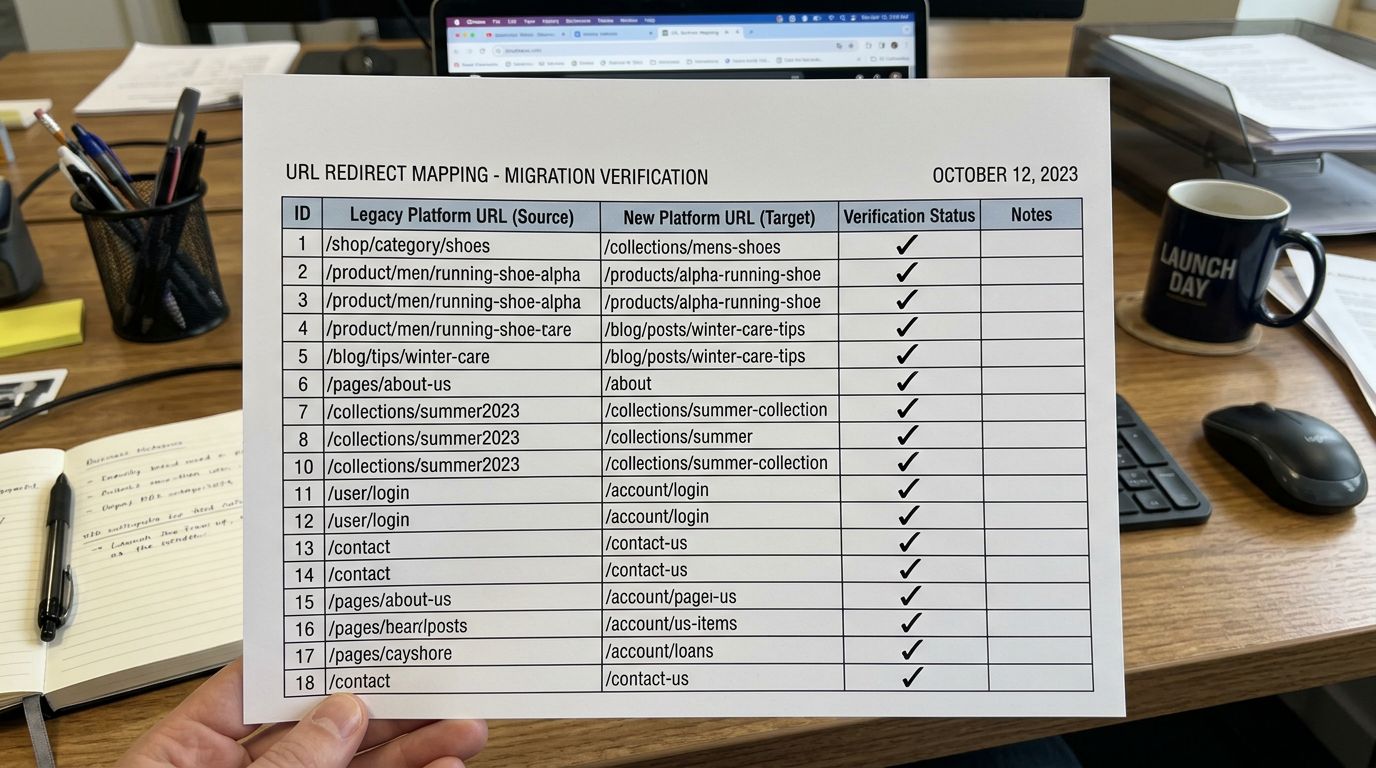
**URL redirects.** The new Shopify store uses different URL structures than WooCommerce or Magento. A WooCommerce product at `/product/blue-wool-scarf/` becomes `/products/blue-wool-scarf` in Shopify. The redirect plan maps every old URL to the corresponding new URL. Shopify's bulk URL redirect import (CSV file, Settings > Navigation > URL Redirects) handles this at scale. Without it, any inbound link, any bookmarked URL, any Google Search result pointing to the old URL structure returns a 404.
**SEO signal transfer delay.** Google re-indexes the new Shopify store after the DNS switch. This process takes days to weeks depending on catalogue size and crawl frequency. During this period, search rankings may appear to drop before they recover. This is normal and expected. The recovery is faster if Shopify's sitemap is submitted to Google Search Console immediately after DNS switch.
**Image loading verification.** Migration image failures are common. If the legacy platform hosted images on a server that is being decommissioned, those image URLs fail when the DNS switches and the old server goes offline. The [six-phase migration plan](https://importier.app/blog/shopify-catalogue-migration-planning) covers the image re-hosting process — download images to staging, re-upload via Importier's URL import, replace source image URLs in the import file. This must be completed before the production import, not after.
According to [Google Merchant Centre's item data quality requirements](https://support.google.com/merchants/answer/6149970), image URL failures are one of the most common reasons migrated stores experience GMC product disapprovals after launch. The product's image URL in the Google Shopping feed changes when images are re-hosted on Shopify's CDN. GMC re-fetches the image at the new URL and re-reviews the product. This is expected and resolves within a few days, but it can temporarily reduce Shopping impression share immediately post-migration.
**Traffic pattern normalisation.** Q1 traffic is already below the annual average. The post-migration traffic pattern for the first four weeks may look unusually low — partly because of Q1 seasonality, partly because Google is still re-indexing the new store. Use the [realistic migration timeline](https://importier.app/blog/shopify-store-migration-timeline) as the reference for stabilisation expectations.

## Key Takeaways
- Q1 is the optimal migration window because traffic is 40-60 per cent lower than BFCM peaks, the team has operational breathing room, and there is a 90-day runway to stabilise before the next seasonal ramp.
- Each legacy platform creates specific data transformation challenges: WooCommerce variable products require parent-child flattening, Magento configurable products require attribute ID-to-label mapping, BigCommerce custom fields require a decision about where they land in the Shopify data model.
- Always run a development store test import before the production migration. Variant grouping problems, broken image URLs, and attribute mapping failures appear in the test import when they can still be fixed with no customer impact.
- Treat migration as a content upgrade, not a copy operation. AI enrichment runs in a single Store Scanner session during the migration window and means the new Shopify store starts with better product content than the old platform ever had.
- Prepare URL redirects before the DNS switch. Without them, every inbound link and Google Search result pointing to the legacy platform URL structure returns a 404 on the new store.
Start your Q1 migration at [importier.app](https://importier.app).
## Related Articles
- [Shopify Catalogue Migration Planning: Six-Phase Framework](/blog/shopify-catalogue-migration-planning)
- [Shopify Store Migration Timeline: Realistic Estimates by Catalogue Size](/blog/shopify-store-migration-timeline)
- [WooCommerce to Shopify Migration](/blog/woocommerce-to-shopify-migration)