# Shopify Image Alt Text Import: Column Mapping and Audit
> Map supplier alt text columns to Shopify, audit keyword-stuffed values, and measure coverage across your product catalogue before and after import.
- Published: 2026-09-28
- Author: Importier Team
- Category: Import Guides / File Imports
- Canonical: https://www.importier.app/blog/shopify-product-image-alt-text-import
---
A sports equipment distributor migrated 1,400 products from their German manufacturer's catalogue into Shopify. The manufacturer's export file included an "AltText" column. The distributor treated this as a data quality win: alt text pre-written, ready to map.
After import, a scan of the catalogue showed 37% alt text coverage. 519 of 1,400 products had the field populated. The remaining 881 had none.
Looking at the populated 519 values revealed the actual problem. The manufacturer had written keyword strings, not descriptions: "Fischer Cross-Country Ski Fischer Ski Buy Fischer Skis Online Fischer XC Ski 2026". The brand name appeared three times. "Buy Online" occupied 9 characters that a search-visible description could have used. Google evaluates alt text for Google Images relevance and treats keyword stuffing in alt text the same way it treats keyword stuffing in body HTML: as a quality signal to act against. The 519 populated fields were worse than blank.
This is the supplier alt text problem: pre-written alt text arrives in product files looking like structured data and containing content that actively harms search performance. Importing it without an audit produces a catalogue in worse shape than one where the field was simply left empty.
## Alt Text as Import Data, Not an Afterthought
The conventional product import workflow treats alt text as an output: something to generate after the import has run, if there is time. A more useful model treats alt text as input data that needs the same quality checks as price, description, and SKU at the column-mapping stage.
Supplier files regularly include an alt text column, an image description column, or a "caption" field that maps naturally to Shopify's image alt text field. The merchant who ignores this column misses a data source. The merchant who maps it without quality review imports content that requires remediation later, possibly after Google Images has already indexed the keyword strings.
The [image import workflow](https://importier.app/blog/shopify-image-import) handles image URL mapping and import sequence. Alt text column mapping is the parallel step that attaches a description to each image before the product goes live on search.
Alt text is import data. A supplier's AltText column should go through the same quality review as descriptions and pricing before being mapped into Shopify. Keyword-stuffed values imported from a supplier file produce worse outcomes than no alt text at all.
## Reading the Column Mapping Step for Alt Text
Shopify's product CSV associates alt text with each image individually, using a column header format of `Image Alt Text` aligned with the `Image Src` and `Image Position` columns. A product with four images has four separate alt text opportunities.
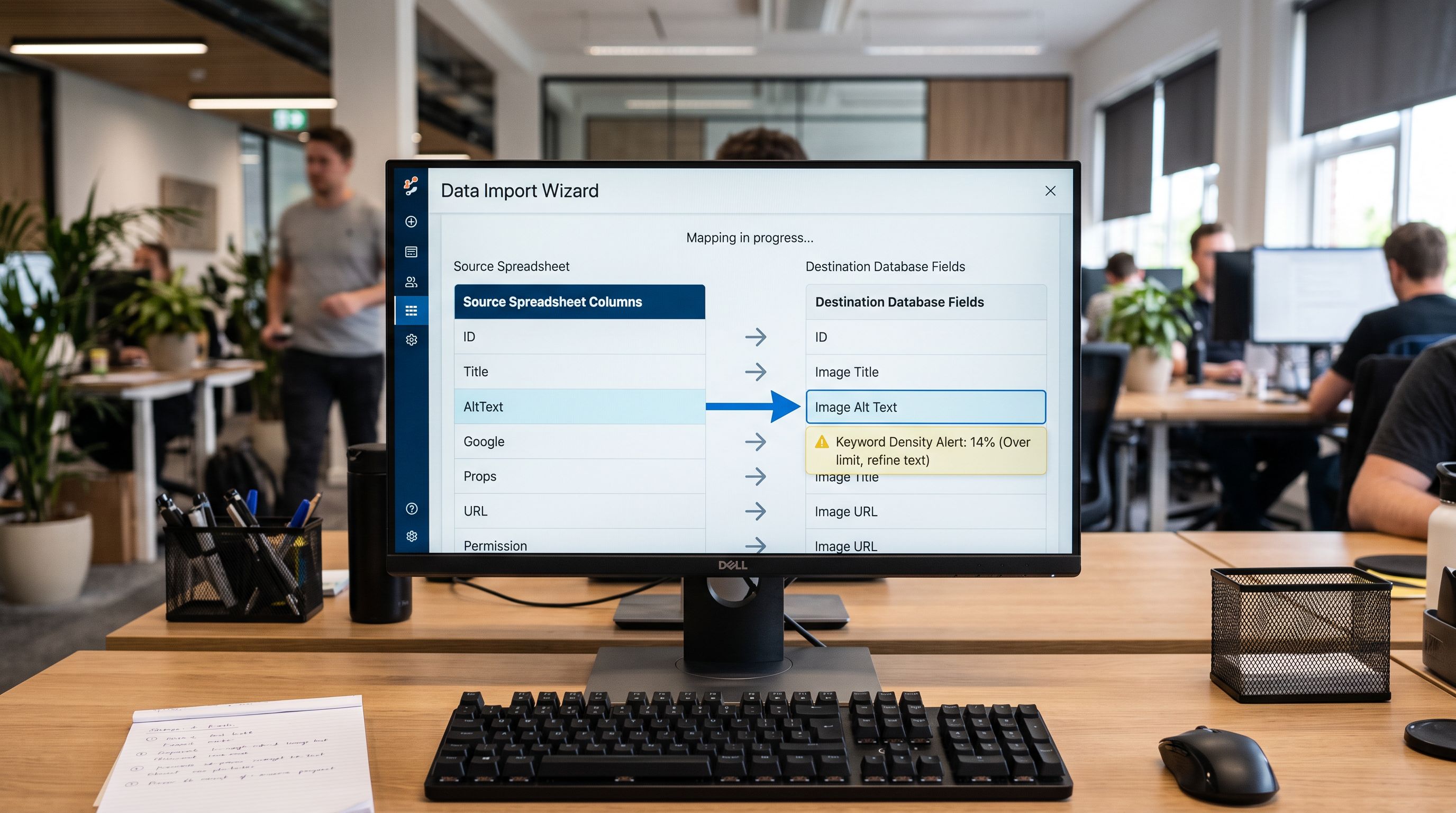
Supplier files use different naming conventions for this field: "AltText", "Alt_Text", "Image Description", "Caption", "Image Caption", "SEO Description". Importier's column auto-mapping in the import wizard recognises these as likely matches for Shopify's `Image Alt Text` field and flags them for confirmation rather than silently skipping them.
When mapping supplier alt text columns, three structural issues appear consistently:
**One value intended for all images.** A supplier may export a single alt text value meant for the primary product image. Applying it to all four images in a gallery means four images with identical alt text, which is a duplication signal. The mapping step should apply the supplier value to the primary image only and leave secondary image positions for the generation pass.
**Specification values in the wrong field.** Some suppliers export dimension or specification text as alt text: "200mm x 300mm Mounting Plate, 4-hole configuration, marine grade 316SS". This is specification data that belongs in a metafield, not image alt text. It describes the product, not the image.
**Language mismatch.** A German manufacturer's AltText column contains German text. Mapping it to an English-language Shopify store creates a language inconsistency that neither Google Images nor screen readers handle correctly. The mapping step flags mismatched language as a data quality warning.
## Auditing Supplier Alt Text Before Mapping
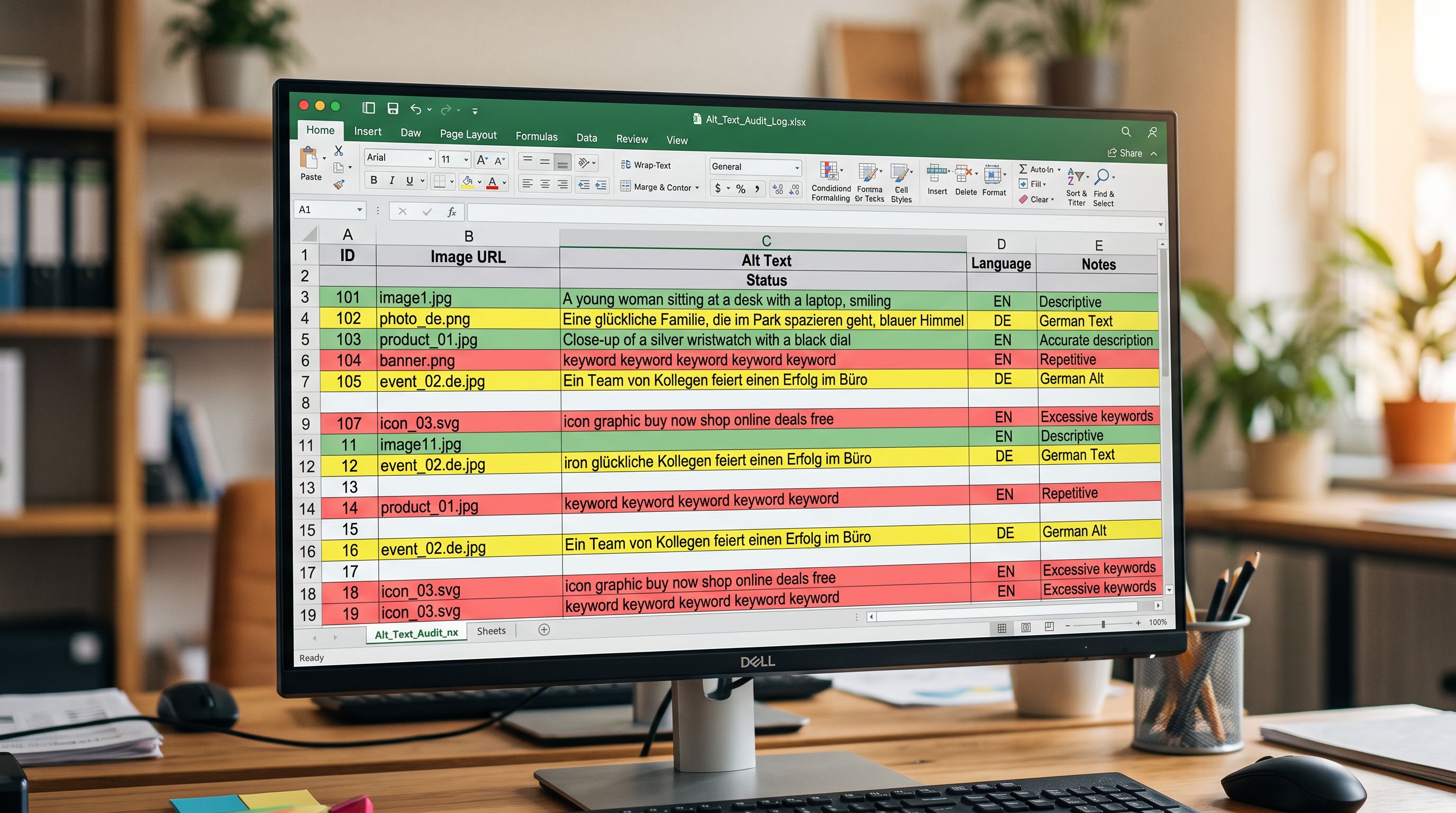
A quality audit on the supplier's alt text column before mapping identifies which values are usable, which need revision, and which should be discarded and replaced. Three checks apply:
**Keyword density check.** Count the number of times a brand name, product name, or category keyword appears in each alt text value. An alt text with "Fischer Ski" appearing three times in a 12-word string has keyword density that Google classifies as manipulative. One clear descriptive use of the brand name is the upper limit.
**Descriptive specificity check.** Does the alt text describe what is visible in the image? "Red winter jacket worn by woman standing on snowy mountain trail" describes an image. "Winter Jacket Buy Online Best Price Winter Clothing Sale" describes a search query. These are distinct content types. Alt text that fails to describe a specific image does not serve screen reader users and does not help Google Images classify the image.
**Length check.** Alt text under 4 words is too short to be descriptive for either Google Images or screen readers. Alt text over 125 characters exceeds the practical limit for screen reader usability. "Jacket" and "This Fischer cross-country ski features an ultra-lightweight monocoque carbon construction developed specifically for competitive sprint Nordic skiing events across varied terrain" both fail.
For the sports equipment distributor's 519 pre-populated values: 89% failed the keyword density check. The remaining 11% (57 products) were written by the manufacturer for German e-commerce accessibility requirements and contained genuine image descriptions. Those 57 values mapped directly. The 462 keyword-stuffed values went to the regeneration queue.
## Alt Text by Image Position Type
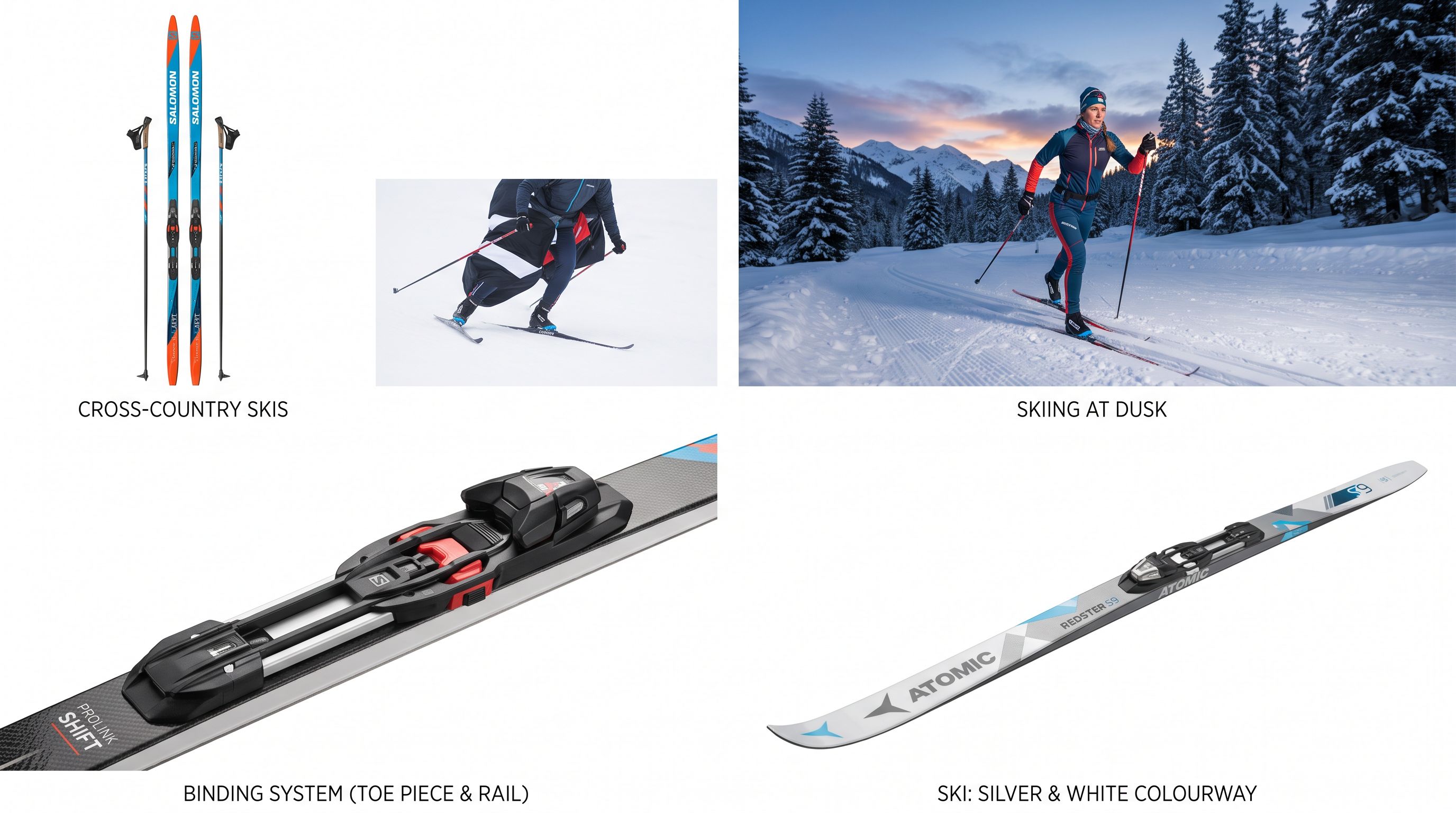
Different image positions in a product gallery serve different buyer needs and require different alt text conventions. Using the same alt text across all images in a product's gallery is an alt text quality failure even when the individual description is accurate.
**Primary or hero image.** The product photographed against a neutral background. Alt text names the product and its distinguishing attribute: "Fischer CRS Skate Ski 170cm, black and orange, right-facing". Product name, model, and size or key variant detail appear here.
**Lifestyle or context image.** The product in use. Alt text describes the activity: "Cross-country skier on groomed track at dusk". Google Images indexes lifestyle images under activity categories separately from product listings. The product name is secondary; the scene is primary.
**Detail or close-up image.** A specific component photographed close. Alt text names the component: "Fischer NNN binding close-up showing the central rail and toe piece". The full product name is unnecessary; the component name is the new information this image adds.
**Variant image.** A colour or configuration variant. Alt text names the variant attribute: "Fischer CRS Skate Ski, white and silver colorway". The differentiating attribute should be the most prominent information.
Importier's [bulk alt text generation](https://importier.app/blog/shopify-product-image-alt-text-bulk) uses position labels to generate position-appropriate descriptions rather than repeating the primary image description for every image in the gallery. For import column mapping, the position type informs which images should receive supplier alt text values and which should receive generated values.
## Measuring Alt Text Coverage as a Quality Metric
Alt text coverage is a data completeness metric that belongs in the pre-import audit alongside description coverage, price coverage, and barcode completeness. A [product data quality](https://importier.app/blog/shopify-product-data-quality) audit that checks everything except image field completeness leaves the most commercially consequential gap in SEO data uncounted.
Coverage measurement at the supplier file stage produces a three-part baseline:
**Presence rate.** What percentage of products have a non-blank alt text value? 519 of 1,400 = 37%.
**Quality-pass rate.** Of the non-blank values, what percentage pass the keyword density and descriptive specificity checks? 57 of 519 = 11%.
**Position coverage rate.** Of the products with alt text, what percentage have position-specific values for secondary images as well as the primary? For the German manufacturer's file: 0%. A single value applied to primary image only.
These three numbers together describe the actual state of alt text data in the supplier file. The presence rate alone (37%) looks like a partial data gap. The quality-pass rate (11%) reveals a data quality problem in the populated portion. The position coverage rate (0%) reveals that even the passing values are primary-image-only.
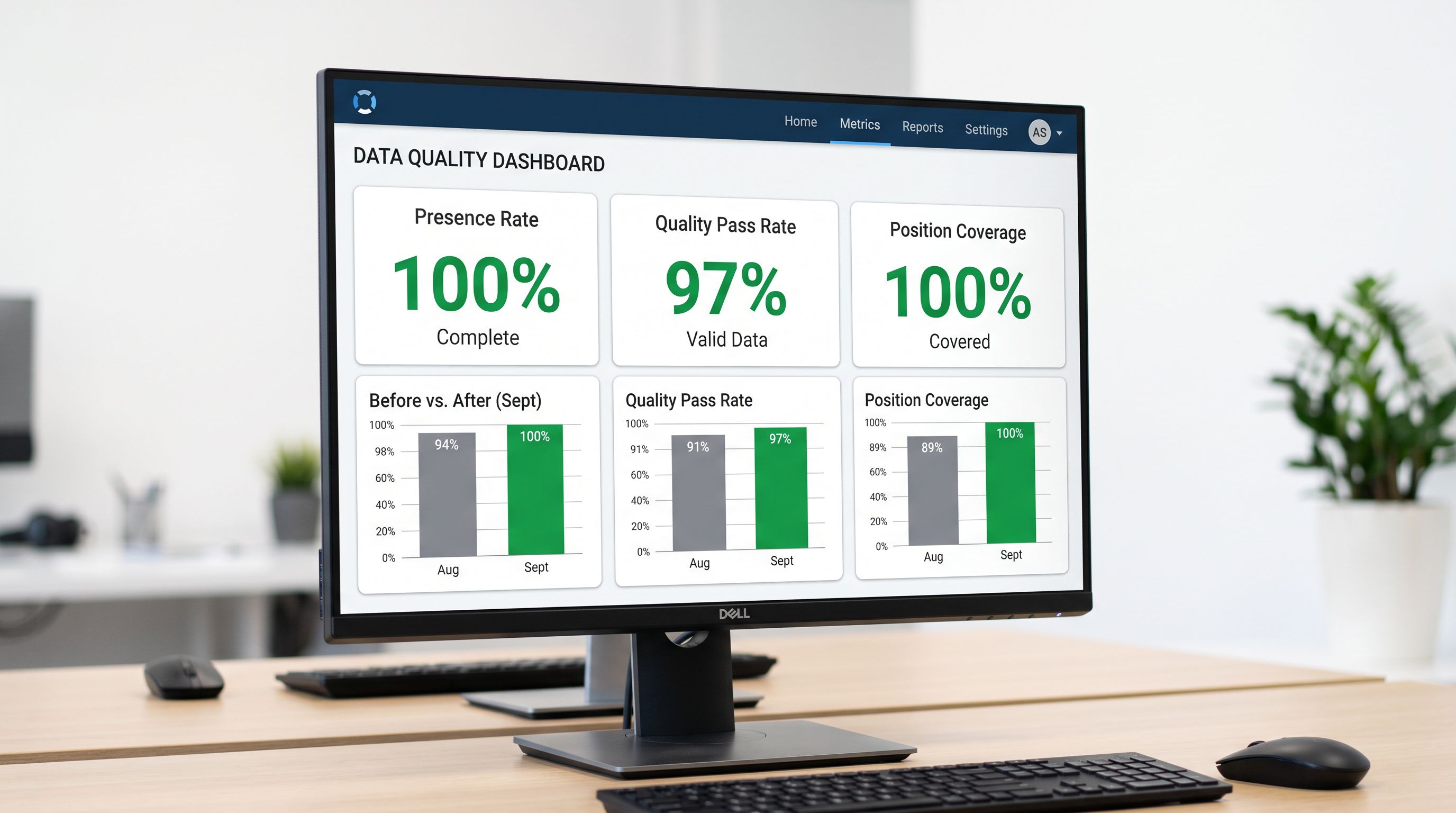
After a complete import, all three metrics should read: presence 100%, quality-pass rate validated by the audit tier classification, position coverage 100% across primary and secondary images.
## Why Keyword-Stuffed Alt Text Is Worse Than Blank
The comparison between blank alt text and keyword-stuffed alt text is not neutral. Blank alt text means Google Images cannot determine what is shown; the image may appear in results or not. Keyword-stuffed alt text sends an active negative quality signal.
According to [Google's image SEO best practices](https://developers.google.com/search/docs/appearance/google-images), alt text should "describe the content of the image clearly and succinctly." Google explicitly states that keyword stuffing alt attributes is a practice to avoid. Images with manipulative alt text are candidates for demotion in Google Images results and contribute to a page-level quality assessment that affects the product listing overall.
The [WCAG 2.1 guidelines on non-text content](https://www.w3.org/WAI/WCAG21/Understanding/non-text-content.html) establish the same requirement from the accessibility direction: alt text must convey the same information as the image it describes. A screen reader announcing "Fischer Ski Buy Online Best Price Fischer Skis" to a visually impaired user conveys nothing about the image and fails the accessibility standard. Both requirements (SEO and accessibility) are satisfied by the same description format: concise, image-specific, free of keyword repetition.
The sports equipment distributor ran the three-stage process on their 1,400-product catalogue. The quality audit identified 57 supplier values worth importing as-is. The 462 keyword-stuffed values were replaced with AI-generated descriptions using position labels to produce hero, lifestyle, and detail descriptions for each image slot. The 881 products with no supplier alt text received generated descriptions across all image positions in the same enrichment pass. Post-import: presence rate 100%, quality-pass rate 97% on a 50-product sample, zero keyword density failures. The three metrics that had started at 37%, 11%, and 0% all resolved to functional values in a single import session.
Try Importier free at importier.app.