# How Shopify Product Data Powers Email Marketing Campaigns
> Structure product descriptions, tags, and metafields at import time to unlock email segmentation, dynamic content blocks, and post-purchase flows.
- Published: 2026-09-29
- Author: Importier Team
- Category: Store Management / SEO & Discoverability
- Canonical: https://www.importier.app/blog/shopify-product-data-email-marketing
---
A sustainable fashion retailer imported 300 products from their supplier's catalogue. Fabric type, fibre composition, and care certification data were all present in the supplier file. The import ran without errors. Three weeks later, the merchant tried to build a "New Season Cotton Arrivals" email campaign in their email platform. Dynamic product blocks returned zero results when filtered by fabric type. The segment they needed (buyers who had previously purchased cotton products) could not be built either.
The product data was in the store. It was in the wrong field type.
The merchant had imported fabric type as a Shopify custom metafield (`custom.fabric_type`). Custom metafields require explicit access configuration before third-party apps can read them through the Storefront API. Their email platform, like most, reads product data through the standard Shopify product API fields: tags, product type, title, description, and vendor. The `fabric_type` metafield was invisible to it. Three weeks of email planning had produced no campaign to show.
The data fix took under an hour. The import-time decision to route fabric type to a metafield rather than a product tag took three weeks to surface as a problem.
## What Email Platforms Actually Read from Shopify
Email marketing platforms connect to Shopify through the Shopify API. What they can access for segmentation and dynamic content depends on the field type the data lives in. Understanding this distinction is the foundation of import-time decisions that enable email marketing.
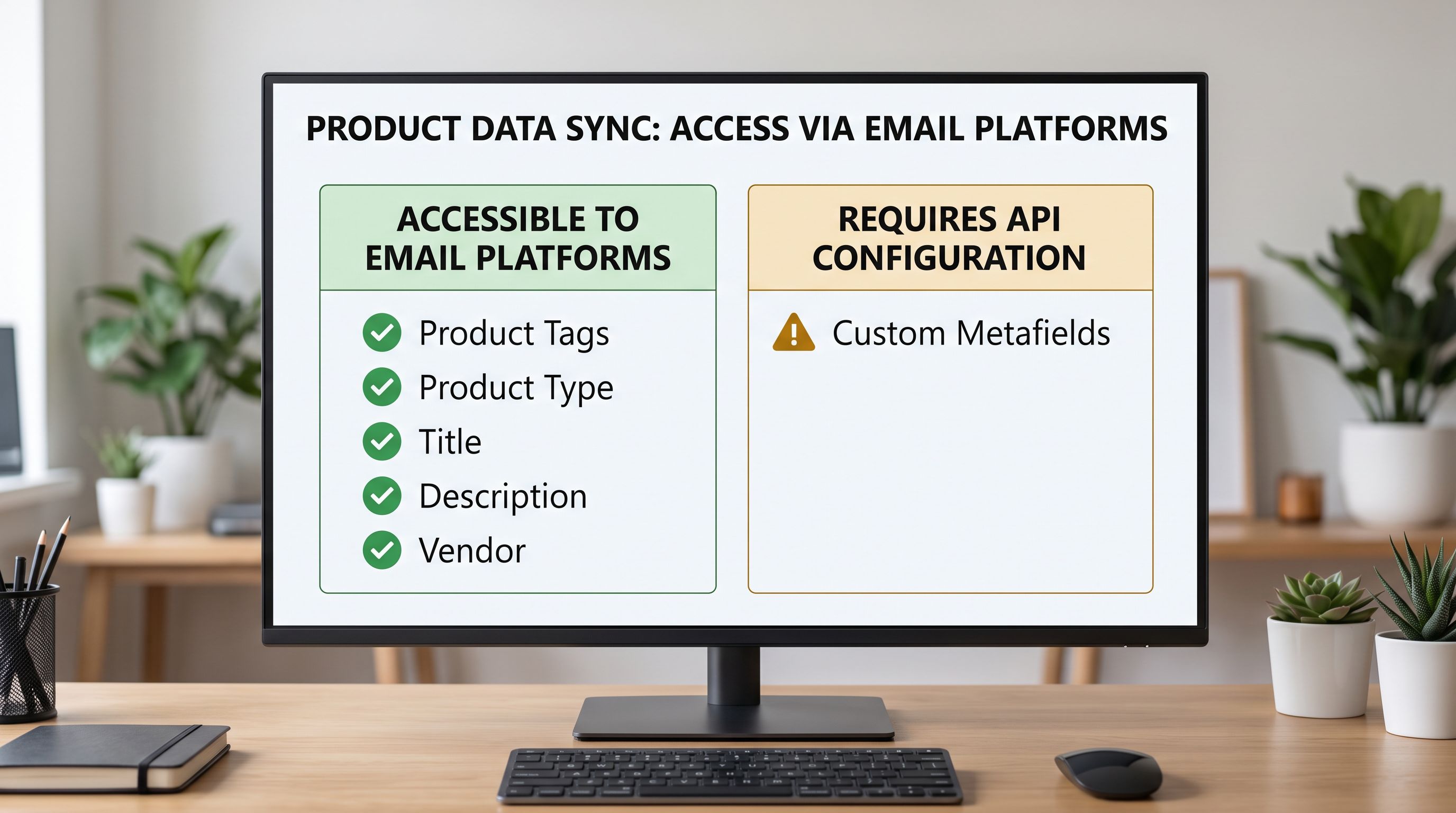
**Product tags** are the most versatile data type for email segmentation. Tags are string values attached to products and stored in a flat list. Email platforms read them directly without additional access configuration. A product tagged `fabric-cotton` is immediately queryable for segmentation ("show me products tagged fabric-cotton"), for dynamic content blocks ("insert products where tag contains fabric-cotton"), and for post-purchase flow triggers ("customer purchased product tagged fabric-cotton: enrol in care-instruction sequence").
**Product type** provides coarse category segmentation. "Clothing", "Accessories", "Homewares" map to high-level audience segments but lack the specificity needed for material, feature, or occasion-based targeting.
**Product body HTML (description)** appears in email dynamic content blocks. When a customer abandonment or post-purchase email includes a "You might also like" product block, the platform pulls title, description, price, and primary image. Description quality determines click-through on those blocks: a 200-character placeholder description produces a different result than a 300-word description structured around the attributes that motivated the original purchase.
**Custom metafields** are not accessible to email platforms by default. They require the metafield namespace to be set to `storefront` access (rather than `app` or `admin` access), which is a Shopify admin configuration step separate from the import. In practice, most Shopify stores have custom metafields configured for internal app use or storefront theme display, not for third-party platform access. Importing specification data to a custom metafield and expecting an email platform to use it is the mistake the sustainable fashion retailer made.
Product tags are the primary product data field that email platforms use for segmentation. Custom metafields require explicit Storefront API access configuration before third-party platforms can read them. Most email marketing use cases are better served by a structured tag taxonomy than by custom metafield values.
## Designing a Tag Taxonomy for Email Segmentation
A tag taxonomy is the set of standardised tag values used across the catalogue for segmentation and automation. Designing it before import rather than after ensures consistent values that email platforms can filter reliably.
The common failure mode is ad hoc tagging: each product gets tags that reflect what the merchant thought of at import time. The sustainable fashion merchant had tags like "cotton", "Cotton", "Cotton Fabric", and "100% cotton" across different products: four values that a segment filter reading exact matches would split across four separate segments rather than unifying into one.
Three principles govern an import-time tag taxonomy:
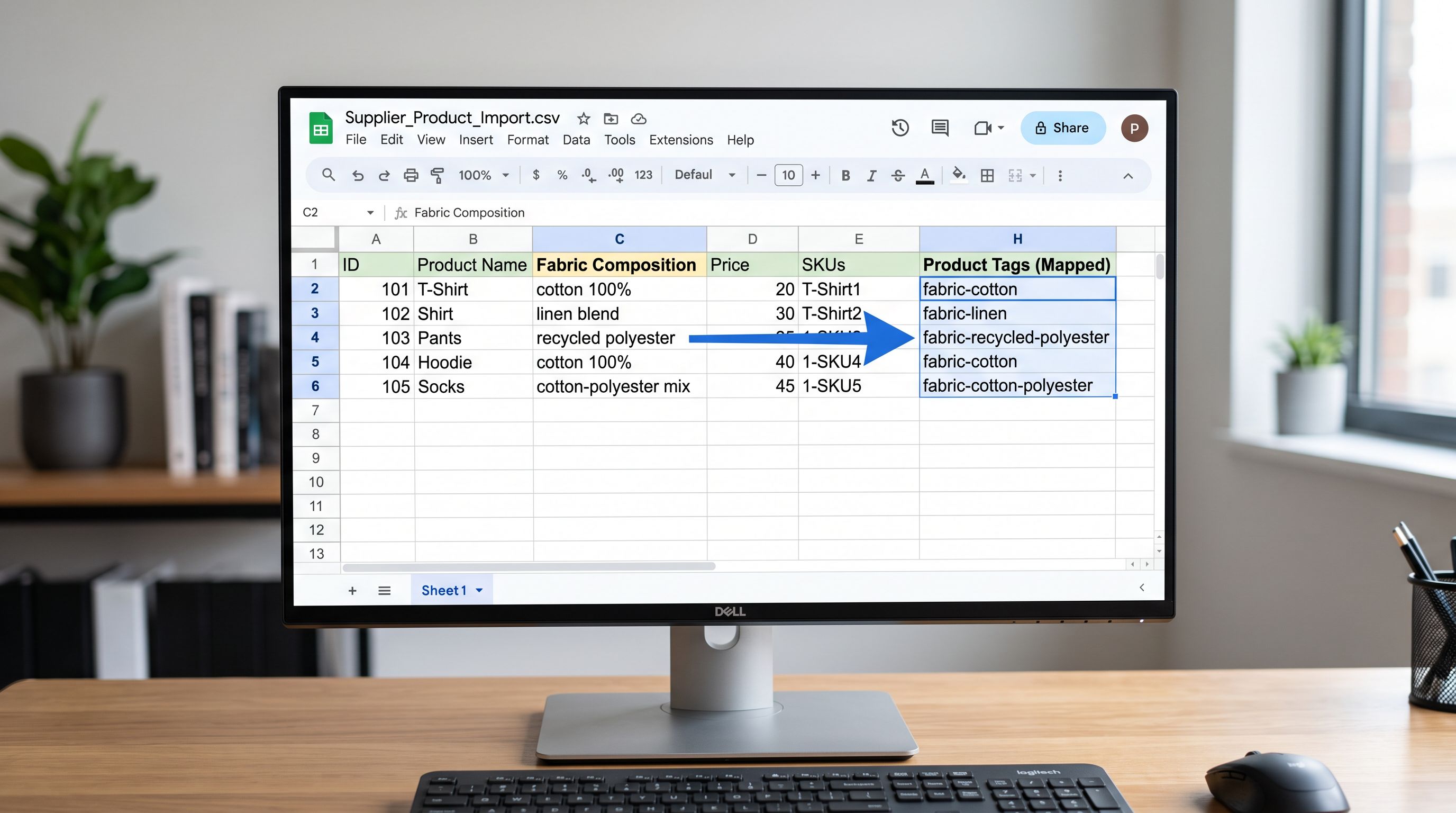
**Namespaced prefixes for segment tags.** Tags used for email segmentation should share a consistent prefix that distinguishes them from operational tags (collection routing, automated collection rules, Shopify POS filtering). The format `category-value` works reliably: `fabric-cotton`, `fabric-linen`, `fabric-recycled-polyester` for materials; `season-spring`, `season-summer` for seasonal routing; `occasion-gifting`, `occasion-formal` for gift campaign segmentation. Namespaced prefixes make it straightforward to build email segments ("products where tag starts with fabric-") without importing unrelated operational tags into the filter.
**Lowercase, hyphenated values.** Email platforms filter tags by exact string match. `fabric-cotton` and `Fabric-Cotton` are different values. Establishing lowercase, hyphenated as the canonical convention at import time prevents case-sensitivity failures in segment filters. [Shopify's product tags documentation](https://help.shopify.com/en/manual/products/details/tags) notes that tags are case-sensitive and limited to 255 characters each, two constraints that reinforce the case for a standardised naming convention. The [product tags bulk import workflow](https://importier.app/blog/shopify-product-tags-bulk) enforces this through the import column mapping step.
**Separate segment tags from flow-trigger tags.** Tags that trigger automations ([new-arrival, restock, sale-markdown triggers in Klaviyo flows](https://importier.app/blog/shopify-klaviyo-product-import-tags)) have different requirements than tags used for audience segmentation. Flow-trigger tags need to be unique to a specific event; segmentation tags need to be persistent. Using distinct tag prefixes for each purpose (`flow-new-arrival` vs `material-cotton`) keeps the two systems from interfering.
A tag taxonomy designed before import costs one planning session. The alternative (unifying ad hoc tags after 300 products are live) costs three times as long and still leaves historical purchases mapped to the old tag values.
## How Descriptions Determine Email Content Performance
Product descriptions serve two separate functions that most merchants conflate. On the product page, descriptions address the buyer who has arrived with intent and is evaluating the product. In email dynamic content blocks, descriptions are pulled automatically to represent the product to a buyer who has not yet decided to visit.
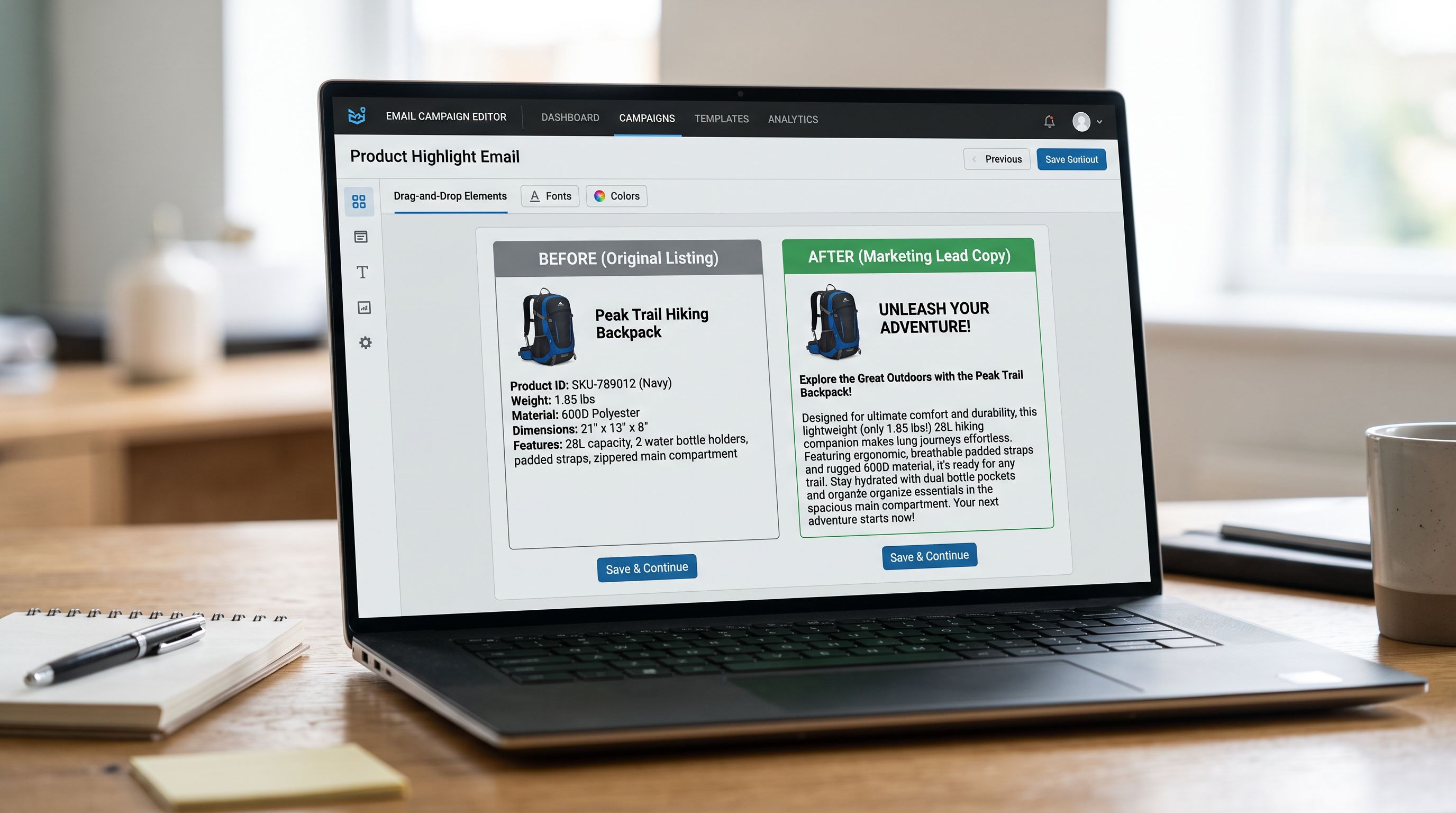
The email platform typically pulls the first 150-300 characters of the body HTML description for product block previews. A description that opens with specifications ("SKU: FSH-COT-001. Material: 100% organic cotton. Weight: 180gsm.") produces a useless email preview. A description that opens with the buyer benefit ("This 180gsm organic cotton tee is cut for everyday wear and certified by the Global Organic Textile Standard") produces a preview that gives the buyer a reason to click.
The practical requirement: the opening sentence of every product description should function as an email preview. It should name what the product is, what distinguishes it, and what buyer situation it addresses, in under 200 characters. The rest of the description can go into specification depth. But the opening sentence determines email click-through.
For the sustainable fashion retailer, 68% of their product descriptions opened with specifications or supplier codes rather than a benefit statement. A [bulk description update](https://importier.app/blog/shopify-product-data-quality) using a consistent "benefit-first" description template resolved the email preview problem across the full catalogue in a single pass.
## Building the Import Workflow for Email-Ready Product Data
An import designed for email marketing capability addresses three requirements: tag taxonomy enforcement, description opening quality, and field routing (tags vs metafields).
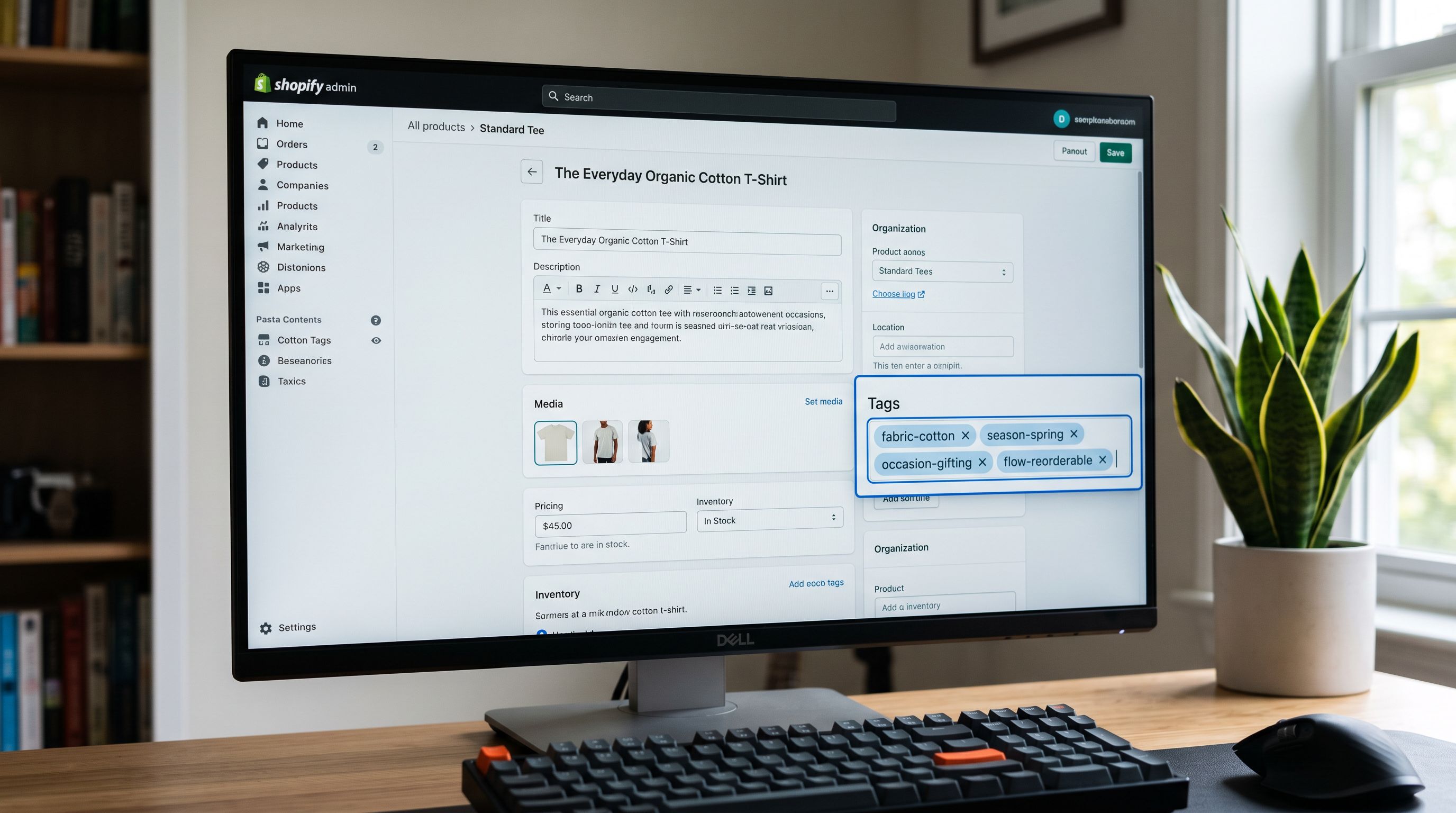
The final step (mapping to both a tag and a metafield) covers the case where the merchant needs the attribute available for both purposes. Shopify collection filters can use product tags or metafield values as filter dimensions; the choice depends on the theme configuration. Email platforms use tags. Importing the attribute to both fields at import time means neither system is compromised.
## Post-Purchase Flows Enabled by Structured Product Data
Post-purchase email sequences (care instructions, reorder reminders, cross-sell recommendations) require product-level data to be structured at the time of purchase. The purchase event records the product tags at that moment; subsequent tag changes do not affect the historical purchase record.
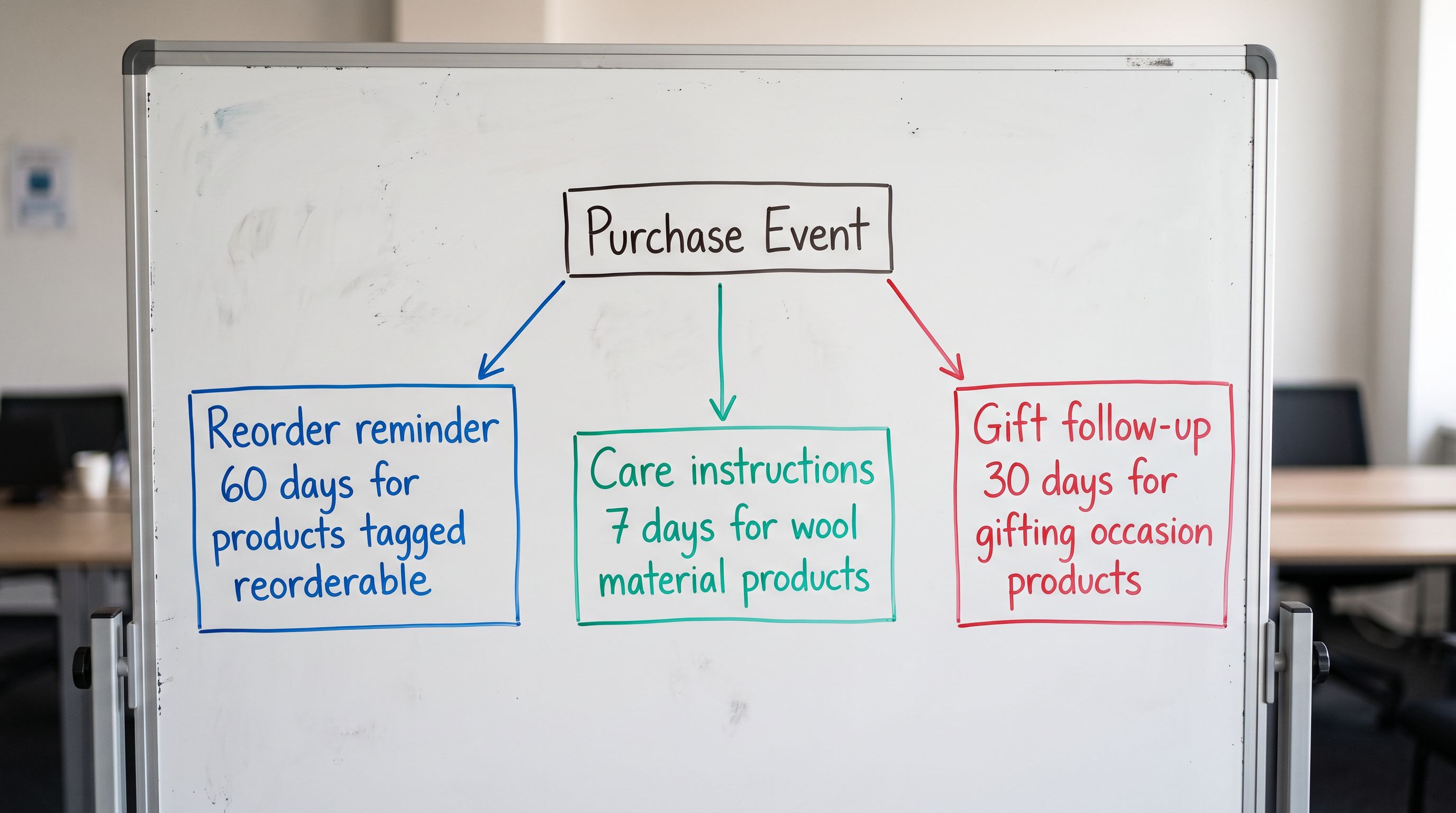
This creates a one-way dependency: the data structure at import time determines what post-purchase flows can be triggered for every purchase that follows. A reorder reminder flow for consumable products requires a tag (`flow-reorderable`) applied at import. A care-instruction sequence for specific materials requires a `material-` prefix tag applied at import. Neither can be applied retroactively to historical purchases.
According to [Shopify's research on email marketing performance](https://www.shopify.com/blog/email-marketing), post-purchase emails generate significantly higher open rates than promotional campaigns. The purchase event is the highest-intent signal available, and the product data structure at import time determines how precisely that signal can be used.
The sustainable fashion retailer rebuilt their import with a tag taxonomy designed in advance: three material prefixes, two seasonal prefixes, one flow-trigger prefix for reorderable products. Descriptions were reviewed against the benefit-first opening sentence standard before the import ran. The "New Season Cotton Arrivals" campaign launched four days after the re-import. The `material-cotton` segment returned 94 products against the 93 expected. Post-purchase care-instruction flows triggered correctly on first orders.
The data that enables email marketing is product data. The decisions that determine email marketing capability are import decisions.
Try Importier free at importier.app.