# Shopify Post-BFCM Returns Import: Restock Returned Products and Capture Return Reasons
> How to process the BFCM returns wave in Shopify: bulk-restocking returned units, capturing return reason codes as product tags, and using return data to fix catalogue gaps before Christmas.
- Published: 2026-11-06
- Author: Importier Team
- Category: Store Management / Compliance & Logistics
- Canonical: https://www.importier.app/blog/shopify-post-bfcm-returns-import
---
The two weeks after BFCM follow a predictable pattern: a surge of return requests arrives, returned units need restocking, and the inventory count in Shopify falls out of sync with the physical count. At the same time, the return reasons (size issues, description mismatches, damaged in transit, changed mind) are sitting in unstructured notes and customer messages, never converted into actionable product data.
A post-BFCM returns import addresses both problems. It restocks returned inventory in bulk and captures return reason data as structured product tags that drive two outcomes: inventory accuracy before Christmas and catalogue improvements for next year.
The BFCM returns window runs roughly 10-14 days after the sale period ends. Processing returns quickly restores inventory levels before Christmas demand: a unit sitting in the returns pile is a unit that cannot sell. The same processing run is the right moment to tag products with the return reason, because the reason data is live and specific.
## Why Return Reasons Matter as Product Data
A return reason captured in a customer service note is ephemeral. It lives in a ticket, gets closed, and disappears. A return reason attached to the product as a tag is permanent, queryable, and actionable.
The four high-signal return reasons from BFCM:
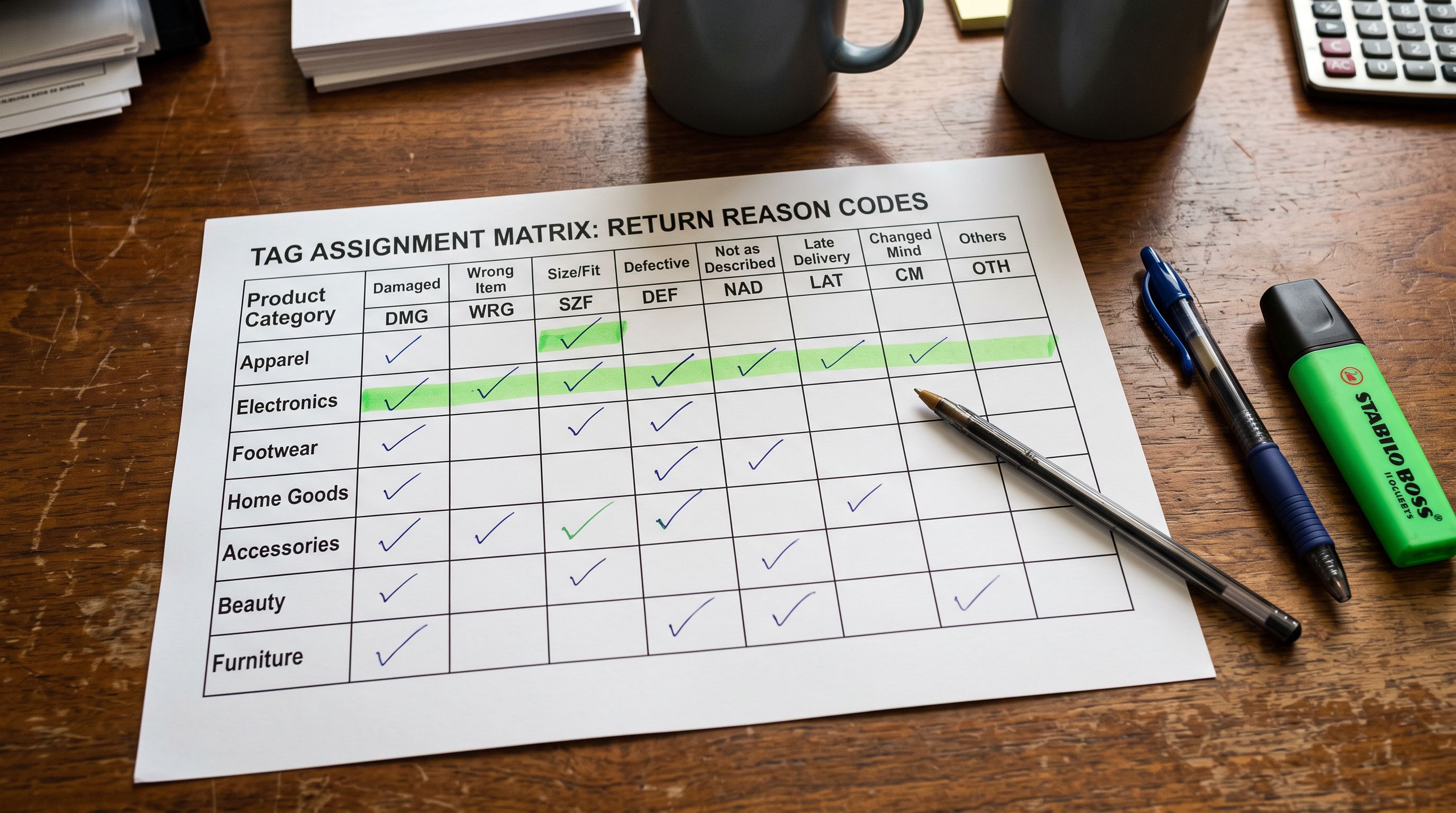
**Size or fit issues.** A product receiving multiple size-related returns has a sizing guide problem, a description problem, or a genuine sizing accuracy problem. Tagging these products with `return-size-issue` flags them for a description update (add explicit measurements, clarify the fit) and potentially a variant structure review (is the size range accurate?).
**Description mismatch.** The product looked different on screen than in person. Colour accuracy, texture misrepresentation, or missing context (this is sheer, this is loud, this is smaller than it looks). Tagging with `return-description-mismatch` flags these for an AI description refresh and potentially a photography review.
**Arrived damaged.** Packaging failure during peak volume. Tagging with `return-damaged` flags these for a packaging assessment. If multiple units of the same product arrived damaged, the product's weight and fragility handling needs a supplier conversation.
**Changed mind or gifting miss.** The buyer made the purchase decision quickly (BFCM pressure) and regretted it, or bought as a gift that did not land. Tagging with `return-changed-mind` distinguishes impulse-driven returns from product quality issues. Products with high changed-mind rates after BFCM often have BFCM-specific positioning that created a mismatch between expectation and delivery.
Each tag category points to a different fix. The return data is free intelligence; merchants who capture it systematically make better decisions the following year.

## The Two-File Returns Import Approach
The post-BFCM returns import runs as two separate operations: an inventory adjustment and a tag update. These need to stay separate because inventory and tags live in different columns of the Shopify CSV, and combining them increases the risk of errors affecting live product data.
**File 1: Inventory restock.** Updates Variant Inventory Qty for returned units that have passed inspection and are cleared for resale. Products that failed inspection (damaged, unsellable) do not go into this file.
**File 2: Return reason tags.** Adds the return reason tag to each product that received returns during the window. This file contains Handle and Tags only.
The two-file approach also means the inventory restock can run immediately (restoring available stock for Christmas buyers) while the tag update runs after the team has completed the return reason classification pass.
## Building the Inventory Restock File
The inventory restock file needs: Handle, Variant SKU, and Location (the specific Shopify location receiving the returned stock), and the restocked quantity.
Shopify's inventory import model for restocked returns uses the Variant Inventory Qty field set to the new total, not the quantity being added. If a product had 12 units before BFCM, sold 8 during the sale, and 2 were returned and cleared for resale, the correct Variant Inventory Qty in the import file is 6 (the 4 unsold units plus the 2 returned and restocked).
This means the restock file is built from your post-BFCM inventory count, not from the return quantity alone. Export your current inventory count from Importier using the Inventory preset, add the returned and cleared units to the count, and import the updated quantity.
```
Handle,Variant SKU,Location,Variant Inventory Qty
merino-crew-neck-sweater-navy,MCS-NAV-M,Main Warehouse,6
linen-tablecloth-natural,LTN-120x180,Main Warehouse,14
cedar-soy-candle-250ml,CSC-250,Main Warehouse,22
```
Run this import in Importier using the **Update existing products only** mode. This prevents any mismatched Handle from creating a new product record. Map Handle to Product Handle, Variant SKU to Variant SKU, and Variant Inventory Qty to the inventory field for the relevant location.
## Building the Tag File
The return reason tag file is Handle and Tags. The same Tags column preservation rule applies as any other tag import: include all existing tags along with the new return reason tag, or the import will overwrite the existing tag set.
The standard approach: export the product's current tags from the Full Shopify CSV export, add the return reason tag in a spreadsheet column, and import the updated Tags column.
```
Handle,Tags
merino-crew-neck-sweater-navy,"new-arrival,gifting,return-size-issue"
linen-tablecloth-natural,"homeware,gifting,return-description-mismatch"
cedar-soy-candle-250ml,"gifting,candle,return-changed-mind"
```
If a product received returns with multiple different reasons (size issues and description mismatches), apply all relevant tags. This is rare (most products generate returns concentrated in one reason category), but it matters for the downstream analysis pass.
The [bulk Compare At Price management guide](https://importier.app/blog/shopify-compare-at-price-bulk) covers the Tags column preservation technique in detail if you are unfamiliar with the full-replacement behaviour of the Shopify Tags import.
## Running the Returns Import in Importier
## Using Return Data Before Christmas
The return reason tags turn a reactive process into a proactive one. By November 15, before the Christmas peak begins, you can query your catalogue for products with return reason tags and address the underlying issues.
**For `return-size-issue` products:** update descriptions to include explicit measurements (not just "S/M/L" but actual centimetre or inch dimensions), add a size guide link, and review whether variant labels match common sizing conventions. Products corrected before Christmas convert better in gift-search contexts where buyers are less certain of the recipient's size.
**For `return-description-mismatch` products:** run an AI description refresh in Importier. Products flagged for description mismatch have a gap between the digital impression and the physical experience. The AI regeneration pass with a Sensory-Rich or Benefits-First persona adds texture and accuracy that closes that gap.
**For `return-damaged` products:** flag these for the operations team. The product data fix (better weight/dimensions, fragility notes) is a supplier conversation, not a catalogue import task.
The [post-BFCM product data cleanup guide](https://importier.app/blog/shopify-post-bfcm-product-data-cleanup) covers the broader catalogue quality pass that runs alongside the returns workflow. The returns import is the inventory and tagging component; the cleanup guide handles compare-at prices, broken collections, and missing metafields from the BFCM period.

## Timing and Sequencing
The returns import sits in a specific window in the post-BFCM calendar. The [BFCM restock import](https://importier.app/blog/shopify-bfcm-restock-import) covers mid-sale inventory top-ups. The [post-BFCM Compare At recovery](https://importier.app/blog/shopify-bfcm-compare-at-price-recovery) clears sale pricing from the catalogue. The returns import processes the customer return wave that follows both.
The correct sequence:
1. **During BFCM:** mid-sale restock imports restore inventory from supplier top-ups.
2. **Day 1-2 after sale closes:** Compare At recovery clears sale pricing across the range.
3. **Days 3-14:** returns arrive and are processed. Inventory restock file runs as units clear inspection. Tag file runs at the end of the returns window once the reason classification is complete.
4. **By November 15:** return reason tags reviewed and fixes applied before Christmas traffic begins.
Running the returns import before the Compare At recovery creates a risk: some returned products may still carry BFCM sale pricing. Clear the sale pricing first (so the product is correctly priced when restocked inventory makes it available again), then run the returns import.
The return reason is not just a refund justification. It is a product brief for the next iteration. Capturing it as a tag takes ten seconds and pays off across every future season.
Shopify's [inventory management documentation](https://help.shopify.com/en/manual/products/inventory/getting-started-with-inventory) covers how inventory adjustments work at the location level. For merchants with multiple warehouse locations, the inventory restock import should specify the location receiving the returned stock; the Location column maps to the specific Shopify location identifier. The Australian Retailers Association's guidance on [post-peak inventory reconciliation](https://www.retail.org.au/resources) outlines the standard window (10-14 days) for processing peak-season returns in retail.

For merchants running BFCM across multiple years, the return reason tags accumulate a data asset. After two or three BFCM cycles, the products consistently tagged `return-size-issue` or `return-description-mismatch` reveal structural catalogue problems that individual fixes do not resolve. These products are candidates for a more fundamental review: variant restructuring, product photography, or supplier discussion. The tags do not expire; they are there every time you run a filtered export.
Try Importier free at [importier.app](https://importier.app).