# Shopify EU VAT Product Import: OSS, Rates, and Compliance
> EU has 27 VAT countries with different rates. A Shopify EU VAT product import needs correct tax classification, OSS registration, and CE compliance data.
- Published: 2026-08-08
- Author: Importier Team
- Category: Store Management / Compliance & Logistics
- Canonical: https://www.importier.app/blog/shopify-eu-vat-product-import
---
A homeware merchant in Melbourne sets up a Shopify EU VAT product import from their main supplier CSV and starts selling into Germany, France, and the Netherlands. Their Shopify store is configured with a single VAT rate. Six months in, their EU accountant flags the problem: Germany's standard VAT rate is 19%, France's is 20%, and the Netherlands is 21%. Every German order has been billed at the wrong rate. Their import also missed the CE marking data required for electrical goods sold in the EU. Two compliance problems from a single missed configuration step.
Selling into EU countries through Shopify requires more than accepting European payment methods. EU VAT is applied at 27 different country rates. Products in certain categories must carry CE marking or other EU compliance declarations. Merchants above a specific threshold must register for VAT through the EU's One Stop Shop (OSS) or individually in each country where they sell. None of this data arrives in a supplier CSV. It must be configured at import time or corrected after every sale.
This article covers the EU tax and compliance requirements that affect Shopify product imports: what OSS is, how EU VAT rates work at the product level in Shopify, which compliance data to include in an import, and how Importier's compliance feature handles multi-country data across a catalogue.
## EU VAT: 27 Countries, 27 Rates
The EU VAT system has no single rate. Each of the 27 member states sets its own standard rate and reduced rates. The standard rates range from 17% (Luxembourg) to 27% (Hungary). Most countries also have reduced rates for food, medicine, and books that differ from country to country. Configuring "EU VAT" as a single number in Shopify misrepresents what a customer in Germany, France, or Spain actually owes.
Shopify handles this through its Shopify Markets feature. A merchant selling to EU customers configures separate markets (or a combined EU market) with country-specific tax rates applied at checkout. The per-country rate configuration is done at the store level, not the product level. However, individual products may qualify for reduced rates or exemptions in some countries (food and medicine being the most common), which requires product-level tax class settings.
The distinction matters at import: when a merchant imports 300 food products without configuring tax class, Shopify applies the standard rate of whatever market the customer is in. A French customer buying bread gets charged at France's standard rate of 20%, when bread in France is zero-rated for VAT purposes.
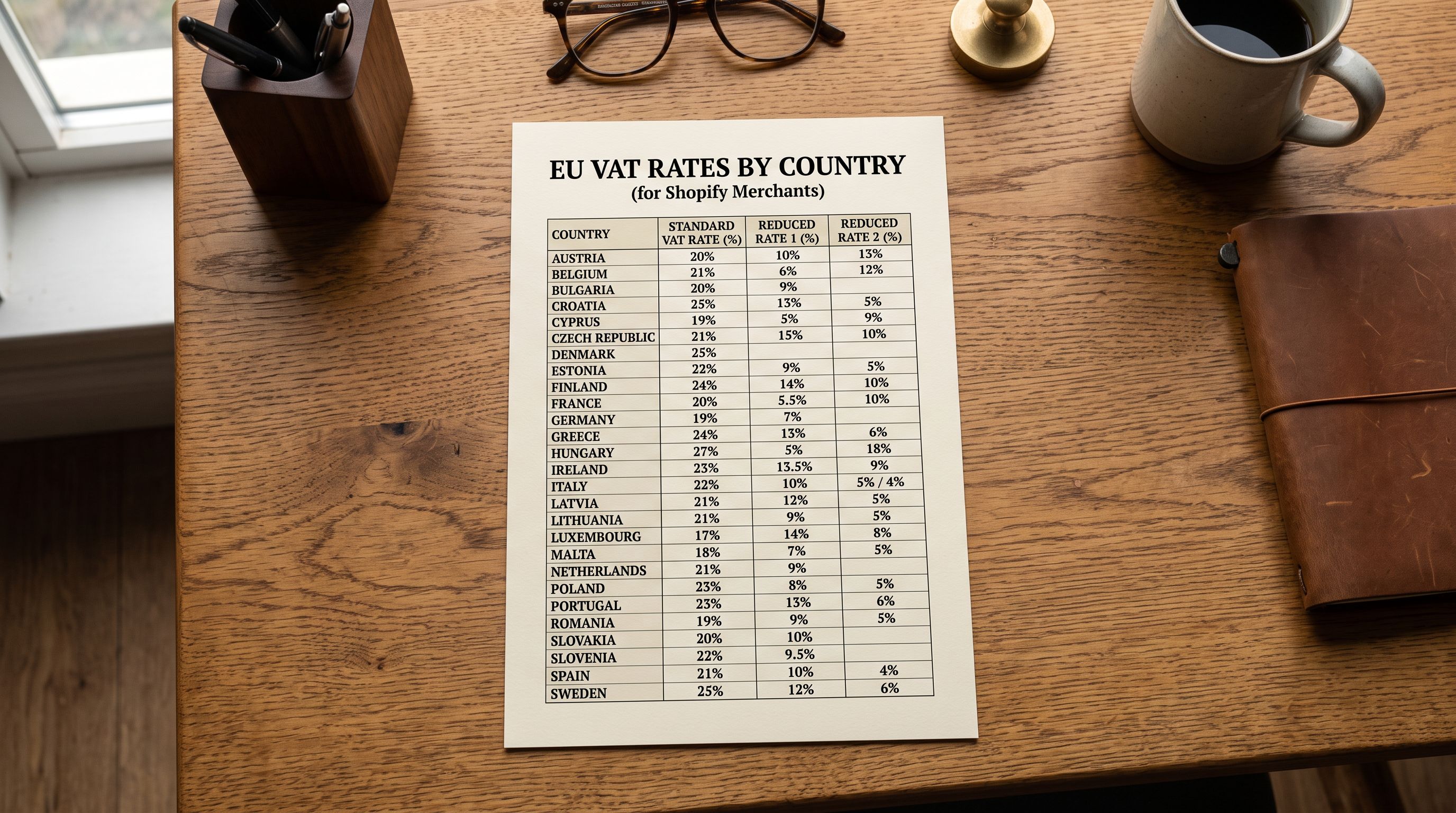
Before July 2021, merchants selling into multiple EU countries had to register for VAT in each country where they sold. The VAT One Stop Shop (OSS) replaced this for most cross-border B2C sales. With OSS, a merchant registers in one EU member state and files a single quarterly return covering all EU countries. The One Stop Shop does not eliminate per-country VAT rate configuration in Shopify; it simplifies the reporting and payment, not the rate calculation.
## When EU VAT Obligations Apply
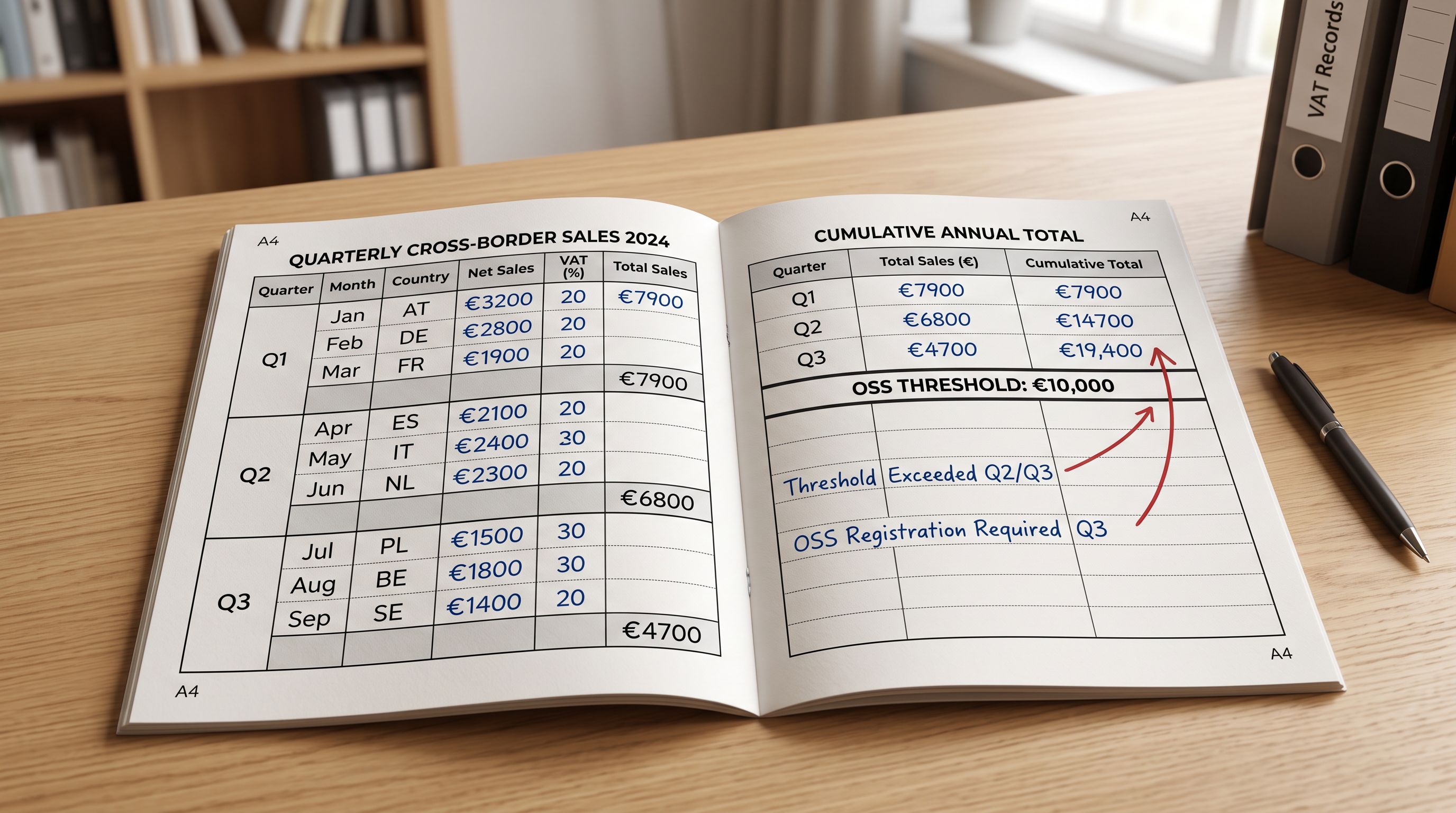
EU VAT obligations apply to any merchant selling goods or services to EU consumers, regardless of where the merchant is based. The threshold that determines registration method is €10,000 in annual cross-border EU sales.
Below €10,000 in EU cross-border sales per calendar year, a merchant may apply their home country's VAT rules (if based in an EU country) or no EU VAT if based outside the EU. Above €10,000, the merchant must apply the VAT rate of the customer's country on each transaction.
A UK-based merchant who sells €9,000 to EU customers in January and €1,500 in February crosses the threshold partway through February. From that point, they owe EU destination-country VAT on every EU sale for the remainder of the calendar year, not just on sales above €10,001. The threshold is cumulative for the year, not per transaction. Merchants close to the threshold need to monitor their EU revenue and trigger OSS registration before the obligation applies, not after.
Non-EU merchants (US, UK, Australian) cannot register for OSS directly. They register for VAT in one EU member state and use the Non-Union OSS scheme. [Ireland's Revenue Commissioners guide to OSS](https://www.revenue.ie/en/vat/oss/) covers the registration process for both EU-based and non-EU merchants in plain language and is one of the clearer official references available.
The OSS threshold of €10,000 in annual EU cross-border sales resets on 1 January each calendar year. A merchant who crosses it in November and registers for OSS continues to owe EU destination VAT from that point. They cannot opt out mid-year and revert to home-country rates until the next calendar year begins.
## EU Product Compliance: CE Marking and Regulatory Data
VAT is not the only compliance requirement for EU product imports. Products in specific categories must carry [CE marking](https://single-market-economy.ec.europa.eu/single-market/goods/ce-marking_en), a declaration that the product conforms to applicable EU health, safety, and environmental directives, before they can be sold in the EU.
Categories that require CE marking include:
**Electrical and electronic equipment.** Anything powered by mains electricity or battery falls under the Low Voltage Directive and often the EMC Directive. This includes home appliances, lighting, consumer electronics, and power tools.
**Toys.** All toys sold in the EU must carry CE marking certifying compliance with the EU Toy Safety Directive, including specific requirements for choking hazard labelling, age warnings, and chemical safety standards.
**Personal protective equipment.** Helmets, safety gloves, respirators, and any protective gear sold in the EU must carry CE marking under the PPE Regulation.
**Machinery.** Industrial equipment, power tools, and certain outdoor equipment must carry CE marking under the Machinery Directive.
**Medical devices.** Any product making a health or diagnostic claim requires CE marking under the Medical Device Regulation.
CE marking is not a certification applied by an external body in most cases; it is a manufacturer's or importer's self-declaration that the product meets the relevant directive requirements, backed by a technical file. The importer of the product into the EU bears responsibility for the declaration if the manufacturer is outside the EU.
For Shopify merchants importing catalogues that include any of these categories, the compliance status of each product needs to be captured at import time. The product record must note whether CE marking applies, whether the declaration of conformity exists, and whether the relevant directive versions are current. Without this data in the product record, a merchant cannot respond to a market surveillance request or generate accurate product documentation.
## Configuring EU VAT Rates in a Shopify Product Import
EU product-level VAT configuration in Shopify operates through two mechanisms: the `taxable` boolean (controls whether any tax applies) and per-market tax rate overrides (controls which rate applies for which country).
For most products, `taxable: true` is correct and Shopify applies the destination-country standard rate. The cases where product-level configuration is needed:
**Zero-rated or exempt products.** Basic food, medicine, printed books, and children's clothing are exempt or zero-rated in many (but not all) EU countries. A merchant importing food products must set `taxable: false` or configure reduced-rate overrides for the relevant markets.
**Reduced-rate products.** Products that qualify for a reduced rate (5-15% depending on country) need Shopify Markets tax overrides applied per product or per collection. The reduced rate for the same product can differ between member states: Germany's reduced rate is 7%, France's is 5.5%, Ireland's is 13.5% for some categories.

**Age-restricted or excise goods.** Alcohol, tobacco, and certain luxury goods have additional excise duty in many EU countries. These are separate from VAT configuration but the import record should flag these products for separate treatment.
## EU Compliance Data in Importier's Import Wizard
Importier's 14-step import wizard includes a compliance step specifically for multi-country selling. For EU products, this step handles:
**Registration number storage.** An OSS registration number, WEEE registration number, or EORI number can be stored against the product or the merchant account and displayed in AI-generated product descriptions for EU-facing pages. Merchants selling in Germany are required to display their WEEE registration number; Importier's compliance feature inserts it automatically in the delivery section of every description for products in applicable categories.
**Country-specific compliance language.** The AI description engine generates different compliance language depending on the destination country configured. German descriptions include the WEEE number and GPSR (General Product Safety Regulation) contact information. French descriptions include waste disposal instructions. This is generated at description-creation time from the compliance data in the product record.
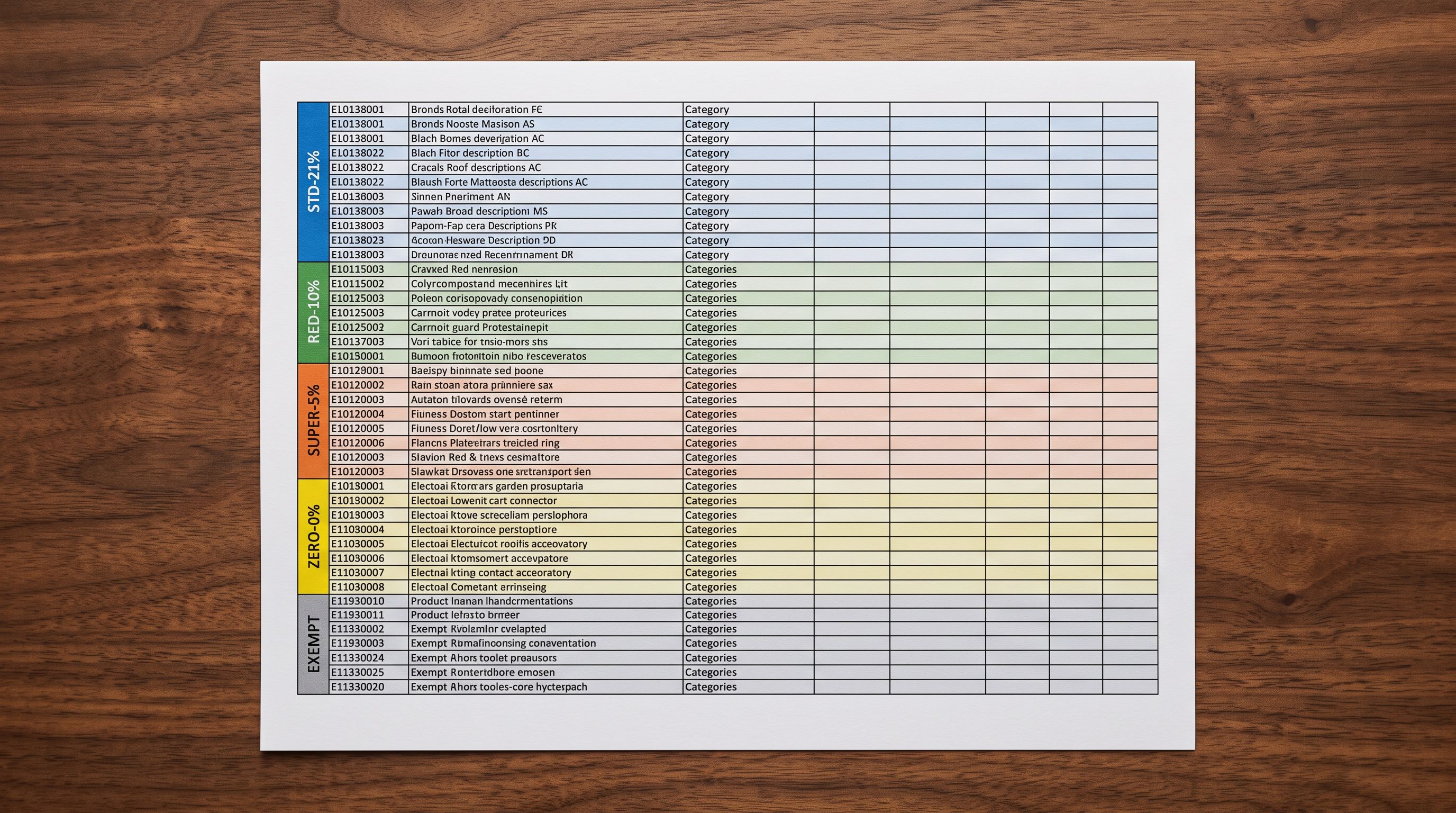
**HS code and country of origin validation.** EU customs requires accurate HS codes and country of origin on commercial invoices for goods crossing into the EU. Importier flags products where HS codes are missing or where the country of origin field is blank during the import wizard's compliance step.
**CE marking metafield.** Products in CE-marking categories can be flagged during import. The CE declaration status appears as a product metafield. This allows merchants to filter their catalogue for CE-compliant vs CE-pending products after import without opening each product record individually.
The broader [international tax compliance workflow](https://importier.app/blog/shopify-international-tax-compliance) in Importier covers the configuration of all four major international schemes (IOSS, UK VAT, VOEC, and GST) alongside EU-specific compliance. The EU product import configuration described in this article sits within that broader compliance framework.
## Key Takeaways
EU VAT and product compliance requirements affect any Shopify merchant selling to EU customers, regardless of where the merchant is based. Configuring these requirements at import time prevents corrective work after every non-compliant sale.
- **EU VAT applies at 27 different country rates.** A single "EU VAT" setting in Shopify misrepresents what customers in different member states actually owe. Shopify Markets handles per-country rates at checkout; product-level tax class handles zero-rated and reduced-rate products.
- **The OSS threshold is €10,000 in annual EU cross-border sales.** Once crossed, destination-country VAT applies to every EU sale for the rest of the calendar year. The threshold is cumulative and resets on 1 January, not per transaction.
- **CE marking is a product data field, not just a label.** Products in electrical, toy, PPE, machinery, and medical device categories must carry a CE declaration backed by a technical file. Importing those products into Shopify without capturing CE status in the product record leaves the merchant unable to respond to compliance requests.
- **Importier's compliance step handles EU-specific fields at import.** OSS and WEEE registration numbers, CE marking status, HS codes, and country of origin can all be captured during the 14-step import wizard and stored as product metafields, removing the need to update each product record manually after import.
- **The UK is outside the EU VAT system.** Post-Brexit, [UK VAT product import configuration](https://importier.app/blog/shopify-uk-vat-product-import) operates under a separate three-rate system and HMRC rules, not EU directives. A merchant selling to both UK and EU customers needs separate configurations for each market.
- **Reduced rates differ by country within the EU.** Germany's food reduced rate (7%) is not the same as France's (5.5%) or Ireland's (13.5%). Product collections that qualify for reduced rates need per-country Shopify Markets overrides, not a single EU reduced rate setting.

Configure EU tax and compliance data at import at [importier.app](https://importier.app).