# Shopify Catalogue Governance: Write a Product Data Standard
> How to write a product data standard document that captures field conventions, locks them into import configuration, and survives staff turnover.
- Published: 2026-09-30
- Author: Importier Team
- Category: Store Management / SEO & Discoverability
- Canonical: https://www.importier.app/blog/shopify-catalogue-governance-policy
---
A fashion retailer had hired four ecommerce coordinators in three years. Each one had imported products. Each had made reasonable choices about how to fill in product fields.
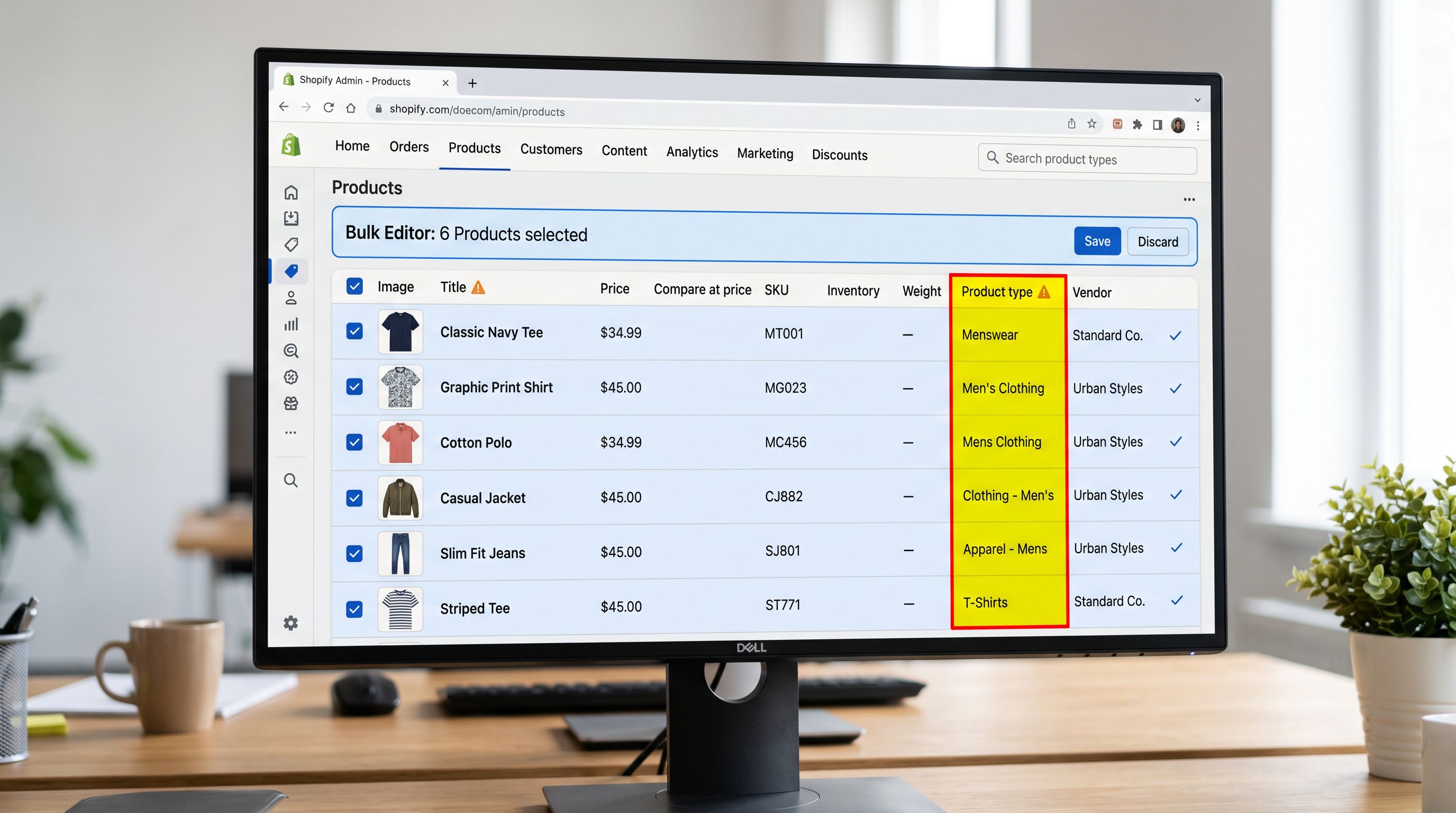
Coordinator one used "Men's Clothing" as the product type. Coordinator two inherited the store with no documentation and used "Mens Clothing" (no apostrophe). Coordinator three, who had come from a competitor's store, used "Menswear". Coordinator four started last month and asked the question no one had asked before: "What's the right way to fill in the product type field?"
The answer was somewhere in the store. Forty-two different product type values across 1,800 products. The collection filter panel on the storefront showed four separate product type facets for what should have been one. Google Shopping had split the product group across three taxonomy entries.
A product data standard document would have prevented every version of this problem. Not a lengthy policy manual: a two-page reference that any new hire could read in ten minutes and use to make consistent field decisions from their first import.
## Why Catalogue Governance Fails at Staff Handoffs
Product data governance fails for a predictable reason: the standards exist in one person's head and never get written down. When that person leaves, the standards leave with them. The three failure modes recur consistently:
**Undocumented conventions become personal preferences.** The product type convention "Men's Clothing" was correct according to the first coordinator who set it up. It aligned with the theme's filter panel configuration and the Google Shopping taxonomy. But this reasoning was never written anywhere. To coordinator two, "Mens Clothing" seemed equally correct, by any surface reading of the field label.
**Configuration files do not explain themselves.** A Scheduled Import preset with a Brand Voice configured, specific column mappings, and AI settings carries those standards forward automatically, but only for the coordinator who knows to use that preset. A new hire opening Importier for the first time sees a list of import configurations without context for which one to use, why it was set up that way, or what it enforces.
**Review processes have no baseline.** A monthly catalogue audit is only meaningful if there is a known standard to check against. "Descriptions should follow the brand voice" is not a checkable standard. "Descriptions should be 150-300 words, open with the primary buyer benefit, and avoid the words listed in the Brand Voice avoidance list" is.
A product data standard is not a lengthy policy document. It is a short, field-by-field reference that tells any new hire exactly how to fill in each product field and which import configuration already enforces it. Two pages is the target length. Longer documents do not get read at staff handoffs.
## The Four Components of a Product Data Standard
A Shopify product data standard covers four areas. Each one addresses a different category of field decision that staff make at import time.
### 1. Canonical field values
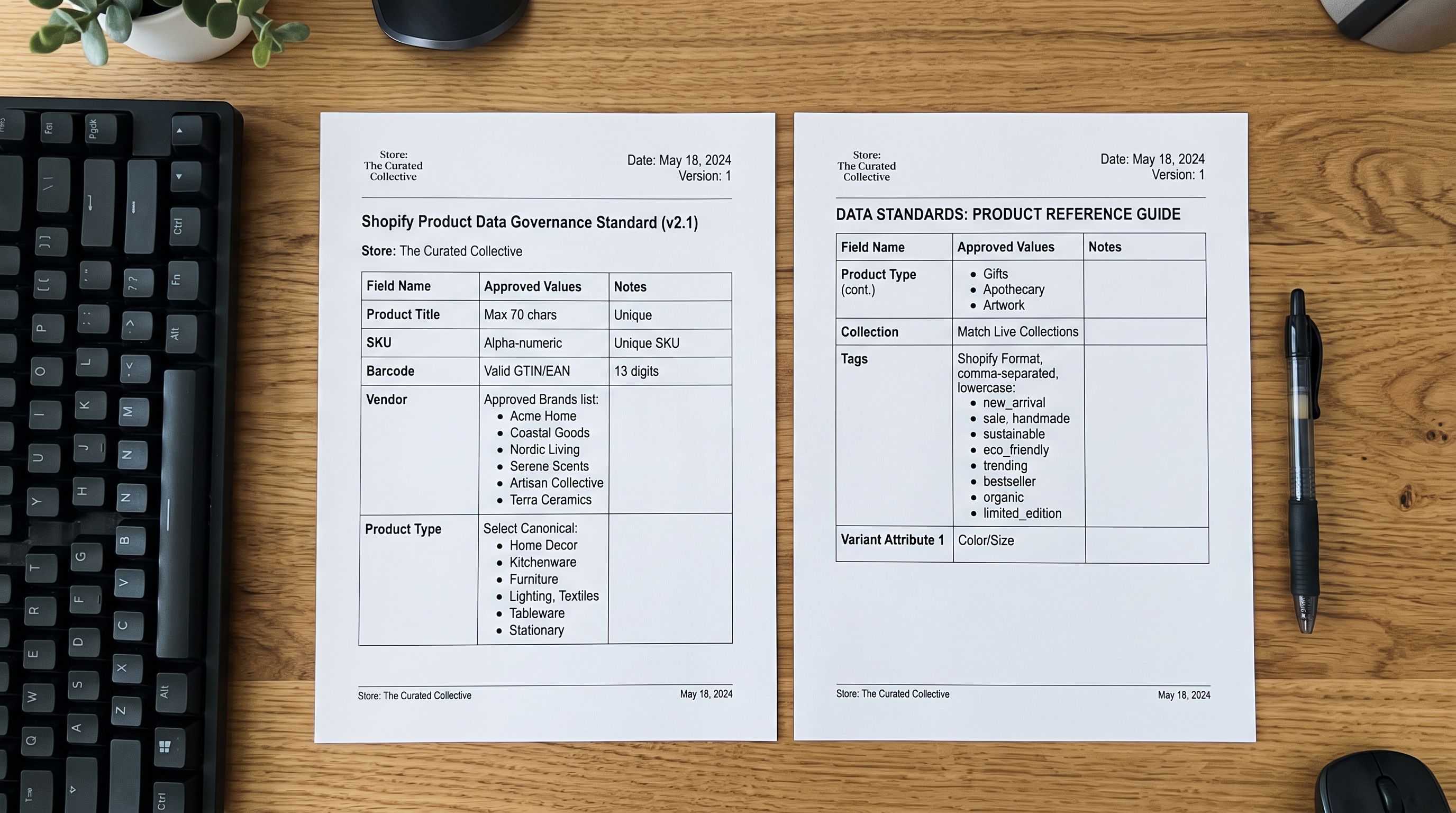
The most important section of any product data standard lists the approved values for each structured field. These are the fields where inconsistent values create downstream problems:
**Product type:** list every approved product type value, exactly as it should appear (including capitalisation, spacing, and apostrophes). Specify which Google Shopping taxonomy category each product type maps to. Flag which product types appear in collection filter panels.
**Vendor:** list approved vendor names in canonical form. For multi-brand catalogues, specify whether vendor names should match the supplier's legal trading name, their common brand name, or a shortened version for display.
**Tags:** list the approved tag namespaces and canonical values for each. If the store uses tag prefixes for email segmentation (`material-`, `season-`) or collection routing (`collection-`), document the prefixes and the approved values under each. A tag taxonomy that is documented once is a tag taxonomy that stays consistent across four coordinators. The [supplier data standardisation guide](https://importier.app/blog/shopify-supplier-data-standardisation) covers how to enforce these conventions when the source data comes from multiple supplier files.
**Status defaults:** specify the default publication status for new products from each source. Some merchants publish all products directly as Active; others use Draft for new SKUs pending review. Document which applies and for which product categories.
### 2. Description standards
Descriptions are the field most likely to drift across staff. A description standard has three parts:
**Structure:** what should the opening sentence do? (state the primary buyer benefit, name the product, identify the key distinguishing attribute). What should the body paragraphs cover? (product specifications, use cases, key features). How should it close?
**Length range:** minimum and maximum word counts for each product category. A notebook description has different length requirements than a technical specification sheet.
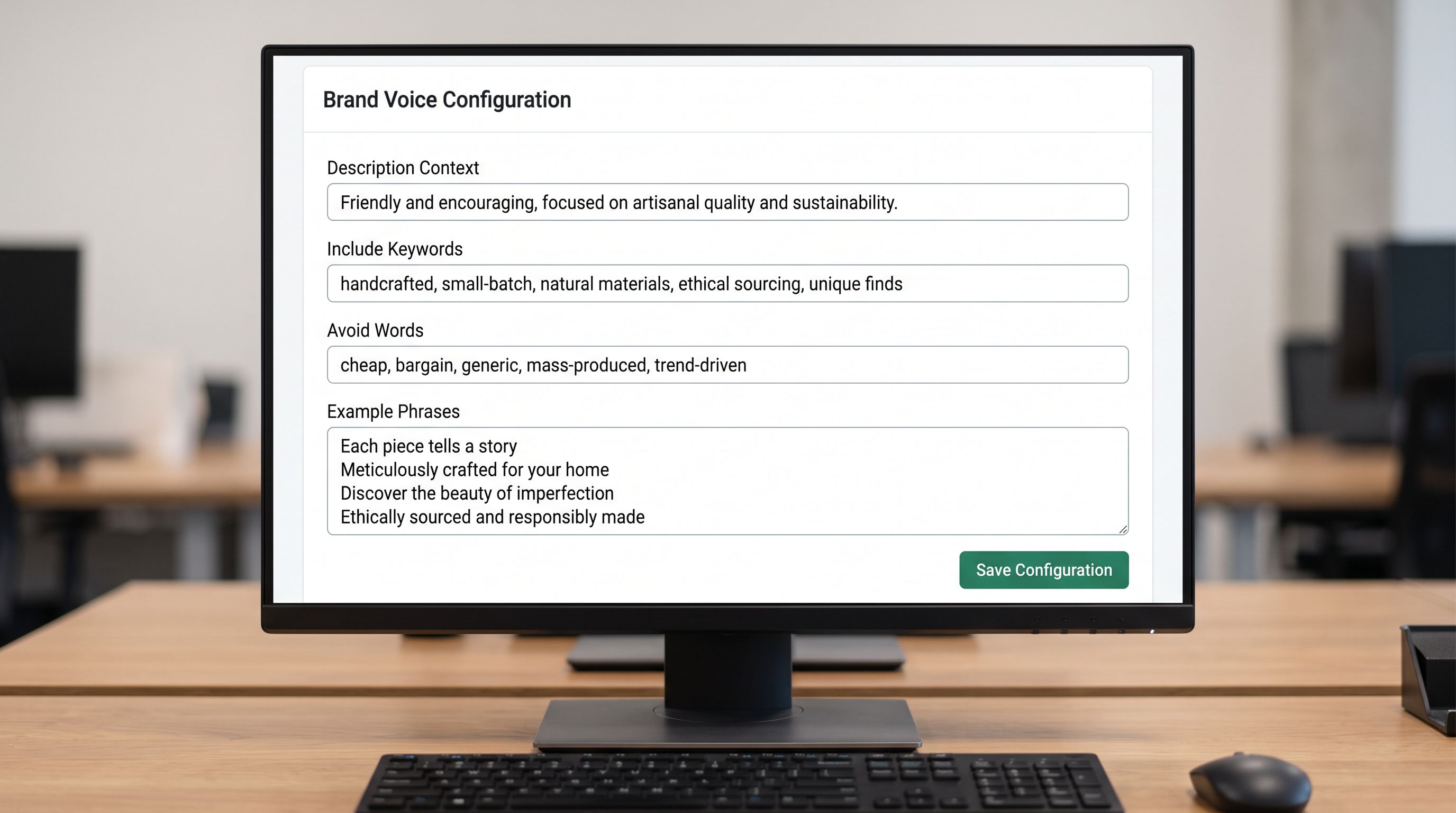
**Avoidance list:** specific words, phrases, or claims the brand does not use. This is distinct from the AI model's Brand Voice avoidance list; it covers brand-specific language choices like not using a competitor's product as a comparison point, or not using superlatives that the brand cannot substantiate.
The Importier Brand Voice configuration captures the avoidance list, the example phrases, and the description context (product category, buyer intent, key attributes to include). Once a Brand Voice is configured in Importier, it applies to every AI-generated description regardless of which staff member configures an import. The [enterprise product data standards guide](https://importier.app/blog/shopify-enterprise-product-data-standards) covers how Brand Voice enforces description standards at generation time across a multi-operator team.
### 3. Import configuration reference
New staff cannot maintain a data standard if they do not know which import configuration enforces it. The product data standard should include:
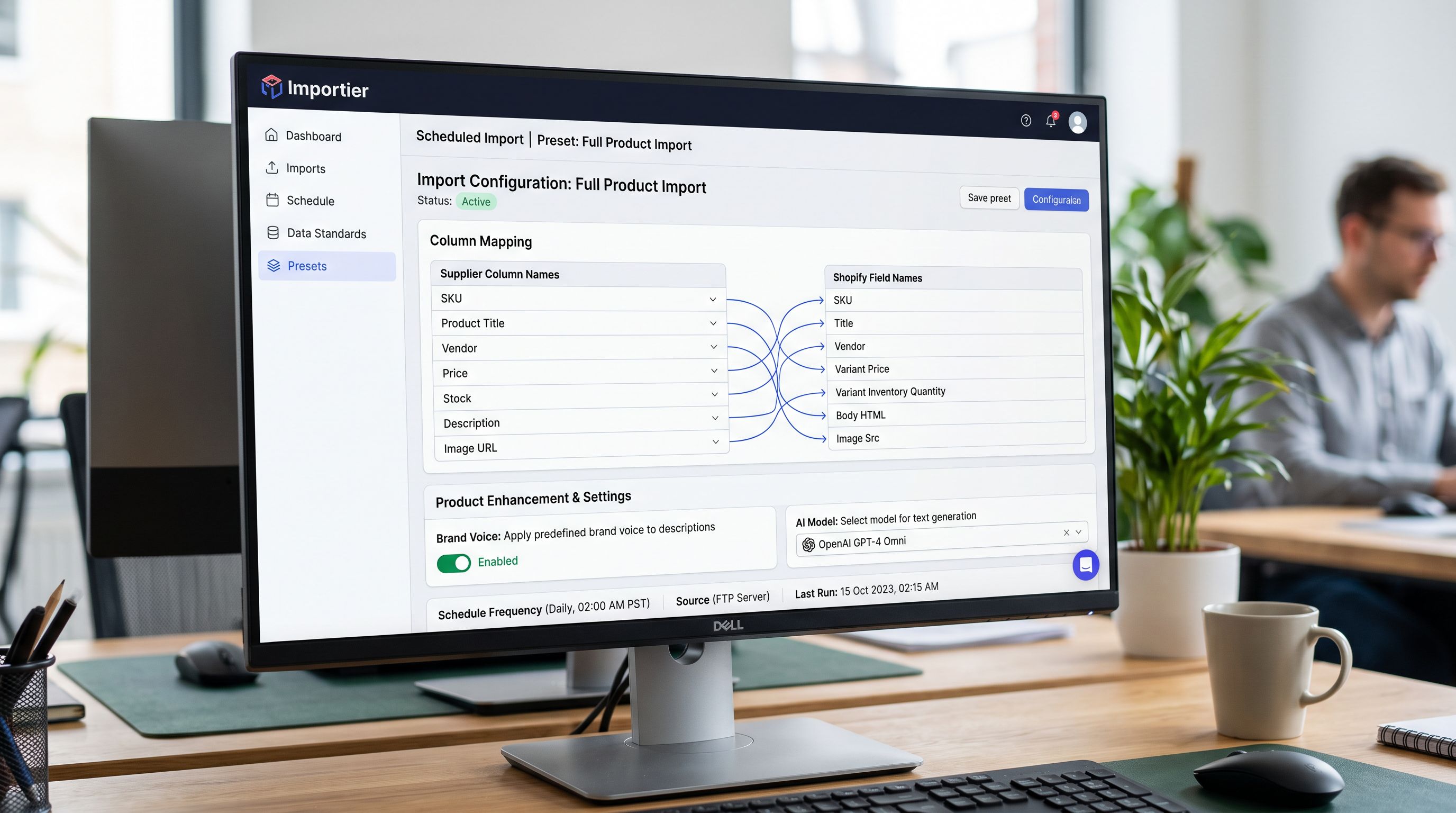
**Named import presets and their purposes.** For each Scheduled Import or saved import configuration in Importier, one sentence explaining what it is for. "Full Product Import (New SKUs): use for all new product additions. Applies Brand Voice, all field mappings, variant detection, and AI generation." "Price and Inventory Update: use for weekly supplier price file updates. Updates price and inventory only; does not touch descriptions, images, or tags."
**Column mapping documentation.** For each import preset, list which supplier CSV columns map to which Shopify fields. This prevents a new hire from reconfiguring a mapping that was set deliberately. "Supplier column `cat_code` maps to Shopify product type via the product type lookup table (tab 3 of the supplier file reference)."
**AI settings.** Which AI model is configured for this store, what persona is applied, and why. "The Growth plan AI model with the Wholesale Distributor persona is set for the Full Product Import preset. Do not change the persona without checking the description examples in tab 2."
### 4. Review cadence and baseline
A data standard without a review process drifts. The standard should specify:
- How often the catalogue is audited against the standard (quarterly is sustainable for most merchants)
- What the audit checks (run the SEO Audit export preset from Importier; flag any product with a description under the minimum word count or missing product type from the canonical list)
- Who owns the standard and how changes to it are decided and communicated
## Locking the Standard Into the Configuration
A documented standard that exists only as a PDF is a standard that will drift. The most durable product data standards are enforced by the import configuration itself, not by staff memory.
Three Importier features lock field conventions into the import:
**Brand Voice.** Once configured, Brand Voice applies the avoidance list, keyword inclusions, and example phrases to every AI-generated description regardless of which operator is running the import. A new hire who runs the Full Product Import preset gets descriptions that match the brand standard automatically, without reading the avoidance list section of the governance document first.
**Scheduled Import presets.** Each preset stores the complete column mapping configuration: which supplier CSV columns map to which Shopify fields, what transformations apply, and which AI settings are active. A new hire who uses the correct preset cannot accidentally map the supplier's `category_code` column to the Shopify tags field. The mapping is already defined. What the governance document needs to communicate is which preset to use for which source file.
**Column mapping value transforms.** For structured fields where canonical values differ from supplier values (the supplier uses "M" for the Size field, the store uses "Medium"), value transforms in the column mapping step apply the conversion automatically. Documenting the approved Shopify values in the governance document and encoding them in the column mapping transform means they are enforced at import time, not at review time.
According to [Shopify's documentation on product details](https://help.shopify.com/en/manual/products/details#product-type), product type is a freeform text field with no validation. Shopify does not prevent inconsistent values. The validation that matters is at import time, not at the store level.
The goal of a product data standard is not to create a compliance checklist. It is to make the correct choice the obvious choice: so that a new coordinator who has never heard of this store's conventions reaches for the right import preset and produces a description that matches month-one quality.

The fashion retailer with four coordinators fixed their product type drift in two sessions: one to write the six canonical product type values into a two-page standard document, one to run a bulk update on the 1,800 affected products. The standard document went into the onboarding checklist. The next coordinator hired six months later ran their first import using the documented preset and produced product types that matched the canonical values without being told to.
Three years of drift. Two sessions to fix. Ten minutes to prevent.
Try Importier free at importier.app.